Archives For November 30, 1999

if you are on linux/solaris and sar is configured and running on your system there is a nice utility called kSar which can be used to create graphs of the various statistics sar gathered. this can be very handy if you are looking for peaks and want to have a quick overview what happened on your system.

installing kSar is just a matter of unzipping the provided package and either executing the run.sh script or use java directly to execute the jar file:

java -jar kSar.jar

this will start ksar and you may load the sar files for having a look at the statistics:
standard

another option is to generate a pdf:

java -jar kSar.jar -input '/var/log/sa/sarXX' -outputPDF today.pdf

pdf

and even faster: create a bash function and an alias in your .bashrc:

ksarfunc() {
java -jar PATH_TO/kSar.jar -input "$1" -outputPDF today.pdf
}
alias ksar='ksarfunc'

… and you will be able to quickly generate a pdf for a specific sar file:

ksar /path/to/sar/file

a much more comprehensive tutorial for sar and ksar can be found here.

we faced an interesting performance issue last week. the situation was ( 11.2.0.2 on Linux x64 ):

  • every day at the same time there was ORA-1652 reported in the alert log
  • at the same time ORA-12012 was logged

figuring out what the job executes and extracting the statement which caused this was not a big deal. as we did not know the password for the user in question we tried to reproduce this like:

alter session set current_schema=THE_USER_IN_QUESTION;
-- exec statement

when we looked at the execution plan nothing seemed to be wrong. the statement executed in a fraction of a second and the right indexes were used. all fine. our next guess was that the data might change just before the job starts so we executed the statement at the same time the job starts. but again, everything was fine. but the same error messages where logged to the alert log from the job execution. at this point it was almost clear that the optimizer environment is somehow different when the user executes the statement. ok, time to request the password for the user and to test in a real environment ( another option would have been to generate the execution plan out of the awr data ). and suddenly the statement took almost seven minutes to complete. what happened?

looking at the execution plan again no index was used and the problematic part was this one:

1 - filter(NLSSORT("A",'nls_sort=''BINARY_CI''')=HEXTORAW

a quick check over dba_source figured out the issue:

create trigger my_trg after logon on schema
begin
  execute immediate 'alter session set NLS_COMP=LINGUISTIC';
  execute immediate 'alter session set NLS_SORT=BINARY_CI';
end;
/

this caused the statement to consume huge amounts of temp space ( it was a “create table as select where” statement ), no index could be used and the execution time bumped up from nearly zero to around seven minutes.

the documentation clearly says: be careful when setting this as this might change the execution plans and normal indexes can not be used.

simple test case:

drop table t1;
create table t1 ( a varchar2(100), b number );
insert into t1
with blubb as 
( select lpad('A',100,'A')
       , trunc(dbms_random.value(1,10000))
    from dual
   connect by rownum < 10001
)
select *
  from blubb;
create index i1 on t1(a);
update t1
   set a = lpad('B',100,'B')
 where mod(b,77) = 0;
commit;
set autotrace on;
select *
  from t1
 where a = lpad('B',100,'B');
alter session set NLS_COMP=LINGUISTIC;
alter session set NLS_SORT=BINARY_CI;
select *
  from t1
 where a = lpad('B',100,'B');
alter session set NLS_COMP=BINARY;
alter session set NLS_SORT=BINARY;
... still waiting

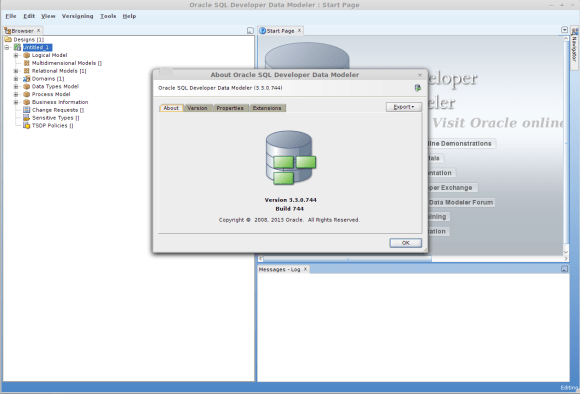
today I quickly wanted a visual representation of an oracle schema and remembered that oracle provides sql developer data modeler which will do this for me. headed over to the download page, wanted to download … ups, only a rpm available for linux.

but, there is alien and this makes the conversion from a rpm to a deb package straightforward and easy:

$sudo apt-get install alien
$sudo alien datamodeler-3.3.0.744-1.noarch.rpm
  Warning: Skipping conversion of scripts in package datamodeler: postinst
  Warning: Use the --scripts parameter to include the scripts.
  datamodeler_3.3.0.744-2_all.deb generated

done. installed:

$sudo dpkg -i datamodeler_3.3.0.744-2_all.deb
  Selecting previously unselected package datamodeler.
  (Reading database ... 150737 files and directories currently installed.)
  Unpacking datamodeler (from datamodeler_3.3.0.744-2_all.deb) ...
  Setting up datamodeler (3.3.0.744-2) ...

ready to use:

$which datamodeler
/usr/local/bin/datamodeler
$ datamodeler 

Oracle SQL Developer Data Modeler
 Copyright (c) 1997, 2011, Oracle and/or its affiliates. All rights reserved. 

data modeler

some time ago I blogged about the managed tablespace privilege and pointed out that there is either a software or documentation bug as this privilege also allows renaming tablespaces. according to oracle support this is a documentation issue and not a software bug. additionally these operations are allowed, too, if you grant the privilege:

alter tablespace nologging;
alter tablespace logging;
alter tablespace force logging;
alter tablespace no force logging;

just a little hint that there is another option than top, which is htop. pre-compiled packages are available for the most distributions.

htop.sourceforge.net/htop-1.0.2-io.png
check htop’s sourceforge page for a tiny comparison between htop and top.

(still) waiting for spring

if you want to play with the latest postgresql development snapshot here is a very simple makefile which does the work for you ( given that you have installed all the dependencies required for building postgresql ):

PGBASEVER=9.3
PG=http://ftp.postgresql.org/pub/snapshot/dev/postgresql-snapshot.tar.bz2
PGFILE=postgresql-snapshot.tar.bz2
CURRDIR=$(shell pwd)
DATADIR=$(CURRDIR)/data

fromscratch: reset download buildpg initdb startdb

reset: stopdb
        rm -rf build
        rm -rf install
        rm -rf data
        mkdir build
        mkdir install
        mkdir data

download:
        wget ${PG}
        mv ${PGFILE} build/

buildpg:
        ( cd build && tar -axf ${PGFILE} )
        ( cd build/postgresql-${PGBASEVER}* && ./configure --prefix=${CURRDIR}/install )
        ( cd build/postgresql-${PGBASEVER}* && make )
        ( cd build/postgresql-${PGBASEVER}* && make check )
        ( cd build/postgresql-${PGBASEVER}* && make install )

initdb:
        ( cd install/bin && ./initdb -D ${DATADIR} )

startdb:
        ( install/bin/pg_ctl -D ${DATADIR} start ) 

stopdb:
        if [ -f ${DATADIR}/postmaster.pid ]; then \
                ( install/bin/pg_ctl -D ${DATADIR} stop -m fast ) \
        fi

copy this to a directory where you are the owner of, name the file “Makefile” and execute:

make fromscratch

this will create the directories, download the latest snapshot, compile the source and start the postgresql database ( this takes 4 minutes on my mint workstation ). once the script finished you may connect to the database and start playing:

install/bin/psql postgres
psql (9.3devel)
Type "help" for help.

postgres=# \h create materialized view
Command:     CREATE MATERIALIZED VIEW
Description: define a new materialized view
Syntax:
CREATE [ UNLOGGED ] MATERIALIZED VIEW table_name
    [ (column_name [, ...] ) ]
    [ WITH ( storage_parameter [= value] [, ... ] ) ]
    [ TABLESPACE tablespace_name ]
    AS query
    [ WITH [ NO ] DATA ]

postgres=# 

of course you may put this in a shell script, too. but this way it was more fun :)

some day

user stati in oracle

March 18, 2013 — 3 Comments

did you ever wonder which status a user in oracle can be in ? there is a small table which answers this question ( this is on 11.2.0.3 ):

SQL> select * from sys.user_astatus_map order by 1;

   STATUS# STATUS
---------- --------------------------------
	 0 OPEN
	 1 EXPIRED
	 2 EXPIRED(GRACE)
	 4 LOCKED(TIMED)
	 5 EXPIRED & LOCKED(TIMED)
	 6 EXPIRED(GRACE) & LOCKED(TIMED)
	 8 LOCKED
	 9 EXPIRED & LOCKED
	10 EXPIRED(GRACE) & LOCKED

9 rows selected.

don’t ask me what happened to status 3 and 7 :)