the last post introduced how postgres implements wal archiving and how the archived logs can be used to recover the database. pretty equal to what oracle does. what about replicating these logs to another server and implement some sort of dataguard ? in postgres terms this is called: log shipping. let’s see how it works.

creating a hot standby server ( active dataguard in oracle words )

as oracle does, postgres provides two different approaches for standby servers:

  • transfer the whole wal files one by one to the standby server, which is asynchronous and may lead to data loss. this is called file based log shipping.
  • record based log shipping, which sends the wal records incrementally to the standby server ( streaming )

before deciding to implement one of the above solutions carefully think about the limitations:

  • all database servers involved in the configuration must be on the same architecture: log shipping from 32bit system to 64bit ( and vice versa ) is not possible
  • all databases involved in the configuration must use the same mountpoints. there is not feature like the various *_name_convert parameters as in oracle
  • all databases involved in the configuration must use the same major version of postgres. minor version differences might work but are not officially supported
  • if you want to upgrade to a new minor release, be sure to upgrade the standby database first
  • postgres requires the destination of the archived logs available on the master and standby server ( at least if you do not want downtime of the primary database )

to give you an idea on what’s happening, this is from the official documentation: “In standby mode, the server continuously applies WAL received from the master server. The standby server can read WAL from a WAL archive (see restore_command) or directly from the master over a TCP connection (streaming replication). The standby server will also attempt to restore any WAL found in the standby cluster’s pg_xlog directory. That typically happens after a server restart, when the standby replays again WAL that was streamed from the master before the restart, but you can also manually copy files to pg_xlog at any time to have them replayed.

At startup, the standby begins by restoring all WAL available in the archive location, calling restore_command. Once it reaches the end of WAL available there and restore_command fails, it tries to restore any WAL available in the pg_xlog directory. If that fails, and streaming replication has been configured, the standby tries to connect to the primary server and start streaming WAL from the last valid record found in archive or pg_xlog. If that fails or streaming replication is not configured, or if the connection is later disconnected, the standby goes back to step 1 and tries to restore the file from the archive again. This loop of retries from the archive, pg_xlog, and via streaming replication goes on until the server is stopped or failover is triggered by a trigger file.”

to avoid any connection issues between the master and the standby it may be a goog idea to disable the firewall on both nodes:

service iptables stop
chkconfig iptables off

for getting the extra tools to manage standby databases I additionally installed the contrib package:

yum install postgresql91-contrib

for me, the fastest way to get a standby server was to clone my virtual box vm I used during the previous post. this gave me exactly the same software and os. all steps that follow assume that both nodes are up and running and can connect to each other.

my primary node:
nodename: postgres
ip: 192.168.56.105

my slave node:
nodename: postgres2
ip: 192.168.56.106

as my vm was cloned, I stopped and deleted the database which was running on the clone:

pg_ctl stop -D /opt/postgres/mydb -m fast
[postgres@postgres2 ~]$ rm -rf /opt/postgres/mydb/*
[postgres@postgres2 ~]$ rm -rf /opt/postgres/backups/*

additionally I set up password less ssh connectivity for the postgres user between the nodes:

node postgres:

[postgres@postgres ~]$ ssh-keygen -t rsa
[postgres@postgres ~]$ ssh-copy-id -i .ssh/id_rsa.pub postgres@postgres2

node postgres2:

[postgres@postgres2 ~]$ ssh-keygen -t rsa
[postgres@postgres2 ~]$ ssh-copy-id -i .ssh/id_rsa.pub postgres@postgres2

for simulating a real life scenario I will assume the the primary database is already configured for archiving ( in real world one would archive to a network location accessible to all nodes ). to prepare this on the master:

echo "port=5432
max_connections = 100
shared_buffers = 32MB
log_destination = 'stderr'
logging_collector = on
log_directory = '/opt/postgres/log/'
log_filename = 'postgresql-%a.log'
log_file_mode = 0600
log_truncate_on_rotation = on
log_rotation_age = 1d
log_rotation_size = 0
datestyle = 'iso, mdy'
lc_messages = 'en_US.UTF-8'
lc_monetary = 'en_US.UTF-8'
lc_numeric = 'en_US.UTF-8'
lc_time = 'en_US.UTF-8'
default_text_search_config = 'pg_catalog.english'
temp_tablespaces='temp1,temp2'
wal_level=hot_standby
archive_mode=on
archive_command = 'rsync -a %p postgres@postgres2:/opt/postgres/mydb/arch/%f'
max_wal_senders=5
listen_addresses='*'" > /opt/postgres/mydb/postgresql.conf
pg_ctl stop -D /opt/postgres/mydb -m fast
pg_ctl start -D /opt/postgres/mydb -l /opt/postgres/log/mydb_pgstartup.log

the parameter in question is the archive_command. if you need more information on this parameter check the documentation or the previous post. the reason for posting the whole configuration is, that the steps should be repeatable.

to allow the standby database to connect to the master, add the following line to your masters pg_hba.conf file:

echo "host    replication     all            192.168.56.106/32      md5" >> /opt/postgres/mydb/pg_hba.conf

for enabling this we need to restart the database ( there is no need to restart if archiving is already enabled and you just need to change the parameter. then a reload is sufficient ). if everything works as expected this will be the only restart. for real life scenarios this means: if the master database has wal archiving enabled you do not need to restart the database, thus no downtime will be necessary. if archiving is not enabled, what hopefully is not the case for any production database, you will need to request a short downtime for enabling it.

ok, this is the starting point: primary database running in archive mode, nothing available on the standby server except the archived wal files from the master:

[postgres@postgres2 ~]$ ls -la /opt/postgres/mydb/arch/
total 32776
drwxrwxr-x. 2 postgres postgres     4096 Jun 14 14:25 .
drwxr-xr-x. 6 postgres postgres     4096 Jun 13 13:29 ..
-rw-------. 1 postgres postgres 16777216 Jun 14 14:14 000000030000000000000041
-rw-------. 1 postgres postgres 16777216 Jun 14 14:23 000000030000000000000042
[postgres@postgres2 ~]$ 

now we are ready to clone the master database:

# on the master start the backup and copy the files to the standby database
psql -U sysdba -d postgres -c "SELECT pg_start_backup('backup');"
scp -pr /opt/postgres/mydb/* postgres@postgres2:/opt/postgres/mydb/
# enable recovery and start the standby database
echo "restore_command = 'cp -f /opt/postgres/mydb/arch/%f %p </dev/null'" > /opt/postgres/mydb/recovery.conf
echo "standby_mode = 'on'" >> /opt/postgres/mydb/recovery.conf
echo "primary_conninfo = 'host=192.168.56.105 user=sysdba password=admin123'" >> /opt/postgres/mydb/recovery.conf
echo "hot_standby=on" >> /opt/postgres/mydb/postgresql.conf
rm -f /opt/postgres/mydb/postmaster.pid
# start the standby database
pg_ctl start -D /opt/postgres/mydb -l /opt/postgres/log/mydb_pgstartup.log
# end backup on the primary database
psql -U sysdba -d postgres -c "SELECT pg_stop_backup();"

if everything went fine you should see log-messages in the standby’s logfile like this:

LOG:  streaming replication successfully connected to primary
LOG:  consistent recovery state reached at 0/55000000
LOG:  database system is ready to accept read only connections

you may double check if the standby is really in recovery mode by:

sysdba@[local]:5432/postgres# select * from pg_is_in_recovery();
 pg_is_in_recovery 
-------------------
 t
(1 row)
sysdba@[local]:5432/postgres*# 

of course you want to failover if something happens to your primary database. in postgres you do this by specifying the trigger_file parameter in the recovery.conf file:

echo "trigger_file='/opt/postgres/mydb/failover'" >> /opt/postgres/mydb/recovery.conf

if you need to failover just touch this file. the standby database will notice this and initiate the failover ( of course after applying all the necessary log files ):

touch /opt/postgres/mydb/failover

… which will result in:

LOG:  trigger file found: /opt/postgres/mydb/failover
FATAL:  terminating walreceiver process due to administrator command
...
LOG:  archive recovery complete
LOG:  database system is ready to accept connections
LOG:  autovacuum launcher started

to further verify if the replication is really working create a table on the master, insert a row and check if this data is available on the standby afterwards:

# primary
psql -U sysdba -d db1
sysdba@[local]:5432/db1# create table t1 ( a int ) ;
sysdba@[local]:5432/db1*# insert into t1 (a) values (1);
INSERT 0 1
sysdba@[local]:5432/db1*# commit;
COMMIT
# check on the standby
psql -d db1 -U sysdba
\d+ t1
                  Table "public.t1"
 Column |  Type   | Modifiers | Storage | Description 
--------+---------+-----------+---------+-------------
 a      | integer |           | plain   | 
Has OIDs: no
sysdba@[local]:5432/db1# select * from t1;
 a 
---
 1
(1 row)

this are the basic steps to create a hot standby with postgres. although postgresql does not have a tool like rman, cloning a database is not a big deal, even if the source database is up and running.

of course you’ll need to carefully review all the parameters and test the setup before going to production.

as a dba one of the most important tasks is to restore the database in case of a crash, total lost of a datacenter or even a user error. so every serious database must provide tools and techniques to backup and restore the system. postgresql provides different tools for different requirements:

cold backups

of course one can perform cold backups with requires the database to be down. a simple tar of the data area and the backup is done. can be easily scripted and implemented. may be a solution for development or even test but nor for production databases. a slightly different approach is to use rsync while the database is running, shutdown the database once rsync finished, do another rsync ( which will require less time ) and start up the database. this will reduce downtime, but still can not be the solution for production databases.

snapshots

of course you can use snapshot technologies provided by the storage vendor or the filesystem ( if you have enabled wal archiving ).

pg_dump

one command to backup a postgres database is pg_dump. this command can be compared to exp/expdp utilities of the oracle database. the result is a sql file which contains all the statements and data to rebuild the database up to the time the dump was taken.

dumping the database is straight forward:

pg_dump -U sysdba template1 > /opt/postgres/backups/dump1.dmp

as I did not create anything in the template1 database the dump is rather small:

cat /opt/postgres/backups/dump1.dmp 
--
-- PostgreSQL database dump
--
SET statement_timeout = 0;
SET client_encoding = 'UTF8';
SET standard_conforming_strings = on;
SET check_function_bodies = false;
SET client_min_messages = warning;
--
-- Name: template1; Type: COMMENT; Schema: -; Owner: sysdba
--
COMMENT ON DATABASE template1 IS 'default template for new databases';
--
-- Name: plpgsql; Type: EXTENSION; Schema: -; Owner: 
--
CREATE EXTENSION IF NOT EXISTS plpgsql WITH SCHEMA pg_catalog;
--
-- Name: EXTENSION plpgsql; Type: COMMENT; Schema: -; Owner: 
--
COMMENT ON EXTENSION plpgsql IS 'PL/pgSQL procedural language';
--
-- Name: public; Type: ACL; Schema: -; Owner: sysdba
--
REVOKE ALL ON SCHEMA public FROM PUBLIC;
REVOKE ALL ON SCHEMA public FROM sysdba;
GRANT ALL ON SCHEMA public TO sysdba;
GRANT ALL ON SCHEMA public TO PUBLIC;
--
-- PostgreSQL database dump complete
--

… but you can see that the dump file is plain text.

what really surprised my are the various options you can give to the pg_dump utility. compression, for example, is a feature you have to pay for if you want to use it with expdp. it’s free with postgres:

pg_dump -U sysdba -Z 9 template1 > /opt/postgres/backups/dump1.dmp

of course the dump file will be binary in this case. in general, all you’ll need is there:

Options controlling the output content:
  -a, --data-only             dump only the data, not the schema
  -b, --blobs                 include large objects in dump
  -c, --clean                 clean (drop) database objects before recreating
  -C, --create                include commands to create database in dump
  -E, --encoding=ENCODING     dump the data in encoding ENCODING
  -n, --schema=SCHEMA         dump the named schema(s) only
  -N, --exclude-schema=SCHEMA do NOT dump the named schema(s)
  -o, --oids                  include OIDs in dump
  -O, --no-owner              skip restoration of object ownership in
                              plain-text format
  -s, --schema-only           dump only the schema, no data
  -S, --superuser=NAME        superuser user name to use in plain-text format
  -t, --table=TABLE           dump the named table(s) only
  -T, --exclude-table=TABLE   do NOT dump the named table(s)
  -x, --no-privileges         do not dump privileges (grant/revoke)
  --binary-upgrade            for use by upgrade utilities only
  --column-inserts            dump data as INSERT commands with column names
  --disable-dollar-quoting    disable dollar quoting, use SQL standard quoting
  --disable-triggers          disable triggers during data-only restore
  --inserts                   dump data as INSERT commands, rather than COPY
  --no-security-labels        do not dump security label assignments
  --no-tablespaces            do not dump tablespace assignments
  --no-unlogged-table-data    do not dump unlogged table data
  --quote-all-identifiers     quote all identifiers, even if not key words
  --serializable-deferrable   wait until the dump can run without anomalies
  --use-set-session-authorization
                              use SET SESSION AUTHORIZATION commands instead of
                              ALTER OWNER commands to set ownership

what is missing, from an oracle perspective, is some sort of parallel option and encryption.

to restore the dump file, one uses:

psql -U sysdba db1 < /opt/postgres/backups/dump1.dmp

things to consider:

  • this will not create the database itself, so create the database from template0 before starting the import: createdb -T template0 db1
  • all users must exist before importing the dump

just to mention it: there are two other formats you can use with pg_dump:

  • the tar format: pg_dump -U sysdba -Ft db1 > filename.tar
  • the custom format: pg_dump -U sysdba -Fc db1 > filename.dmp

for both of these commands you have to use pg_restore instead of psql:

pg_restore -U sysdba -d dbname filename.dmp

when choosing one of the custom formats this enables you to create a table of contents of the dumpfiles:

pg_restore -l filename.tar > filename.toc
cat filename.toc
;
; Archive created at Thu Jun 21 13:34:31 2012
;     dbname: db1
;     TOC Entries: 8
;     Compression: 0
;     Dump Version: 1.12-0
;     Format: TAR
;     Integer: 4 bytes
;     Offset: 8 bytes
;     Dumped from database version: 9.1.4
;     Dumped by pg_dump version: 9.1.4
;
;
; Selected TOC Entries:
;
2710; 1262 16384 DATABASE - db1 sysdba
5; 2615 2200 SCHEMA - public sysdba
2711; 0 0 COMMENT - SCHEMA public sysdba
2712; 0 0 ACL - public sysdba
161; 3079 12506 EXTENSION - plpgsql 
2713; 0 0 COMMENT - EXTENSION plpgsql 

if you’d like to do a partial restore you can now edit the file and comment the objects you do not want to get created, pass the adjusted table of contents to pg_restore:

pg_restore -U sysdba -d db1 -L filename.toc filename.dmp

… and you’re done. keep in mind that you may destroy dependencies when commenting objects.

pg_dumpall

another utility to perform dump is: pg_dumpall. in contrast to pg_dump, pg_dumpall exports roles or tablespaces, too. so, if you want to export all databases:

pg_dumpall -U sysdba > /opt/postgres/backups/dump1.dmp

… and to restore the dump:

psql -U sysdba -f /opt/postgres/backups/dump1.dmp db1

what do we have until now ? we can create and restore dumps of a single database ( and some subsets ) what provides some sort of backup. for a production system this will not be enough as data will come into the database and gets modified every moment. shutting down the database and do a filesystem backup is possible, too, but will not solve the issue with backups of production databases. in oracle you can enable archiving to force the database to archive the redo logs. how does postgres handle this ?

wal archiving

postgres writes every change to the database to its logfiles ( as oracle does ) which are located in the pg_xlog directory in the data area. as with oracle, these logs are primarily used to replay the changes when the database comes up after a crash occurred.

the procedure to do online backups with postgres is to combine file system backups with wal ( write ahead archiving ).

to enable wal you obviously need to set some parameters and do some preparation. the first parameter you need to set is: wal_level:

echo "wal_level=archive" >> /opt/postgres/mydb/postgresql.conf

next one needs to enable archiving:

echo "archive_mode=on" >> /opt/postgres/mydb/postgresql.conf

nothing special so far if you know oracle dataguard. the interesting parameter is the third one: archive_command. this parameter specifies the command to use for archiving the logfiles ( or archiveable wal segments, in postgres terms ). this mean, postgres gives you the full flexibility on how to actually do the archiving. for example, you can specify:

archive_command = 'test ! -f /opt/postgres/arch/%f && cp %p /opt/postgres/arch/%f'

or if you want to call a custom script:

archive_command = 'my_allinone_archiving_script'

let’s see if it works. restart the database and check the startup file for any errors:

pgstop
pgstart
cat /opt/postgres/log/mydb_pgstartup.log

seems to work, at least no errors reported during the startup. but does the archiving work? :

pg
sysdba@[local]:5432/postgres# select * from pg_switch_xlog();
 pg_switch_xlog 
----------------
 0/1B7D5E8
(1 row)

if everything works we should now be able to locate the archived log:

ls -la /opt/postgres/arch/
total 49160
drwxrwxr-x. 2 postgres postgres     4096 Jun 13 14:18 .
drwxr-xr-x. 6 postgres postgres     4096 Jun 13 13:29 ..
-rw-------. 1 postgres postgres 16777216 Jun 13 14:17 000000010000000000000001
-rw-------. 1 postgres postgres 16777216 Jun 13 14:17 000000010000000000000002
-rw-------. 1 postgres postgres 16777216 Jun 13 14:18 000000010000000000000003

seems to work. what else needs to be done? we need a level 0 backup, right ?

connect to postgres and start the backup by calling the pg_start_backup function and provide a label:

pg
SELECT pg_start_backup('my_level_0_backup',true);

this will create a backup label file in the data area:

cat /opt/postgres/mydb/backup_label 
START WAL LOCATION: 0/5000020 (file 000000010000000000000005)
CHECKPOINT LOCATION: 0/5000020
BACKUP METHOD: pg_start_backup
START TIME: 2012-06-13 14:23:19 CEST
LABEL: my_level_0_backup

now you can backup all the datafiles with a method of your choice, for example:

tar -cvf my_level_0_backup.ta /opt/postgres/mydb/*

reconnect to postgres and stop the backup mode:

pg
SELECT pg_stop_backup();
NOTICE:  pg_stop_backup complete, all required WAL segments have been archived
 pg_stop_backup 
----------------
 0/60000A0
(1 row)

you’re done when the file reported by the pg_stop_backup arrived at the defined location. from now on it is essential that you place the archived files to a save location in case you need to apply them to the base backup in case of recovery.
in oracle syntax this procedure is very similar to “alter database begin backup”, “alter database end backup”…..

if you’d like to save some work there is another command called: pg_basebackup. this tool will do all the work for you: starting the backup, copying the files, ending the backup. check that you have an entry like the following in your pg_hba.conf-file:

host    replication     replication             all                     md5 

… and that the parameter max_wal_senders is high enough:

echo "max_wal_senders=5" >> /opt/postgres/mydb/postgresql.conf

if ok, you are ready:

pg_basebackup -U sysdba -D /opt/postgres/backups/ -Ft -x -z
ls -la /opt/postgres/backups/
total 6444
drwxrwxr-x. 2 postgres postgres    4096 Jun 13 14:45 .
drwxr-xr-x. 6 postgres postgres    4096 Jun 13 13:29 ..
-rw-rw-r--. 1 postgres postgres  733018 Jun 13 14:45 16384.tar.gz
-rw-rw-r--. 1 postgres postgres     121 Jun 13 14:45 16389.tar.gz
-rw-rw-r--. 1 postgres postgres     119 Jun 13 14:45 16391.tar.gz
-rw-rw-r--. 1 postgres postgres 5845363 Jun 13 14:45 base.tar.gz

this includes all the files in data area directory, including configuration files, tablespaces and third party files. so this backup could be extracted and you could start the server directly.

a backup without a proof that the restore is actually possible is not worth anything. let’s try the restore:

restore using the archive backup(s)

the first thing you need to do, obviously, is to shutdown the postgres server if it is running and to make a backup of all the files in data area ( just in case you’ll need any of the configuration data files later ).

pgstop
tar -cvf /opt/postgres/backups/current_state.tar /opt/postgres/mydb/*
# if you are short on space, compress the tar archive
gzip /opt/postgres/backups/current_state.tar

next, cleanup the current data area by deleting all the files and directories ( remember to cleanup any tablespace directories in case they are located elsewhere ) :

rm -rf /opt/postgres/mydb/*

time to restore. locate your backup and extract the files to the data area:

cp /opt/postgres/backups/16* /opt/postgres/backups/base.tar.gz /opt/postgres/mydb/
cd /opt/postgres/mydb/
gunzip *
tar -xvf base.tar
tar -xvf 16391.tar
tar -xvf 16389.tar
tar -xvf 16384.tar
rm -f *.tar

delete the archived wal files currently present in pg_xlog/ directory as they might not be current:

rm -f /opt/postgres/mydb/pg_xlog/*

as with the archive_command above you’ll need to define the restore_command parameter ( recovery settings are maintained in a separate file called recovery.conf ):

echo "restore_command='cp /opt/postgres/arch/%f \"%p\"'" >> /opt/postgres/mydb/recovery.conf

ok, let’s start the server. postgres will start in recovery mode. tail your server logfile to see what’s happening:

pgstart

the logfile reports:

LOG:  database system was interrupted; last known up at 2012-06-13 14:45:08 CEST
LOG:  creating missing WAL directory "pg_xlog/archive_status"
LOG:  starting archive recovery
LOG:  restored log file "00000001000000000000000A" from archive
LOG:  redo starts at 0/A000078
LOG:  consistent recovery state reached at 0/B000000
LOG:  restored log file "00000001000000000000000B" from archive
...
LOG:  archive recovery complete
LOG:  database system is ready to accept connections
LOG:  autovacuum launcher started

seems the revocery worked. can we connect to the database again ? :

pg
select * from pg_database;

allright. database restored, work done. if you want to do a point in time recovery you’ll need to add one of the recovery target parameters to your recovery.conf file.

one more thing to mention: every time you recover the database from the archived wals the database creates a new time line. you can think of it as the oracle incarnations. if you check your location where the databases places the archived files you will notice a small history file which describes the new time line:

cat /opt/postgres/arch/00000002.history
1	00000001000000000000000B	no recovery target specified

additionally the wal files which get archived from now an, will have an increased number to reflect the time line:

pg
select * from pg_switch_xlog();
 pg_switch_xlog 
----------------
 0/C000098
(1 row)

after the logswitch you can confirm the new timeline by checking the filename of the archived wal:

ls -ltra /opt/postgres/arch/
-rw-------. 1 postgres postgres 16777216 Jun 13 15:13 00000001000000000000000B
-rw-------. 1 postgres postgres       56 Jun 13 15:41 00000002.history
-rw-------. 1 postgres postgres 16777216 Jun 13 15:53 00000002000000000000000C

the timeline id increased from 1 to 2.

conclusion: postgres provides the tools which help you in establishing your backup and restore processes. once you are familiar with the tools, backing up and restoring the database is easy and robust. of course you’ll need to test the procedures before going to production and regular restore tests are a must.

do you think of dataguard ? when there is archiving there should be a possibility to apply these archives to another database …

as with oracle there are some maintenance tasks once should perform with the postgres database. while the first and second posts introduced the essentials for setting up the server and creating an initial database this post will look at the maintenance of the postgres database.

one of the most important maintenance task in postgres is: vacuuming. as described in the second post the vacuum launcher processes is responsible for starting the vacuum worker processes for the databases. another important task is collecting statistics.

these two tasks are done by the vacuum and analyze commands, where:

  • analyze: is used to collect statistics about a database ( collects statistics of the tables in the database and stores them in the pg_statistics catalog ).
  • vacuum: is used to reclaim storage used by dead tuples ( for example produced by deletes )

let’s take a look at two commands.

analyze

in oracle you would use the dbms_stats package to gather statistics. in postgres it is the analyze command. a description of all the options, as usual, can be found in the documentation.

without any arguments the analyze command will collect the statistics for every table in the database:

sysdba@[local]:5432/postgres*# analyze;
ANALYZE
sysdba@[local]:5432/postgres*#

a nice argument, especially if you are new to postgres, is the verbose argument. when executed with this argument analyze reports the tables which are analyzed. this gives you some hints on the internal tables ( catalog ):

sysdba@[local]:5432/postgres*# analyze verbose;
INFO: analyzing "pg_catalog.pg_type"
INFO: "pg_type": scanned 7 of 7 pages, containing 309 live rows and 2 dead rows; 309 rows in sample, 309 estimated total rows
INFO: analyzing "pg_catalog.pg_attribute"
INFO: "pg_attribute": scanned 40 of 40 pages, containing 2155 live rows and 30 dead rows; 2155 rows in sample, 2155 estimated total rows
INFO: analyzing "pg_catalog.pg_authid"
INFO: "pg_authid": scanned 1 of 1 pages, containing 1 live rows and 0 dead rows; 1 rows in sample, 1 estimated total rows
INFO: analyzing "pg_catalog.pg_proc"

additionally analyze reports various statistics collected for each table. this is a feature I’d like to see in oracle, too. especially when called automatically this information might be useful if you quickly need to compare statistics. it is not a big deal to save this information to a logfile and to keep some of them for every run of analyze.

there are two more parameters analyze accepts. of course you can specify a single table to collect statistics for:

sysdba@[local]:5432/postgres# analyze verbose pg_catalog.pg_am;
INFO: analyzing "pg_catalog.pg_am"
INFO: "pg_am": scanned 1 of 1 pages, containing 4 live rows and 0 dead rows; 4 rows in sample, 4 estimated total rows
ANALYZE

… and you can tell analyze to collect statistics for a single column:

analyze verbose pg_catalog.pg_am(amname);
INFO: analyzing "pg_catalog.pg_am"
INFO: "pg_am": scanned 1 of 1 pages, containing 4 live rows and 0 dead rows; 4 rows in sample, 4 estimated total rows
ANALYZE

as collecting statistics on large tables requires a lot of resources and some amount of time postgres uses samples of these tables as oracle does. the size of the samples is controlled by the default_statistics_target parameter which defaults to 100. in contrast to oracle this is not a percentage, but: “The target value sets the maximum number of entries in the most-common-value list and the maximum number of bins in the histogram”.

as with oracle you can override the system wide setting of the default_statistics_target by setting statistics on the columns level…

alter table pg_catalog.pg_am alter column amname set statistics 99;
ALTER TABLE
sysdba@[local]:5432/postgres*#

… and directly set statistical values of columns ( only n_distinct and n_distinct_inherited at the moment ):

alter table pg_catalog.pg_am alter column amname set ( n_distinct = 5 );
ERROR: permission denied: "pg_am" is a system catalog

seems postgres does not allow to directly update catalog tables ( at least in the default configuration ). might be good idea :)

vacuum

as mentioned above vacuum reclaims wasted/unused space. in oracle one would use rebuilding or shrinking. without any parameter vacuum will process any table in the database the user who executes the command has access to:

sysdba@[local]:5432/postgres# vacuum pg_catalog.pg_am;
VACUUM
sysdba@[local]:5432/postgres#

as with the analyze command there is the verbose option:

vacuum (verbose) pg_catalog.pg_am;
INFO: vacuuming "pg_catalog.pg_am"
INFO: index "pg_am_name_index" now contains 4 row versions in 2 pages
DETAIL: 0 index row versions were removed.
0 index pages have been deleted, 0 are currently reusable.
CPU 0.00s/0.00u sec elapsed 0.00 sec.
INFO: index "pg_am_oid_index" now contains 4 row versions in 2 pages
DETAIL: 0 index row versions were removed.
0 index pages have been deleted, 0 are currently reusable.
CPU 0.00s/0.00u sec elapsed 0.00 sec.
INFO: "pg_am": found 0 removable, 4 nonremovable row versions in 1 out of 1 pages
DETAIL: 0 dead row versions cannot be removed yet.
There were 0 unused item pointers.
0 pages are entirely empty.
CPU 0.00s/0.00u sec elapsed 0.00 sec.
VACUUM
sysdba@[local]:5432/postgres#

… which gives you some interesting information of what is really done.

another argument to vacuum is analyze, so you may combine vacuuimg and analyzing ( here on a single table rather than the whole database )…

vacuum (verbose,analyze) pg_catalog.pg_am;
INFO: vacuuming "pg_catalog.pg_am"
INFO: index "pg_am_name_index" now contains 4 row versions in 2 pages
DETAIL: 0 index row versions were removed.
0 index pages have been deleted, 0 are currently reusable.
CPU 0.00s/0.00u sec elapsed 0.00 sec.
INFO: index "pg_am_oid_index" now contains 4 row versions in 2 pages
DETAIL: 0 index row versions were removed.
0 index pages have been deleted, 0 are currently reusable.
CPU 0.00s/0.00u sec elapsed 0.00 sec.
INFO: "pg_am": found 0 removable, 4 nonremovable row versions in 1 out of 1 pages
DETAIL: 0 dead row versions cannot be removed yet.
There were 0 unused item pointers.
0 pages are entirely empty.
CPU 0.00s/0.00u sec elapsed 0.00 sec.
INFO: analyzing "pg_catalog.pg_am"
INFO: "pg_am": scanned 1 of 1 pages, containing 4 live rows and 0 dead rows; 4 rows in sample, 4 estimated total rows
VACUUM

… which is handy for automation.

without the “full” parameter vacuum does not lock the table and simple reclaims space for reuse. if you want to give back space to the operating system ( by actually using less space for the database files ) you will need to call vacuum with the full parameter:

vacuum (verbose,analyze,full);
INFO: vacuuming "pg_catalog.pg_statistic"
INFO: "pg_statistic": found 29 removable, 370 nonremovable row versions in 15 pages
DETAIL: 0 dead row versions cannot be removed yet.
...

… but be careful: this will put an exclusive lock on the table currently processed and temporarily will use more space as the table gets copied. you should not do this while the database is accessed in production.

the last parameter, called “freeze”, leads to a specific design decision with postgres: the internal transaction IDs are limited by 32bits. because of this transaction id wraparounds occur which could lead to data loss ( transaction ids higher as the current are considered future and should not be visible to users, so if the wraparound occurs this could be disastrous ). in postgres there is a special transaction id called: FrozenXID. these transactions ids are always considered older than the every other transaction id. the assignment of the FrozenXID is done by the vacuum command. check the documentation for a detailed description of this behaviour.

to control this behaviour there is a parameter called: vacuum_freeze_min_age ( specified in number of transactions ), which controls how old a transaction (xid) may be until it is replaced with the FrozenXID. thus, a larger value will preserve transactional information longer, while a smaller value will increase the number of transactions before a table must be vacuumed. the other parameter involved is called: vacuum_freeze_table_age

calling the vacuum command with the freeze parameter is equivalent to setting the vacuum_freeze_min_age to zero.

as the vacuum command can be very I/O intensive there might be side effects to current active users of the database. to minimize this effect the administrator can specify the vacuum_cost_delay parameter which will put the vacuum process to sleep if it reaches a defined cost limit ( vacuum_cost_limit ).

because these tasks are such important the autovacuum feature should be enabled which is controlled by the autovacuum and track_counts parameters.
as this is only an introduction I will not mention the other parameters which are used to control the vacuum behaviour.

so, as it is with oracle: it is very important to carefully define your statistic collecting strategy for the best performance. when it comes to postgres you need to think about the vacuum process, too. as postgres keeps old versions of data in the tables data files ( no undo like in oracle ) and the transaction ID will wrap around it is essential to be familiar with the parameters which control this process.

the next post will give an introduction to backup and restore…


if you followed the first postgresql post the initial postgresql instance should be up and running and now it is time to create the first database. remember that in postgresql terms a database is defined as: A database is a named collection of SQL objects (“database objects”). Generally, every database object (tables, functions, etc.) belongs to one and only one database. (However there are a few system catalogs, for example pg_database, that belong to a whole cluster and are accessible from each database within the cluster.) More accurately, a database is a collection of schemas and the schemas contain the tables, functions, etc. So the full hierarchy is: server, database, schema, table (or some other kind of object, such as a function).

first of all let’s create a .psqlrc file which will control some settings for the psql sessions created:

echo "\set AUTOCOMMIT off
\set PROMPT1 '%n@%m:%>/%/%x%# '
\pset null '<NULL>'
\pset format aligned" > ~/.psqlrc

this will turn off autocommit, set a nice psql prompt for us, display NULL values as ‘<NULL>’ and sets the output to aligned mode.

addtionally I will create a new alias for my database connection as I am too lazy to type the whole command every time:

echo "alias pg='psql -d postgres -U sysdba'" >> ~/.bashrc
. ~/.bashrc

lest quickly check which databases are already present in the current postgresql instance:

pg
Null display is "<>".
Output format is aligned.
psql (9.1.4)
Type "help" for help.
sysdba@[local]:5432/postgres# select datname from pg_database;
datname
-----------
template1
template0
postgres
(3 rows)
sysdba@[local]:5432/postgres*#

the template1 database will essentially be cloned for every database created. this means if you create objects or users in this database they will be present ( cloned ) in the created database, too. If i remember correctly microsoft sql server uses a similar concept.
the template0 database should not be used to create users or objects so that you always have a blank template at the original state available if you need to create databases without custom objects.

to create a database issue a command similar to this:

mkdir /opt/postgres/mydb/tbs
pg
CREATE TABLESPACE db_tbs1 LOCATION '/opt/postgres/mydb/tbs/';
CREATE DATABASE db1
OWNER default
TEMPLATE template1
ENCODING 'UTF8'
TABLESPACE db_tbs1
;

the character sets supported by postgres are listed in the documentation.

to quickly check the encodings of your databases may either query pg_database:

 sysdba@[local]:5432/postgres*# select datname,datcollate,datctype from pg_database; 
datname    | datcollate  | datctype 
-----------+-------------+------------- 
template1 | en_US.UTF-8 | en_US.UTF-8 
template0 | en_US.UTF-8 | en_US.UTF-8 
postgres | en_US.UTF-8 | en_US.UTF-8 
db1 | en_US.UTF-8 | en_US.UTF-8 

or use the psql shortcut:

psql -U sysdba -l 
Null display is "<>". 
Output format is aligned. 
List of databases 
Name | Owner | Encoding | Collate | Ctype | Access privileges 
-----------+--------+----------+-------------+-------------+------------------- 
db1       | sysdba | UTF8 | en_US.UTF-8 | en_US.UTF-8 | postgres | sysdba | UTF8 | en_US.UTF-8 | en_US.UTF-8 | 
template0 | sysdba | UTF8 | en_US.UTF-8 | en_US.UTF-8 | =c/sysdba + | | | | | sysdba=CTc/sysdba 
template1 | sysdba | UTF8 | en_US.UTF-8 | en_US.UTF-8 | =c/sysdba + | | | | | sysdba=CTc/sysdba 

destroying the database is almost exactly the same as in oracle:

DROP DATABASE db1;

what about temporary tablespaces ? let’s see what tablespaces currently exist in the instance:

SELECT * FROM pg_tablespace; 
spcname    | spcowner | spclocation | spcacl | spcoptions 
------------+----------+------------------------+----------+------------ 
pg_default | 10       | | | pg_global | 10 | | | 
db_tbs1    | 10       | /opt/postgres/mydb/tbs | | 

if you read the documentation postgresql seems to use a similar concept than the table space groups within oracle. let’s create two new tablespaces. for this prepare the directories ( is not possible to create more than one tablespace in the same directory ):

mkdir /opt/postgres/mydb/tbs_temp1/
mkdir /opt/postgres/mydb/tbs_temp2/

… and create the tablespaces:

CREATE TABLESPACE temp1 LOCATION '/opt/postgres/mydb/tbs_temp1/'; 
CREATE TABLESPACE temp2 LOCATION '/opt/postgres/mydb/tbs_temp2/'; 
SELECT * FROM pg_tablespace; 
spcname | spcowner | spclocation | spcacl | spcoptions 
------------+----------+------------------------------+----------+------------ 
pg_default | 10 | | <> | <> pg_global | 10 | | <> | <> 
db_tbs1 | 10 | /opt/postgres/mydb/tbs | <> | <> 
temp1 | 10 | /opt/postgres/mydb/tbs_temp1 | <> | <> 
temp2 | 10 | /opt/postgres/mydb/tbs_temp2 | <> | <> 

adjusting the configuration file:

echo "temp_tablespaces='temp1,temp2'" >> /opt/postgres/mydb/postgresql.conf

… reload the configuration

pgreload

… and check the actual value:

show temp_tablespaces;
temp_tablespaces
------------------
temp1, temp2
(1 row)

postgresql will now select one of the tablespaces ( round robin ) for the operations which will require temporary space.

next time I will take a look at the maintenance tasks which can/should be performed with postgres.

from time to time it is interesting to see how other databases are implemented and as postgresql seems to be one of the most widely used open source databases I decided to have a look at it. the result will be some posts which describe the very basics one needs to know to start working with this database system. please keep in mind that I am not an experienced postgres admin nor developer so some statements may not be totally correct or even misleading. just drop me an email or post a comment if you find any wrong statements or think something is missing to complete the picture.

if you are running a rpm based linux distribution the easiest way to install postgres is to include the postgres yum repository ( if you are on a debian based distribution there are apt repositories, too, just check the download section on the postgresql website )

to avoid any conflicts with current repositories it may be a good idea to exclude the postgres packages provided by your distribution. for this you need to add “exclude=postgresql*” to the sections of your repositories. here is an example:

cat CentOS-Base.repo
# CentOS-Base.repo
#
# The mirror system uses the connecting IP address of the client and the
# update status of each mirror to pick mirrors that are updated to and
# geographically close to the client. You should use this for CentOS updates
# unless you are manually picking other mirrors.
#
# If the mirrorlist= does not work for you, as a fall back you can try the
# remarked out baseurl= line instead.
#
#
[base]
name=CentOS-$releasever - Base
mirrorlist=http://mirrorlist.centos.org/?release=$releasever&arch=$basearch&repo=os
#baseurl=http://mirror.centos.org/centos/$releasever/os/$basearch/
gpgcheck=1
gpgkey=file:///etc/pki/rpm-gpg/RPM-GPG-KEY-CentOS-6
exclude=postgresql*
#released updates
[updates]
name=CentOS-$releasever - Updates
mirrorlist=http://mirrorlist.centos.org/?release=$releasever&arch=$basearch&repo=updates
#baseurl=http://mirror.centos.org/centos/$releasever/updates/$basearch/
gpgcheck=1
gpgkey=file:///etc/pki/rpm-gpg/RPM-GPG-KEY-CentOS-6
exclude=postgresql*
#additional packages that may be useful
[extras]
name=CentOS-$releasever - Extras
mirrorlist=http://mirrorlist.centos.org/?release=$releasever&arch=$basearch&repo=extras
#baseurl=http://mirror.centos.org/centos/$releasever/extras/$basearch/
gpgcheck=1
gpgkey=file:///etc/pki/rpm-gpg/RPM-GPG-KEY-CentOS-6
exclude=postgresql*
#additional packages that extend functionality of existing packages
[centosplus]
name=CentOS-$releasever - Plus
mirrorlist=http://mirrorlist.centos.org/?release=$releasever&arch=$basearch&repo=centosplus
#baseurl=http://mirror.centos.org/centos/$releasever/centosplus/$basearch/
gpgcheck=1
enabled=0
gpgkey=file:///etc/pki/rpm-gpg/RPM-GPG-KEY-CentOS-6
exclude=postgresql*
#contrib - packages by Centos Users
[contrib]
name=CentOS-$releasever - Contrib
mirrorlist=http://mirrorlist.centos.org/?release=$releasever&arch=$basearch&repo=contrib
#baseurl=http://mirror.centos.org/centos/$releasever/contrib/$basearch/
gpgcheck=1
enabled=0
gpgkey=file:///etc/pki/rpm-gpg/RPM-GPG-KEY-CentOS-6
exclude=postgresql*

now you can safely add the postgresql repository to your yum:

wget http://yum.postgresql.org/9.1/redhat/rhel-6-x86_64/pgdg-centos91-9.1-4.noarch.rpm
rpm -ihv pgdg-centos91-9.1-4.noarch.rpm

this will download the repository rpm and, once installed, create the yum repo file:

ls -la /etc/yum.repos.d/
total 24
drwxr-xr-x. 2 root root 4096 Jun 12 07:28 .
drwxr-xr-x. 61 root root 4096 Jun 12 07:28 ..
-rw-r--r--. 1 root root 2026 Jun 12 07:22 CentOS-Base.repo
-rw-r--r--. 1 root root 657 Jun 12 07:22 CentOS-Debuginfo.repo
-rw-r--r--. 1 root root 646 Jun 12 07:22 CentOS-Media.repo
-rw-r--r--. 1 root root 436 Aug 22 2011 pgdg-91-centos.repo

before installing the software you need to decide which packages you want to install. check the Installing PostgreSQL on Red Hat Enterprise Linux / Fedora Core document for a list of the packages provided.

because I want to install the server, this is the procedure to use:

yum clean all
yum install postgresql91-libs, postgresql91 and postgresql91-server

as stated in the pdf linked above, these are the locations of the files installed:

what where
Executables /usr/bin
Libraries /usr/lib
Documentation /usr/share/doc/postgresql­x.y.z, /usr/share/doc/postgresql­x.y.z/contrib
Contrib /usr/share/pgsql/contrib
Data /var/lib/pgsql/data
Backup area /var/lib/pgsql/backup
Templates /usr/share/pgsql
Procedural Languages /usr/lib/pgsql
Development Headers /usr/include/pgsql
Other shared data /usr/share/pgsql
Regression tests /usr/lib/pgsql/test/regress

the very first thing one needs to do is to initialize the database cluster, which in postgresql terms is the database storage area on disk which contains the actual data. according to the documentation this is also called: data directory or data area. the definition the wiki referenced below uses is: “A database cluster is a collection of databases that is stored at a common file system location (the “data area”). It is possible to have multiple database clusters, so long as they use different data areas and different communication ports.”
once initialized the cluster will contain three databases:

  • postgres: the default database for utilities and users
  • template0: same as template1 but should not be used for creating any objects or users
  • template1: which serves as a template for other databases created ( everything installed in the template DB will be copied to newly created databases )

as with every database there needs to be a location on disk where all the files will be stored:

su -
mkdir -p /opt/postgres/mydb
mkdir -p /opt/postgres/log
chown postgres:postgres /opt/postgres
chown postgres:postgres /opt/postgres/mydb
chown postgres:postgres /opt/postgres/log

the installed package provides a system V init script. because I created custom locations for the data and the logfiles I adjusted the init script:

vi /etc/init.d/postgresql-9.1
PGDATA=/opt/postgres/mydb
PGLOG=/opt/postgres/log/mydb_pgstartup.log

to initialize the cluster on the newly created location the initdb command is used:

/usr/pgsql-9.1/bin/initdb -D /opt/postgres/mydb -U sysdba -W
The files belonging to this database system will be owned by user "postgres".
This user must also own the server process.
The database cluster will be initialized with locale en_US.UTF-8.
The default database encoding has accordingly been set to UTF8.
The default text search configuration will be set to "english".
fixing permissions on existing directory /opt/postgres/mydb ... ok
creating subdirectories ... ok
selecting default max_connections ... 100
selecting default shared_buffers ... 32MB
creating configuration files ... ok
creating template1 database in /opt/postgres/mydb/base/1 ... ok
initializing pg_authid ... ok
Enter new superuser password:
Enter it again:
setting password ... ok
initializing dependencies ... ok
creating system views ... ok
loading system objects' descriptions ... ok
creating collations ... ok
creating conversions ... ok
creating dictionaries ... ok
setting privileges on built-in objects ... ok
creating information schema ... ok
loading PL/pgSQL server-side language ... ok
vacuuming database template1 ... ok
copying template1 to template0 ... ok
copying template1 to postgres ... ok
WARNING: enabling "trust" authentication for local connections
You can change this by editing pg_hba.conf or using the -A option the
next time you run initdb.
Success. You can now start the database server using:
/usr/pgsql-9.1/bin/postgres -D /opt/postgres/mydb
or
/usr/pgsql-9.1/bin/pg_ctl -D /opt/postgres/mydb -l logfile start

in my opinion the “-U” and “-W” are very important. by using inidb’s default behaviour every local os-user may become the database superuser. so specifying a username and password for the superuser is a good idea.

for the scope of this and the following posts I will start with a minimal set of parameters, so overwriting the default configuration file ( this is the equivalent of oracle’s pfile ):

echo "max_connections = 100
shared_buffers = 32MB
log_destination = 'stderr'
logging_collector = on
log_directory = '/opt/postgres/log/'
log_filename = 'postgresql-%a.log'
log_file_mode = 0600
log_truncate_on_rotation = on
log_rotation_age = 1d
log_rotation_size = 0
datestyle = 'iso, mdy'
lc_messages = 'en_US.UTF-8'
lc_monetary = 'en_US.UTF-8'
lc_numeric = 'en_US.UTF-8'
lc_time = 'en_US.UTF-8'
default_text_search_config = 'pg_catalog.english'" > /opt/postgres/mydb/postgresql.conf

startup the service:

# check the current status of the service
service postgresql-9.1 status
# start the service
service postgresql-9.1 start

quickly use chkconfig to see if postgres will come up again once the servers is rebooted:

chkconfig --list postgresql-9.1
postgresql-9.1 0:off 1:off 2:off 3:off 4:off 5:off 6:off

no. so let’s enable this:

chkconfig postgresql-9.1 on
chkconfig --list postgresql-9.1
postgresql-9.1 0:off 1:off 2:on 3:on 4:on 5:on 6:off

installation done. do a reboot to confirm everything works as expected..

reboot
service postgresql-9.1 status
(pid 937) is running...

if you prefer to manually startup the service you can either do:

postgres -D /opt/postgres/mydb >logfile 2>&1 &

or

pg_ctl start -D /opt/postgres/mydb -l serverlog

and always remember to _not_ start the service as the root user.

for shutting down the server manually use:

/usr/pgsql-9.1/bin/pg_ctl stop -D /opt/postgres/mydb/ -m smart

as with the oracle database there are some shutdown options ( the “-m” switch ):

  • smart: quit after all clients have disconnected
  • fast: quit directly, with proper shutdown
  • immediate: quit without complete shutdown; will lead to recovery on restart

you can directly send the signals to the server process, too, if you prefer:

  • SIGTERM = smart
  • SIGINT = fast
  • SIGQUIT = immediate

for exmaple:

kill -INT `head -1 /opt/postgres/mydb/postmaster.pid`

as admins tend to be lazy let’s simplify life and define the environment and some aliases:

echo "PGDATA=/opt/postgres/mydb
PATH=$PATH:/usr/pgsql-9.1/bin
PGLOGDIR=/opt/postgres/log
PGPORT=5432
PGLOG=$PGLOGDIR/mydb_pgstartup.log
export PGDATA PATH PGLOG PGPORT
alias pgstart='pg_ctl start -D $PGDATA -l $PGLOG'
alias pgstop='pg_ctl stop -D $PGDATA -m fast'
alias pgreload='pg_ctl reload -D $PGDATA'
alias pgrestart='pg_ctl restart -D $PGDATA -m fast'
alias pgstatus='pg_ctl status'
alias viparam='vi $PGDATA/postgresql.conf'
alias tlog='tail -1000f $PGLOGDIR/postgresql-Tue.log'" >> ~/.bashrc
. ~/.bashrc

if you miss the kernel parameters you may check the documentation for the recommendations ( the default parameters should be sufficient for a test installation ).

might be a good idea to prevent the OOM symptom mentioned in the documentation by setting the parameter in question :) :

sysctl -w vm.overcommit_memory=2

oracle uses various kinds of processes for different tasks. how does postgresql handle this ? there is a wiki on the postgres website especially for oracle dbas which describes the processes involved:

  • Master process – launches the other processes, background and session processes.
  • Writer process – background process that coordinates database writes, log writes and checkpoints.
  • Stats collector process – background process collecting information about server activity.
  • User session processes.

additionally you will see processes like this:

  • Wal writer process – background process for writing write ahead logs ( redo )
  • autovacuum launcher process – launcher for processes that scan tables to release memory/space and prevents loss of data. vacuum processes are also used to clean-up any unused undo data which is present in the table’s files. there are no separate undo/rollback segments as in oracle

if you take a look at the data area ( /opt/postgres/mydb in my case ) you will see various files and directories. the wiki mentioned above provides a clean description what all the files and directories are for:

  • postgresql.conf – Parameter or main server configuration file.
  • pg_hba.conf – Client authentication configuration file.
  • pg_ident.conf – Map from OS account to PostgreSQL account file.

The cluster subdirectories:

  • base – Subdirectory containing per-database subdirectories
  • global – Subdirectory containing cluster-wide tables
    • pg_auth – Authorization file containing user and role definitions.
    • pg_control – Control file.
    • pg_database – Information of databases within the cluster.
  • pg_clog – Subdirectory containing transaction commit status data
  • pg_multixact – Subdirectory containing multitransaction status data (used for shared row locks)
  • pg_subtrans – Subdirectory containing subtransaction status data
  • pg_tblspc – Subdirectory containing symbolic links to tablespaces
  • pg_twophase – Subdirectory containing state files for prepared transactions
  • pg_xlog – Subdirectory containing WAL (Write Ahead Log) files

to finish the this post, here is a quick comparison between oracle and postgres for the things I noticed right now:

oracle postgres
default transaction isolation level: read committed default transaction isolation level: read committed
pfile/spfile postgresql.conf
binary parameter file: yes binary parameter file: no, but reload function of the server
multiplexed control files one pg_control directory containing one control-file
create database … initdb
location of the archived logs: dynamic pg_xlog
size of the redologs: dynamic must be specified once when building postgres and can not be changed afterwards
system/sysaux, data dictionary base and global directories
listener/sqlnet configuration postgresql.conf, pg_hba.conf
datafiles symlinks in pg_tblspc
sqlplus psql
one to one relation of instance and database ( except for rac ) one cluster can serve multiple databases
select * from v$instrance; SELECT version();
show user; select current_user;
select 1 +3 from dual; select 1 + 3;
shutdown modes: normal, immediate, transactional, abort shutdown modes: smart, immediate, fast
$ORACLE_SID $PGDATABASE
alter session… SET…TO…

yesterday we hit a bug in 11.2.0.3:

if you grant various dbms_* packages to another user “with grant” option and try to pass through this grant with that user you may hit bug 13036331

simple test-case to confirm that you are affected:

create user blubb identified by "blubb";
create user blabb identified by "blabb";
grant connect,resource to blubb;
grant execute on dbms_lob to blubb with grant option;
connect blubb/blubb
grant execute on dbms_lob to blabb;
*
ERROR at line 1:
ORA-01031: insufficient privileges 

it seems that only 11.2.0.3 is affected. we already had a psu applied ( 11.2.0.3.1 ), so this does not help…

by now we know that we can tell the optimizer to write its decisions to a trace file. this file can tell us what access plans for the sql in question were considered and what statistics were used to come up with the final costs.

as introduced in the first post one parameter which influences the correctness of the statistics is the estimate_percent parameter of the the gather_*_stats procedures. wouldn’t it be great if we could compare statistics which were gathered with different values for the parameters to help us to decide which will be the best strategy for our database and application ?

recall the table containing the house- and phonenumbers which was created in the second post. we already noticed that the num_rows statistic reported different values once the estimate_percent changed. so let’s see if we can report the changes for different sets of parameters for the gather_*_stats procedures.

the first thing we’ll need is a table where we can export some sets of statistics to:

BEGIN
dbms_stats.create_stat_table ( ownname => USER
, stattab => 'MY_STATS'
, tblspace => 'USERS'
);
END;
/

as oracle recommends using the default value for the estimate_percent ( which is DBMS_STATS.AUTO_SAMPLE_SIZE ) this shall be our first set of statistics:

BEGIN
dbms_stats.gather_table_stats ( ownname => USER
, tabname => 'T1' );
END;
/

we already noticed in the first post that the values will not be that correct:

SELECT num_rows
FROM user_tab_statistics
WHERE table_name = 'T1';
NUM_ROWS
----------
9966

the actual number of rows is still 10’000:

SELECT count(*)
FROM t1;
COUNT(*)
----------
10000

before playing around with the estimate_parameter save the current statistics to the statistic table created above:

BEGIN
dbms_stats.export_table_stats ( ownname => USER
, tabname => 'T1'
, statid => 'DEFAULT_ESTIMATE_PERCENT'
, stattab => 'MY_STATS'
);
END;
/

now there is stored set of statistics we may use to compare with other sets. as we know a value of 100 for the estimate_percent parameter should produce better statistics let’s re-generate with the increased value:

BEGIN
dbms_stats.gather_table_stats ( ownname => USER
, tabname => 'T1'
, estimate_percent => 100 );
END;
/

… and quickly check the result for the num_rows statistic:

SELECT num_rows
FROM user_tab_statistics
WHERE table_name = 'T1';
NUM_ROWS
----------
10000

looks correct. again, let’s save the statistics:

BEGIN
dbms_stats.export_table_stats ( ownname => USER
, tabname => 'T1'
, statid => 'ESTIMATE_PERCENT_100'
, stattab => 'MY_STATS'
);
END;
/

to see what values changed for the different sets we can now compare the sets of statistics:

SET LONG 20000
SET LINES 164
SET PAGES 999
SELECT *
FROM TABLE ( dbms_stats.diff_table_stats_in_stattab ( USER
, 'T1'
, 'MY_STATS'
, 'MY_STATS'
, NULL
, 'DEFAULT_ESTIMATE_PERCENT'
, 'ESTIMATE_PERCENT_100'
)
);

this will produce a report similar to this one:

REPORT MAXDIFFPCT
-------------------------------------------------------------------------------- ----------
###############################################################################
STATISTICS DIFFERENCE REPORT FOR:
.................................
TABLE : T1
OWNER : OW
SOURCE A : User statistics table MY_STATS
: Statid : DEFAULT_ESTIMATE_PERCENT
: Owner : OW
SOURCE B : User statistics table MY_STATS
: Statid : ESTIMATE_PERCENT_100
: Owner : OW
PCTTHRESHOLD :
~~~~~~~~~~~~~~~~~~~~~~~~~~~~~~~~~~~~~~~~~~~~~~~~~~~~~~~~~~~~~~~~~~~~~~~~~~~~~~~
TABLE / (SUB)PARTITION STATISTICS DIFFERENCE:
.............................................
OBJECTNAME TYP SRC ROWS BLOCKS ROWLEN SAMPSIZE
...............................................................................
T1 T A 9966 20 8 4764
B 10000 20 8 10000
~~~~~~~~~~~~~~~~~~~~~~~~~~~~~~~~~~~~~~~~~~~~~~~~~~~~~~~~~~~~~~~~~~~~~~~~~~~~~~~
COLUMN STATISTICS DIFFERENCE:
.............................
COLUMN_NAME SRC NDV DENSITY HIST NULLS LEN MIN MAX SAMPSIZ
...............................................................................
HOUSENUMBER A 9941 .000100593 NO 0 4 C104 C302 4752
B 10000 .0001 NO 0 4 C102 C302 10000
PHONENUMBER A 5503 .000181719 NO 0 4 C104 C2646 4852
B 6376 .000156838 NO 0 4 C102 C2646 10000
~~~~~~~~~~~~~~~~~~~~~~~~~~~~~~~~~~~~~~~~~~~~~~~~~~~~~~~~~~~~~~~~~~~~~~~~~~~~~~~
INDEX / (SUB)PARTITION STATISTICS DIFFERENCE:
.............................................
OBJECTNAME TYP SRC ROWS LEAFBLK DISTKEY LF/KY DB/KY CLF LVL SAMPSIZ
...............................................................................
INDEX: I_HOUSENUMBER
....................
I_HOUSENUMBER I A 10000 21 10000 1 1 18 1 10000
B 10000 21 10000 1 1 18 1 10000
INDEX: I_PHONENUMBER
....................
I_PHONENUMBER I A 10000 21 6376 1 1 9411 1 10000
B 10000 21 6376 1 1 9411 1 10000
###############################################################################

take a look at the report and you can easily see how the statistics changed when increasing the estimate_percent parameter ( of course you can change any other parameter, too ).

this is a great feature if you want to play around with different settings for the gather_*_procedures and want to check which settings are the best for your case. and always remember that you can set different parameters down to the table level. for a quick description check this post.

this post will continue the post optimizer basics (2) and further look at how the optimizer decides if an index will be used or not. the clustering_factor was already introduced as one important statistic the optimizer uses for making its decisions.

recall the two statements from the last post:

-- first statement
SELECT phonenumber
FROM t1
WHERE housenumber < 100;
-- second statement
SELECT housenumber
FROM t1
WHERE phonenumber < 100;

while for the first statement the appropriate index ( I_HOUSENUMBER ) was used the index on the phone number column ( I_PHONENUMBER ) was ignored for the second statement. until now the assistant of the phone company realized that it makes a difference on how well the table is ordered in relation to the index and that this is expressed in a statistic called the clustering_factor. what is missing to complete the picture is how the optimizer chooses its plan.

as the oracle database is highly instrumented we are lucky and can tell the optimizer to write its decisions to a trace file. the event one needs to set for this is: 10053.

let’s create two trace files, one for each of the statements from above:

alter session set tracefile_identifier='I_HOUSENUMBERS';
alter session set events '10053 trace name context forever, level 12';
SELECT phonenumber
FROM t1
WHERE housenumber < 100;
alter session set events '10053 trace name context forever, level 0';

alter session set tracefile_identifier='I_PHONENUMBERS';
alter session set events '10053 trace name context forever, level 12';
SELECT housenumber
FROM t1
WHERE phonenumber < 100;
alter session set events '10053 trace name context forever, level 0';

remember that you can can ask the database if you’re not sure where to find the trace files:
show parameter background_dump_dest

if you open the trace files and scroll down to the section called “QUERY BLOCK TEXT” you will see the statement. right after that the interesting stuff begins:
-----------------------------
SYSTEM STATISTICS INFORMATION
-----------------------------
Using NOWORKLOAD Stats
CPUSPEEDNW: 1998 millions instructions/sec (default is 100)
IOTFRSPEED: 4096 bytes per millisecond (default is 4096)
IOSEEKTIM: 10 milliseconds (default is 10)
MBRC: NO VALUE blocks (default is 8)

these are the statistical values which are valid for the system:

  • CPUSPEEDNW: the speed of the cpu
  • IOTFRSPEED: transfer speed for singel I/O read requests
  • IOSEEKTIM: I/O seek time
  • MBRC: multiblock read count

for a detailed description of these statistics check the oracle documentation.
how this statistics are gathered and how they are modified will be a topic for another post. for the scope of this post just realize the ones present in the trace file.

the next section in the trace file reports the statistics for the table and its indexes:
Table Stats::
Table: T1 Alias: T1
#Rows: 10000 #Blks: 20 AvgRowLen: 8.00 ChainCnt: 0.00
Index Stats::
Index: I_HOUSENUMBER Col#: 1
LVLS: 1 #LB: 21 #DK: 10000 LB/K: 1.00 DB/K: 1.00 CLUF: 18.00
Index: I_PHONENUMBER Col#: 2
LVLS: 1 #LB: 21 #DK: 6376 LB/K: 1.00 DB/K: 1.00 CLUF: 9411.00

these are the same values that you can query directly from the database:
SELECT NUM_ROWS "#rows"
, BLOCKS "#Blks"
, AVG_ROW_LEN "AvgRowLen"
, CHAIN_CNT "ChainCnt"
FROM user_tab_statistics
WHERE table_name = 'T1';
#rows #Blks AvgRowLen ChainCnt
---------- ---------- ---------- ----------
10000 20 8 0
SELECT BLEVEL "LVLS"
, LEAF_BLOCKS "#LB"
, DISTINCT_KEYS "#DK"
, AVG_LEAF_BLOCKS_PER_KEY "LB/K"
, AVG_DATA_BLOCKS_PER_KEY "DB/K"
, CLUSTERING_FACTOR "CLUF"
FROM user_ind_statistics
WHERE index_name IN ( 'I_HOUSENUMBER','I_PHONENUMBER' );
LVLS #LB #DK LB/K DB/K CLUF
---------- ---------- ---------- ---------- ---------- ----------
1 21 10000 1 1 18
1 21 6376 1 1 9411

let’s look at the first statement. the trace file reports that the following access paths were considered:
SINGLE TABLE ACCESS PATH
Single Table Cardinality Estimation for T1[T1]
Column (#1): HOUSENUMBER(
AvgLen: 4 NDV: 10000 Nulls: 0 Density: 0.000100 Min: 1 Max: 10000
Table: T1 Alias: T1
Card: Original: 10000.000000 Rounded: 99 Computed: 99.01 Non Adjusted: 99.01
Access Path: TableScan
Cost: 7.09 Resp: 7.09 Degree: 0
Cost_io: 7.00 Cost_cpu: 2144409
Resp_io: 7.00 Resp_cpu: 2144409
Access Path: index (RangeScan)
Index: I_HOUSENUMBER
resc_io: 3.00 resc_cpu: 58364
ix_sel: 0.009901 ix_sel_with_filters: 0.009901
Cost: 3.00 Resp: 3.00 Degree: 1
******** Begin index join costing ********
****** trying bitmap/domain indexes ******
Access Path: index (IndexOnly)
Index: I_HOUSENUMBER
resc_io: 2.00 resc_cpu: 34243
ix_sel: 0.009901 ix_sel_with_filters: 0.009901
Cost: 2.00 Resp: 2.00 Degree: 0
Bitmap nodes:
Used I_HOUSENUMBER
Cost = 2.001985, sel = 0.009901
****** finished trying bitmap/domain indexes ******
******** End index join costing ********
Best:: AccessPath: IndexRange
Index: I_HOUSENUMBER
Cost: 3.00 Degree: 1 Resp: 3.00 Card: 99.01 Bytes: 0

clearly the IndexRange scan reports the lowest cost. so this is the plan to choose for the first statement. for the second statement:
SINGLE TABLE ACCESS PATH
Single Table Cardinality Estimation for T1[T1]
Column (#2): PHONENUMBER(
AvgLen: 4 NDV: 6376 Nulls: 0 Density: 0.000157 Min: 1 Max: 9998
Table: T1 Alias: T1
Card: Original: 10000.000000 Rounded: 99 Computed: 99.03 Non Adjusted: 99.03
Access Path: TableScan
Cost: 7.10 Resp: 7.10 Degree: 0
Cost_io: 7.00 Cost_cpu: 2342429
Resp_io: 7.00 Resp_cpu: 2342429
Access Path: index (RangeScan)
Index: I_PHONENUMBER
resc_io: 96.00 resc_cpu: 720658
ix_sel: 0.009903 ix_sel_with_filters: 0.009903
Cost: 96.03 Resp: 96.03 Degree: 1
******** Begin index join costing ********
****** trying bitmap/domain indexes ******
Access Path: index (IndexOnly)
Index: I_PHONENUMBER
resc_io: 2.00 resc_cpu: 34243
ix_sel: 0.009903 ix_sel_with_filters: 0.009903
Cost: 2.00 Resp: 2.00 Degree: 0
Bitmap nodes:
Used I_PHONENUMBER
Cost = 2.001986, sel = 0.009903
****** finished trying bitmap/domain indexes ******
******** End index join costing ********
Best:: AccessPath: TableScan
Cost: 7.10 Degree: 1 Resp: 7.10 Card: 99.03 Bytes: 0

… the cost for using the index ( 96.03 ) is far to high in comparison to the cost of the full tablescan ( 7.10 ). that’s why the full table scan will be the plan of choice.

if you are interesed in how these numbers gets calculated: there are lots of smart people out there who spent a lot of work in describing this, for example:
Richard Foote
Randolf Geist
John Brady

… and of course Jonathan Lewis’ book

in short every I/O is a cost + some costing for CPU.

conclusion: if you know how your data is organized you should be able to predict what the optimizer will do for the statements in question. you always should think about the indexes before you decide to create them. not every index will be used by oracle and every additional index will increase the work oracle needs to do in case of insert/updates/deletes to the table. sequential reads are very fast today so don’t be surprised if a full tablescan is the plan of choice …

linux ( as well as most of the unixes ) provides the ability to integrate many different file systems at the same time. to name a few of them:

  • ext2, ext3, ext4
  • ocfs, ocfs2
  • reiserfs
  • vxfs
  • brtfs
  • dos, ntfs

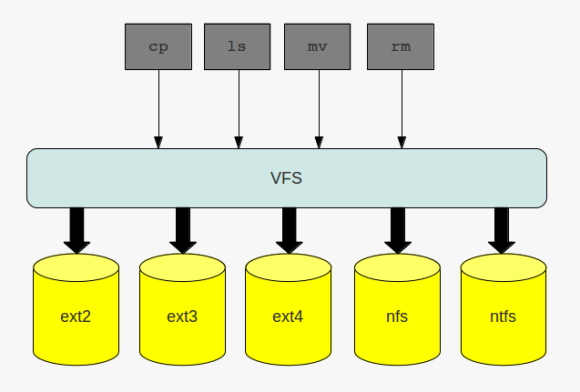
although each of them provides different features and was developed with different purposes in mind the tools to work with them stay the same:

  • cp
  • mv
  • cd

the layer which makes this possible is called the virtual filesystem ( vfs ). this layer provides a common interface for the filesystems which are plugged into the operating system. I already introduced one special kind of filesystem, the the proc filesystem. the proc filesystem does not handle any files on disk or on the network, but neitherless it is a filesystem. in addition to the above mentioned filesystems, which all are disk based, filesystem may also handle files on the network, such as nfs or cifs.

no matter what kind of filesystem you are working with: when interacting with the filesystem by using the commands of choice you are routed through the virtual filesystem:

the virtual file system

to make this possible there needs to be a standard all file system implementations must comply with, and this standard is called the common file model. the key components this model consist of are:

  • the superblock which stores information about a mounted filesystem ( … that is stored in memory as a doube linked list )
  • inodes which store information about a specific file ( … that are stored in memory as a doube linked list)
  • the file object which stores information of the underlying files
  • dentries, which represent the links to build the directory structure ( … that are stored in memory as a doube linked list)

to speed up operations on the file systems some of the information which is normally stored on disk are cached. if you recall the post about slabs, you can find an entry like the following in the /proc/slabinfo file if you have a mounted ext4 filesystem on your system:

cat /proc/slabinfo | grep ext4 | grep cache
ext4_inode_cache   34397  34408    920   17    4 : tunables    0    0    0 : slabdata   2024   2024      0

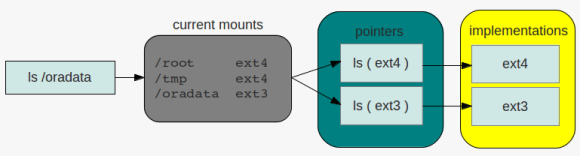
so what needs the kernel to do if, for example, a request for listing the contents of a directoy comes in and the directory resides on an ext4 filesystem? because the filesystem is mounted the kernel knows that the filesystem for the specific request is of type ext4. the ls command will then be translated ( pointed ) to the specific ls implementation of the ext4 filesystem. this operation is the same for all commands interacting with filesystems. there is a pointer for each operation that links to the specific implementation of the command in question:

directory listing

as the superblock is stored in memory and therefore may become dirty, that is not synchronized with the superblock on disk, there is the same issue that oracle must handle with its buffer pools: periodically check the dirty flag and write down the changes to disk. the same is true for inodes ( while in memory ), which contain all the information that make up a file. closing a loop to oracle again: to speed up searching the ionodes linux maintains a hash table for fast access ( remember how oracle uses hashes to identify sql statements in the shared_pool ).

when there are files, there are processes which want to work with files. once a file is opened a new file object will be created. as these are frequent operations file objects are allocated through a slab cache.

the file objects itself are visible to the user through the /proc filesystem per process:

ls -la /proc/*/fd/
/proc/832/fd/:
total 0
dr-x------ 2 root root  0 2012-05-18 14:03 .
dr-xr-xr-x 8 root root  0 2012-05-18 06:40 ..
lrwx------ 1 root root 64 2012-05-18 14:03 0 -> /dev/null
lrwx------ 1 root root 64 2012-05-18 14:03 1 -> /dev/null
lr-x------ 1 root root 64 2012-05-18 14:03 10 -> anon_inode:inotify
lrwx------ 1 root root 64 2012-05-18 14:03 2 -> /dev/null
lrwx------ 1 root root 64 2012-05-18 14:03 3 -> anon_inode:[eventfd]
lrwx------ 1 root root 64 2012-05-18 14:03 4 -> /dev/null
lrwx------ 1 root root 64 2012-05-18 14:03 5 -> anon_inode:[signalfd]
lrwx------ 1 root root 64 2012-05-18 14:03 6 -> socket:[7507]
lrwx------ 1 root root 64 2012-05-18 14:03 7 -> anon_inode:[eventfd]
lrwx------ 1 root root 64 2012-05-18 14:03 8 -> anon_inode:[eventfd]
lrwx------ 1 root root 64 2012-05-18 14:03 9 -> socket:[11878]
...

usually numbers 0 – 3 refer to the standard input, standard output and standard error of the corresponding process.

last but not least there are the dentries. as with the file objects, dentries are allocated from a slab cache, the dentry cache in this case:

cat /proc/slabinfo | grep dentry
dentry             60121  61299    192   21    1 : tunables    0    0    0 : slabdata   2919   2919      0

directories are files, too, but special in that kind that dictories may contain other files or directories. once a directory is read into memory it is transformed into a dentry object. as this operation is expensive there is the dentry cache mentioned above. thus the operations for building the dentry objects can be minimized.
another link to oracle wording: the unused dentry double linked list uses a least recently used ( lru ) algorithm to track the usage of the entries. when the kernel needs to shrink the cache the objects at the tail of the list will be removed. as with the ionodes there is hash table for the dentries and a lock protecting the lists ( dcache_spin_lock in this case ).

this should give you enough hints to go further if you are interesed …