how does one retrieve data from the database ? by using the sql language. sql is easy to learn and everyone can write statetments, but many times the user who fires a statement has little or no knowledge on how the data is organized and stored inside the database system.
this is where the optimizer comes into the game. once the statement reaches the database it is the task of the optimizer to find the fastest and most efficient way to the data. to make things a littler easier to understand lets start with an example:

imagine the following the scenario:

  • as the teacher is ill you have been asked to teach the class
  • the subject of todays class is J.R.R. Tolkien’s Lord of the Rings
  • the students are allowed to ask any question which can be answered by reading the book
  • all you have to answer the questions is the book, your memory, a blank paper and a pencil

in this scenario you are the optimizer while the books is the entity which stores the actual data. the students represent the users querying the database. it is your ( the optimizers ) task to find the most efficient way to answer your student’s questions. the problem is: nobody told you what is the subject of todays class and, oh my god, you never read the book :) anyway, as the real teacher is a good friend of you, you decided to give your best.

lets set up the scenario. first of all we’ll need a table which represents our book:

DROP TABLE LORDOFTHERINGS;
CREATE TABLE LORDOFTHERINGS ( PAGENUMBER NUMBER
, CHAPTER NUMBER
, TEXT VARCHAR2(4000)
)
TABLESPACE USERS;

as a book without any content would not be worth reading lets generate some content:

DECLARE
  ln_chapter lordoftherings.chapter%TYPE := 0;
  -- same stupid text for all pages, for now
  lv_text lordoftherings.text%TYPE := LPAD('GOLLUM IS SAD',4000,'BLABLA');
BEGIN
  FOR
    i IN 1..10000
  LOOP
    -- each chapter will have 50 pages
    IF
      mod(i,50) = 0
    THEN
      ln_chapter := ln_chapter + 1;
    END IF;
    INSERT INTO LORDOFTHERINGS ( PAGENUMBER, CHAPTER, TEXT )
           VALUES ( i, ln_chapter, lv_text );
  END LOOP;
  COMMIT;
END;
/
-- as we know there is a bad warlock called sauron:
UPDATE LORDOFTHERINGS
   SET TEXT = 'SAURON'
 WHERE MOD(pagenumber,77) = 0;
-- ... and hobbits play some kind of role
UPDATE LORDOFTHERINGS
   SET TEXT = 'HOBBITS'
 WHERE MOD(pagenumber,111) = 0;
-- ... and there is the good counterpart to sauron called gandalf
UPDATE LORDOFTHERINGS
   SET TEXT = 'GANDALF'
 WHERE MOD(pagenumber,201) = 0;
UPDATE LORDOFTHERINGS
   SET TEXT = 'RING'
 WHERE MOD(pagenumber,2) = 0;
COMMIT;

so our book is ready:

  • there is a total of 10’000 pages, each containing a maximum of 4’000 characters
  • there are 200 chapters, each consisting of 50 pages
  • on some pages the story tells about hobbits
  • on some pages the story tells about sauron
  • on some pages the story tells about gandalf
  • on every second page the ring is mentioned

your class opens, the students are coming in and prepare to ask the questions they’d like to have answered from your side. remember, you are the expert. the students do not know that you never read the book. this is the same situation as when the database queries a table for the first time. for our scenario this means…

alter system flush buffer_cache;

… which erases the buffer cache of the database ( no brain available currently, or at least the brain has nothing to remember ).

07:31 am ( almost in time ), first question from a student: how many pages does the book consist of ?

puh, easy. isn’t it? just open the book go to the last page and take a look at the page number. really ? are you sure all pages are numbered including the first few pages which introduce the author and the last ones which may contain some advertising for other books one may be interested in ? perhaps the author decided to start over with page number one for each chapter ? not as simple as you thought. the only option you have: count all the pages. this is the only option which will give the correct answer. if you take a look the thickness of book you could guess that there should be around 10’000 pages ( if you are good at guessing how many pages a book may consist of ), but you can’t know for sure. you just did what the optimizer will do if a statement like this comes in:

SELECT count(pagenumber)
  FROM lordoftherings;

the only option the optimizer has available at this very moment is to do a full tablescan, that is reading every block of the table:

ALTER SYSTEM FLUSH BUFFER_CACHE;
SET AUTOTRACE TRACEONLY;
SELECT count(pagenumber)
  FROM lordoftherings;
Execution Plan
----------------------------------------------------------
Plan hash value: 4101815809
-------------------------------------------------------------------------------------
| Id  | Operation	   | Name	    | Rows  | Bytes | Cost (%CPU)| Time     |
-------------------------------------------------------------------------------------
|   0 | SELECT STATEMENT   |		    |	  1 |	 13 |  2739   (1)| 00:00:33 |
|   1 |  SORT AGGREGATE    |		    |	  1 |	 13 |		 |	    |
|   2 |   TABLE ACCESS FULL| LORDOFTHERINGS | 11059 |	140K|  2739   (1)| 00:00:33 |
-------------------------------------------------------------------------------------

you probably noticed that the 11059 rows reported in the above plan are wrong. that’s the guess mentioned above. you ( the optimizer ) guess that 11059 will be the correct answer. this guess is based on dynamic sampling which is reported under the “Note” section. as you could guess the number of pages by looking at the thickness of the book the optimizer uses dynamic sampling if it has no other statistics available which may help in finding the fastest way to the data. but as it is with a guess, this may be wrong. i will introduce dynamic sampling in a later post, for now just remember that the optimizer makes some assumptions if no adequate statistics are available.

09:30 am: after two hours you finally finished counting the pages and are able to answer the student’s question: there are 10’000 pages in total. you did quite a lot of work for answering a simple question. lets take a look at what the database does once the optimizer decided how to query the data:

SET AUTOTRACE OFF;
ALTER SYSTEM FLUSH BUFFER_CACHE;
ALTER SESSION SET TRACEFILE_IDENTIFIER = 'select_1';
ALTER SESSION SET EVENTS '10046 trace name context forever, level 8';
SELECT count(pagenumber)
  FROM lordoftherings;
ALTER SESSION SET EVENTS '10046 trace name context forever, level 0';

this will produce a sql trace file which you can find in the trace directory of your database. if you are not sure where to search, ask the database:

show parameter background_dump_dest

I’ll just copy two representative lines here:

WAIT #47691901769152: nam='db file sequential read' ela= 274 file#=3 block#=128 blocks=1 obj#=0 tim=1336672754891155
WAIT #47691901769152: nam='direct path read' ela= 15962 file number=4 first dba=161 block cnt=15 obj#=19241 tim=1336672754908366

these are the two reads the database was performing for answering our question:

  • db file sequential read: read one block per I/O request
  • direct path read: read multiple blocks per I/O request ( these reads go directly to the pga not to the sga )

don’t be confused because of the “direct path read” and that the blocks do not go to the sga in this case. for the scope of this post it is just important to note that multiple blocks can be read at once. if you ( as the teacher ) are really good in counting pages then you too may be able to count several pages at once. and thats what happens here: because the database needs to read the whole table which results in a full tablescan multiple blocks are read at once. in contrast, if you see “db file sequential read” this is always a single block read.

two hours of work for answering a simple question….

after a short coffee break, at 09:40 the second question comes in: how many pages are there per chapter ?
seems a little bit more complicated as the first question. after thinking about it: oh no. again you need to browse through all the pages very quickly and count those on which you find the chapter’s heading. again, no other option is available for getting the correct answer:

Execution Plan
----------------------------------------------------------
Plan hash value: 3984697483
-------------------------------------------------------------------------------------
| Id  | Operation	   | Name	    | Rows  | Bytes | Cost (%CPU)| Time     |
-------------------------------------------------------------------------------------
|   0 | SELECT STATEMENT   |		    | 11059 |	140K|  2740   (1)| 00:00:33 |
|   1 |  HASH GROUP BY	   |		    | 11059 |	140K|  2740   (1)| 00:00:33 |
|   2 |   TABLE ACCESS FULL| LORDOFTHERINGS | 11059 |	140K|  2739   (1)| 00:00:33 |
-------------------------------------------------------------------------------------
Note
-----
   - dynamic sampling used for this statement (level=2)

11:40 am: another two hours of work. almost noon and time for lunch. but you are able to answer the question: its 50 pages per chapter. you start hating the students for asking stupid questions. it can not go on like this. after sending them to lunch you start thinking on how you will be able do less work while still providing the correct answers. as you already answered two questions you decide to write down the results:

  • 10’000 pages in total
  • 50 pages per chapter
  • 201 chapters in total

these are your first statistics. only three, but better than nothing. this is input you can use for future questions. this does not mean it saves you any of the work, but it may help. in regards to the database this does mean:

exec dbms_stats.gather_table_stats ( USER, 'LORDOFTHERINGS' );

this told the database to create statistics for the table which may help the optimizer with its decisions. lets quickly check what a few of them are at the table level:

SELECT NUM_ROWS
     , BLOCKS
     , AVG_ROW_LEN 
  FROM USER_TAB_STATISTICS 
 WHERE TABLE_NAME = 'LORDOFTHERINGS';
  NUM_ROWS     BLOCKS AVG_ROW_LEN
---------- ---------- -----------
     10076	10097	     1985

hm. we know for sure that the book consists of 10’000 pages. why does the database report to have 10076 ? this is dependent on the parameter estimate_percent of the gather_table_stats procedure. try to re-gather the statistics with estimate_percent=100 ( which means a hundred percent ) and the numbers will be correct:

exec dbms_stats.gather_table_stats ( USER, 'LORDOFTHERINGS',NULL,100 );
SELECT NUM_ROWS
     , BLOCKS
     , AVG_ROW_LEN 
  FROM USER_TAB_STATISTICS 
 WHERE TABLE_NAME = 'LORDOFTHERINGS';
  NUM_ROWS     BLOCKS AVG_ROW_LEN
---------- ---------- -----------
     10000	10097	     1966

this is one decision you need to make for your statistic gathering strategy. gather statistics faster, which means a lower estimate percent or give more time and resources for the gathering and get more adequate statistics by using the whole table. in general the defaults should be fine for most environments, but this depends on your database and application.

additionally the database created statistics for the columns of the table:

SELECT COLUMN_NAME
     , NUM_DISTINCT
     , DENSITY
     , NUM_NULLS 
  FROM USER_TAB_COL_STATISTICS 
 WHERE TABLE_NAME = 'LORDOFTHERINGS';
COLUMN_NAME		       NUM_DISTINCT    DENSITY	NUM_NULLS
------------------------------ ------------ ---------- ----------
PAGENUMBER			      10000	 .0001		0
CHAPTER 				201 .004975124		0
TEXT					  5	    .2		0

this corresponds to the statistics you as a teacher recorded. i will not discuss how this numbers influence the optimizer right now, maybe in later post. just notice there are statistical values right now.

lunch finished, all the students are back to the classroom.
01:00 am, third question: how many pages do just contain the word gandalf ?
damn it. none of the statistics will help you in answering the question. another two hours of work, another time browsing through the whole book.

Execution Plan
----------------------------------------------------------
Plan hash value: 1483287049
------------------------------------------------------------------------------------
| Id  | Operation	  | Name	   | Rows  | Bytes | Cost (%CPU)| Time	   |
------------------------------------------------------------------------------------
|   0 | SELECT STATEMENT  |		   |  2000 |  3828K|  2739   (1)| 00:00:33 |
|*  1 |  TABLE ACCESS FULL| LORDOFTHERINGS |  2000 |  3828K|  2739   (1)| 00:00:33 |
------------------------------------------------------------------------------------
Predicate Information (identified by operation id):
---------------------------------------------------
   1 - filter("TEXT"='GANDALF')

its 03:00 p.m and you are at the point where you really hate the students. and you hate author, too, for writing such a thick book. something must change. you send send the students to get a coffee and start thinking again. a few minutes later you have an idea. once the students are back from coffee you tell them that the class will continue tomorrow but give them some work to do for the remaining two hours: everyone who wants to ask a question shall send it before 08:00 pm so you may prepare for the next day. under no circumstances you will spend two hours for answering a simple question again. home sweet home, take a rest from this frustrating day. at around 09:00 pm ( students are not that in time ) you check your mails for tomorrows questions:

  • how many pages just contain the word HOBBIT ?
  • how many pages just contain the word HOBBIT or GANDALF
  • how many pages in chapter fifty are empty ?
  • someone wants to know the page number and chapter for pages where there is the term ring

… and for sure there will be more questions at 10:00 pm
grrr. why do they ask such questions ? none of the question is about the story. ok, that’s life. you can not influence what people like to ask. but, you are smart again, you can recognize the patterns. the first step was to make them think before they ask the questions, so far so good. one step forward. you notice that these people seem to be interested in crazy stuff, like page numbers, single words, the amount of chapters but not in the story. and then you remember: why not create an index for the most common search terms ( columns ) ? wonderful.

CREATE INDEX I_TEXT ON LORDOFTHERINGS(TEXT);
CREATE INDEX I_CHAPTERS ON LORDOFTHERINGS(CHAPTER);

after hours of work you are finished with the indexes and go to sleep. you should be prepared for the crazy students tomorrow. some dreams ( fights against horrible page numbers, chapters and small hobbits ) later, you take your morning coffee and go to the classroom. ok, students…..

07:00 am ( in time this morning ): first question: how many pages just contain the word HOBBIT ?
hah, easy. just go to the index and count:

Execution Plan
----------------------------------------------------------
Plan hash value: 2876191354
-----------------------------------------------------------------------------------
| Id  | Operation	 | Name 	  | Rows  | Bytes | Cost (%CPU)| Time	  |
-----------------------------------------------------------------------------------
|   0 | SELECT STATEMENT |		  |  2000 |  3828K|   987   (0)| 00:00:12 |
|*  1 |  INDEX RANGE SCAN| I_SINGLE_WORDS |  2000 |  3828K|   987   (0)| 00:00:12 |
-----------------------------------------------------------------------------------
Predicate Information (identified by operation id):
---------------------------------------------------
   1 - access("TEXT"='HOBBIT')

07:05 am: five minutes later you are able to provide the correct the answer. this will be a short day.

07:06 am: second question: how many pages just contain the word HOBBIT or GANDALF

Execution Plan
----------------------------------------------------------
Plan hash value: 2888173227
---------------------------------------------------------------------------------------
| Id  | Operation	     | Name	      | Rows  | Bytes | Cost (%CPU)| Time     |
---------------------------------------------------------------------------------------
|   0 | SELECT STATEMENT     |		      |  4000 |  7656K|  1329	(1)| 00:00:16 |
|*  1 |  INDEX FAST FULL SCAN| I_SINGLE_WORDS |  4000 |  7656K|  1329	(1)| 00:00:16 |
---------------------------------------------------------------------------------------
Predicate Information (identified by operation id):
---------------------------------------------------
   1 - filter("TEXT"='GANDALF' OR "TEXT"='HOBBIT')

pff, another five minutes later you can answer the question. this will be a very short day. indexes are the solution.

07:15 am: third question: how many pages in chapter fifty are empty ?

Execution Plan
----------------------------------------------------------
Plan hash value: 1881835047

-----------------------------------------------------------------------------------------------
| Id  | Operation		     | Name	      | Rows  | Bytes | Cost (%CPU)| Time     |
-----------------------------------------------------------------------------------------------
|   0 | SELECT STATEMENT	     |		      |     1 |  1964 |    51	(0)| 00:00:01 |
|   1 |  SORT AGGREGATE 	     |		      |     1 |  1964 | 	   |	      |
|*  2 |   TABLE ACCESS BY INDEX ROWID| LORDOFTHERINGS |     1 |  1964 |    51	(0)| 00:00:01 |
|*  3 |    INDEX RANGE SCAN	     | I_CHAPTERS     |    50 |       |     1	(0)| 00:00:01 |
-----------------------------------------------------------------------------------------------

thanks to the chapter index you only have to look at the pages for chapter fifty. this speeds up your work, and ten minutes later you’re finished. you love indexes. because you feel wonderful and because you do not hate the students anymore you decide to do a coffee break. because of the work you spend on building the indexes there is no time pressure anymore.

08:30 am: fourth question: someone wants to know the page number and chapter for pages where there is the term ring ?
easy, you have the index. you take a look at the index, pick the first reference, go to the page in book and note the chapter and the page number. back to the index, pick the next reference, open the bock at the page the index tells you, note the chapter and the page number….
back to the index, pick the next reference, open the bock at the page the index tells you, note the chapter and the page number…

you start to realize that this will take a whole bunch of time. you even notice that this will take longer than scanning the whole book. how can this be ? you spend so much work in creating the index and now the index is no help at all. the problem is: for every entry in the index you have to go to the book and open the page the index points to. that is at least two reads. one for the index, one for the page in book. you remember the statistics you wrote down above: there a five distinct values for the text, so it should be around 2’000 pages to scan ( you don’t know right now that it actually are 5’000 ). as the term ring seems to present on every fifth page that would be at least 2’000×2 reads, one index read, one page read for every index entry, puh.
that’s not going to be fast. it will be faster to scan the whole book ( remember that you are able to scan very fast, multiple book pages at a time ) so your decision is: do a full scan of the book.

lets see what the database does:

SET AUTOTRACE TRACEONLY;
SELECT pagenumber,chapter
  FROM lordoftherings
 WHERE text = 'RING';
Execution Plan
----------------------------------------------------------
Plan hash value: 1483287049
------------------------------------------------------------------------------------
| Id  | Operation	  | Name	   | Rows  | Bytes | Cost (%CPU)| Time	   |
------------------------------------------------------------------------------------
|   0 | SELECT STATEMENT  |		   |  2000 |  3839K|  2739   (1)| 00:00:33 |
|*  1 |  TABLE ACCESS FULL| LORDOFTHERINGS |  2000 |  3839K|  2739   (1)| 00:00:33 |
------------------------------------------------------------------------------------
Predicate Information (identified by operation id):
---------------------------------------------------
   1 - filter("TEXT"='RING')

exactly the same. as the database is able to scan multiple blocks at a time when using a full table scan this will be faster than processing the index and visiting the table for every pointer in the index. note that the guess of 2’000 rows in total in the above plan is far from being correct, the correct answer is 5’000 ( more on that in a later post ).

you manage to answer the question just before noon. you decide to close the class and give the students a free afternoon. that has been to much work and you are frustrated. very, very simple questions and you have not been able to answer some questions in a reasonable time.
in the evening, because you are ambitious, you decide to write down what you learned from the one and half days. perhaps this is helpful for the other teacher:

  • always tell the students to think about what they want to know and write down the questions in advance
  • indexes may be useful if there are not to many references to the search term wich point you to a lot of different pages in the book
  • scanning a whole book seems to be fast, in regards to I/O, as you are able to scan multiple pages a time
  • index scans which require you to read the page in the book are, in regards to I/O, much slower as it requires at least two reads and each read can process only one page
  • statistics help in making decisions, but statistics might be wrong and therefore might drive you to the wrong direction
  • some parts of the book, probably the ones you read over and over again, stay in the brain, so you may answer repeated questions without reading the book

time to go to sleep …..

asm workshop

May 17, 2012 — Leave a comment

if you think about switching your databases to asm, want to boot your people or just want to do a workshop which offers a lot of practice and less slides feel free to contact me.

what you’ll get:

your own virtual box image, containing:

  • pre-installed oracle linux
  • software only installation of the grid infrastructure
  • all scripts and solutions for the topics discussed
  • reset scripts for each topic, so you may re-do each topic as much as you want

.. and the full set of slides, of course ( although the workshop is much more about practice you need to know the theoretical fundamentals )

some of the topics are:

  • storage preparation for asm
  • asmlib, use it or not ?
  • configuration of the cluster stack and asm
  • troubleshooting techniques
  • best practices
  • command line tools
  • patching

it’s up to you if you’d like to do the workshop in-house or at a location organized by my company. you may even reuse the slides and virtual image for your own internal workshops, if you want.

here is the summary for the os essentials posts:


  1. linux and its processes
  2. double linked lists
  3. sema… what ? interprocess communication (1)
  4. shared memory – interprocess communication (2)
  5. SIGSEGV and the ORA-07445
  6. kill is not really about killing
  7. memory management
  8. slabs are not only for kitchens
  9. hey, I don’t care if you are ext3 … just follow the model

will update the toc once there is more to say …

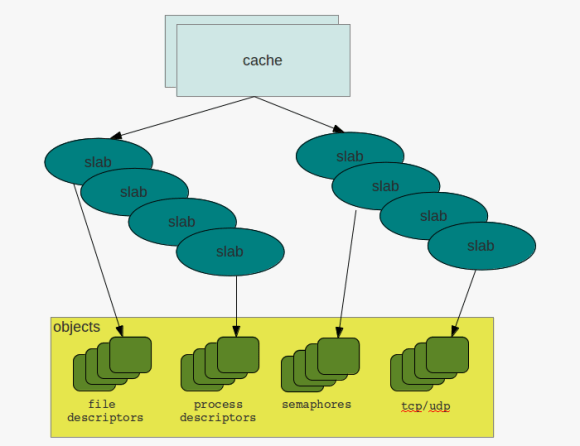
to be honest, when I first heard about slabs i thought of kitchens, or a bathroom, but not about memory management. but after reading and started learning about it, this term seemed not to be bad for what it stands for. to stay in the context of a kitchen there are different kinds of slabs:

  • some maybe appropriate for the floor
  • others for the wall
  • there are all kinds of colors …
  • … all kinds of sizes
  • slabs may consist of different materials

and in a way that’s exactly what slabs, in regards to memory management, are about. they provide regions of memory which are fixed in size and for different kinds of tasks.

the basic idea behind slabs is to avoid fragmentation by reserving fixed size memory regions and minimizing the work for allocation and deallocation. the so called constructor is used to initialize areas if memory while the destructor de-initializes them.

while the system is running the kernel requests memory regions of the same size and type over and over again. the process descriptors discussed earlier are one example. if a new process descriptor gets requested the slab allocator is used to get a memory area from cache which fits for holding the structures. once the process terminates and the descriptor can be discarded the memory region will not be deallocated but can be reused when another process needs to get created. in this way the overhead of frequent allocation and deallocation of pages frames can be avoided.

caches & slabs

to check the current caches and slabs you can either directly go to the /proc filesystem:

cat /proc/slabinfo
slabinfo - version: 2.1
# name : tunables : slabdata
UDPLITEv6 0 0 1024 16 4 : tunables 0 0 0 : slabdata 0 0 0
UDPv6 32 32 1024 16 4 : tunables 0 0 0 : 

… or check the current behavior with slabtop:

 Active / Total Objects (% used) : 305636 / 315218 (97.0%)
Active / Total Slabs (% used) : 11077 / 11077 (100.0%)
Active / Total Caches (% used) : 68 / 99 (68.7%)
Active / Total Size (% used) : 74608.55K / 76732.62K (97.2%)
Minimum / Average / Maximum Object : 0.01K / 0.24K / 8.00K
OBJS ACTIVE USE OBJ SIZE SLABS OBJ/SLAB CACHE SIZE NAME
89193 89192 99% 0.10K 2287 39 9148K buffer_head
55020 54352 98% 0.19K 2620 21 10480K dentry
30260 30247 99% 0.90K 1780 17 28480K ext4_inode_cache
19992 19974 99% 0.08K 392 51 1568K sysfs_dir_cache
17158 16006 93% 0.17K 746 23 2984K vm_area_struct
15360 14165 92% 0.01K 30 512 120K kmalloc-8
10710 10077 94% 0.05K 126 85 504K shared_policy_node
9664 8544 88% 0.06K 151 64 604K kmalloc-64
9051 8118 89% 0.19K 431 21 1724K kmalloc-192
7917 7904 99% 0.59K 609 13 4872K inode_cache

a cache initially does not contain any slabs. slabs will be created once requested and there is no free object to satisfy the request. in this case the cache will grow by n slabs. as with all concurrent access to memory regions caches and slabs are protected by locks, cache spin locks in this case. and when there are locks the must be different states for the objects, that are:

  • emtpy
  • partial
  • full

so what to remember: slabs and caches provide a way to avoid fragmentation and save some work in regards to frequent allocation and deallocation of memory regions. structures that are created and destroyed frequently such as the process or file descriptors benefit from this technique as the requests can be served at much faster time.

due to some network changes we were forced to adjust the interconnect configuration of one our managed grid infrastructure installations today. surprisingly this was a really smooth task, and all that needs to to be done is:

before doing any changes to the network configuration and while the rac databases and grid infrastructure are still running:

backup the current gpng ( grid plug and play ) profile in case you need to restore the old configuration:

cd $GRID_HOME/gpnp/[hostname]/profiles/peer
cp profile.xml profile.xml_bak

shutdown the rac database and listener:

srvctl stop database -d db_name
srvctl stop listener -l listener_name

make the changes to the interconnect configuration:

oifcfg setif -global eth1/10.167.77.0:cluster_interconnect
oifcfg getif

… where eth1 is the interface name for the interconnect and 10.167.77.0 is the new network to use

as root shutdown and disable the cluster stack:

crsctl stop crs
crsctl disable crs

shutdown the servers and perform the physical network changes, if any, start them up again and adjust the hosts file and the interface configurations.

as root user enable and start crs:

crsctl enable crs
crsctl start crs

wait a few minutes and check the cluster status:

oifcfg getif
crsctl status resource -t

that’s it.

a probably less known feature of the oracle database is the database filesystem (dbfs). in short dbfs provides a filesystem interface on top of database tables accessible through standard operating system commands. storing files inside the database becomes as easy as creating files on the operating system level. there is no need to use a programming language to store blobs/clobs inside the database.

for demonstrating dbfs this post will show how to create a subversion repository which actually resides in the oracle database. this is not intended for any production use and shall only show that is basically works.

because I am on linux and want to mount the database filesystem on the operating system I will need to install the kernel-devel and fuse packages and give execute privileges to the fusermount command:

su-
yum install kernel-devel fuse fuse-libs
chmod +x /bin/fusermount

next I’ll create the configuration file for fuse:

touch /etc/fuse.conf
echo "user_allow_other" > /etc/fuse.conf

the mountpoint for holding my database filesystem and subversion repository will be /oradata/DB112/svn owned by the database owner:

su - oracle
mkdir /oradata/DB112/svn

as all the files will reside inside the oracle database I will create a separate user:

su - oracle
sqlplus / as sysdba
CREATE USER svn
IDENTIFIED by "svn"
DEFAULT TABLESPACE USERS
TEMPORARY TABLESPACE TEMP;
GRANT CREATE SESSION TO svn;
GRANT dbfs_role TO svn;
GRANT RESOURCE TO svn;

the script that creates the dbfs “MYSVNFS” which will be stored in the “USERS” tablespace is:

connect svn/svn
@$ORACLE_HOME/rdbms/admin/dbfs_create_filesystem.sql USERS MYSVNFS

the output should be similar to this:

No errors.
--------
CREATE STORE:
begin dbms_dbfs_sfs.createFilesystem(store_name => 'FS_MYSVNFS', tbl_name =>
'T_MYSVNFS', tbl_tbs => 'USERS', lob_tbs => 'USERS', do_partition => false,
partition_key => 1, do_compress => false, compression => '', do_dedup => false,
do_encrypt => false); end;
--------
REGISTER STORE:
begin dbms_dbfs_content.registerStore(store_name=> 'FS_MYSVNFS', provider_name
=> 'sample1', provider_package => 'dbms_dbfs_sfs'); end;
--------
MOUNT STORE:
begin dbms_dbfs_content.mountStore(store_name=>'FS_MYSVNFS',
store_mount=>'MYSVNFS'); end;
--------
CHMOD STORE:
declare m integer; begin m := dbms_fuse.fs_chmod('/MYSVNFS', 16895); end;
No errors.

the client program used to mount the filesystem is called dbfs_client and is located under $ORACLE_HOME/bin. the proper way in regards to security would be to use an oracle wallet for storing the password but as this is only a test I will do it the easy way ( if someone is interested on how to setup the wallet way, just let me know ):

echo "svn" > /home/oracle/passwordfile
nohup dbfs_client svn@DB112 /oradata/DB112/svn < /home/oracle/passwordfile &

if everything worked the new mount is now visible with the os commands:

df -h
Filesystem Size Used Avail Use% Mounted on
/dev/hdc1 28G 11G 15G 43% /
tmpfs 741M 456M 286M 62% /dev/shm
dbfs-svn@DB112:/ 1.1G 160K 1.1G 1% /oradata/DB112/svn
##
ls -la /oradata/DB112/svn/MYSVNFS/
total 0
drwxrwxrwx 3 root root 0 May 4 01:10 .
drwxr-xr-x 3 root root 0 May 4 01:15 ..
drwxr-xr-x 7 root root 0 May 4 01:10 .sfs

now I am ready to create the subversion repository:

su - oracle
cd /oradata/DB112/svn/MYSVNFS/
svnadmin create MYREPO

for being able to access the repository later on from another user I’ll add the user to the subversion password file:

cat MYREPO/conf/passwd
[users]
svn = svn

… and uncomment the following line in the svnserve.conf file:

password-db = passwd

… and start the subversion deamon:

svnserve -d -r /oradata/DB112/svn/MYSVNFS

to simulate real-life subversion usage I will create a new os user and do some work on the subversion repository ( I could have done this from another workstation, too ):

su -
useradd svn
passwd svn
su - svn

the first thing I need to do is to checkout the repository:

svn co svn://localhost/MYREPO/
cd MYREPO
ls -la

lets copy some files ( text and binary ) to populate the repository ( don’t care if not all files are copied because of permissions ):

cp /etc/*.conf .
cp /bin/cpio .
ls -la

as I now have some files I’ll add them to the repository and commit ( commit means pushing to the subversion server here ):

svn add *
svn commit -m "blabla" *.conf --username=svn
svn commit -m "blabla" cpio

done. all files committed to the subversion server and stored inside the oracle database. don’t believe it ?

su - oracle
sqlplus / as sysdba
set lines 164
col object_name for a20
col object_type for a15
SELECT object_name,object_type FROM all_objects WHERE owner = 'SVN';
##
OBJECT_NAME          OBJECT_TYPE
-------------------- ---------------
T_MYSVNFS            TABLE
IG_SFS$_FST_19       INDEX
IP_SFS$_FST_19       INDEX
IPG_SFS$_FST_19      INDEX
SFS$_FSTP_19         TABLE
SYS_C005052          INDEX
##
col item for a30
col pathname for a40
select item ,PATHNAME from svn.T_MYSVNFS;
##
ITEM PATHNAME
------------------------------ ----------------------------------------
MYREPO /MYREPO
locks /MYREPO/locks
db.lock /MYREPO/locks/db.lock
db-logs.lock /MYREPO/locks/db-logs.lock
hooks /MYREPO/hooks
start-commit.tmpl /MYREPO/hooks/start-commit.tmpl
pre-commit.tmpl /MYREPO/hooks/pre-commit.tmpl
post-revprop-change.tmpl /MYREPO/hooks/post-revprop-change.tmpl
conf /MYREPO/conf
authz /MYREPO/conf/authz
db /MYREPO/db
fs-type /MYREPO/db/fs-type
revs /MYREPO/db/revs
0 /MYREPO/db/revs/0
revprops /MYREPO/db/revprops
0 /MYREPO/db/revprops/0
transactions /MYREPO/db/transactions
txn-protorevs /MYREPO/db/txn-protorevs
write-lock /MYREPO/db/write-lock
uuid /MYREPO/db/uuid
0 /MYREPO/db/revs/0/0
0 /MYREPO/db/revprops/0/0
fsfs.conf /MYREPO/db/fsfs.conf
rep-cache.db /MYREPO/db/rep-cache.db
min-unpacked-rev /MYREPO/db/min-unpacked-rev
txn-current-lock /MYREPO/db/txn-current-lock
format /MYREPO/db/format
format /MYREPO/format
passwd /MYREPO/conf/passwd
svnserve.conf /MYREPO/conf/svnserve.conf
pre-revprop-change.tmpl /MYREPO/hooks/pre-revprop-change.tmpl
pre-lock.tmpl /MYREPO/hooks/pre-lock.tmpl
pre-unlock.tmpl /MYREPO/hooks/pre-unlock.tmpl
ROOT /
.sfs /.sfs
attributes /.sfs/attributes
tools /.sfs/tools
snapshots /.sfs/snapshots
RECYCLE /.sfs/RECYCLE
content /.sfs/content
post-commit.tmpl /MYREPO/hooks/post-commit.tmpl
post-lock.tmpl /MYREPO/hooks/post-lock.tmpl
post-unlock.tmpl /MYREPO/hooks/post-unlock.tmpl
README.txt /MYREPO/README.txt
1 /MYREPO/db/revs/0/1
txn-current /MYREPO/db/txn-current
2 /MYREPO/db/revs/0/2
1 /MYREPO/db/revprops/0/1
current /MYREPO/db/current
2 /MYREPO/db/revprops/0/2

that’s the subversion repository stored in the oracle database.

remember this is only for educational purposes, but imagine what you could do with it:

  • back up the repository with rman
  • use rman to duplicate the database for testing purposes
  • setup rac one node, integrate the subversion daemon with the oracle grid infrastructure and make the repository high available
  • create multiple dbfs and multiple svn repositories in one oracle database
  • enable deduplication for the repository files ( see * )
  • enable compression for the repository files ( see ** )

oracle uses secure files to store the files located in the dbfs. this means you may use all the features secure files provide. check the examples for an overview.

*

alter table svn.T_MYSVNFS modify lob(FILEDATA) (deduplicate);

**

alter table svn.T_MYSVNFS modify lob(FILEDATA) (compress high);

as said above, this is only educational but i’d be happy to start a discussion about the pros and cons ( beside the licensing costs, of course ) …. what would be a good use case to use dbfs for ?

when it comes to the grid infrastructure ( single node or cluster configuration ) oracle needs to store and manage some configuration data about the state of the node(s) and its resources. each node in the configuration has its own container to store and manage data which is called the “oracle local registry (olr)”.

by using the ocrcheck utility one can check the current the status of the local registry:

ocrcheck -local
Status of Oracle Local Registry is as follows :
Version : 3
Total space (kbytes) : 262120
Used space (kbytes) : 2472
Available space (kbytes) : 259648
ID : 1322090758
Device/File Name : /opt/oracle/product/crs/11.2.0.3/cdata/localhost/oracleplayground.olr
Device/File integrity check succeeded
Local registry integrity check succeeded
Logical corruption check bypassed due to non-privileged user

beside some other information this tells that the local registry is located here:

/opt/oracle/product/crs/11.2.0.3/cdata/localhost/oracleplayground.olr

if you wonder about the “Logical corruption check bypassed due to non-privileged user” message, this is because the ocrcheck command was executed as the grid infrastructure software owner. re-executing the same command as root user will show “Logical corruption check succeeded”. why root? because some parts of the grid infrastructure run with root privileges ( remember the roothas.pl or rootcrs.pl setup script ).

as the local registry is essential for the cluster stack to start up there must be a way to do proper backups and restores of it in case it gets lost or corrupted. oracle creates an initial backup of the olr after the configuration of the grid infrastructure. from that point onwards it is up to you to create and manage the backups. you will find the initial backup of your olr under ORACLE_HOME/cdata/[HOSTNAME]/, in my case:

ls -al /opt/oracle/product/crs/11.2.0.3/cdata/oracleplayground/
total 5644
drwxr-x--- 2 grid oinstall 4096 Mar 23 09:18 .
drwxrwx--- 4 grid oinstall 4096 Mar 23 09:17 ..
-rw------- 1 grid oinstall 5746688 Mar 23 09:18 backup_20120323_091815.olr

first of all one should decide where to store the manual backups of the olr. the default location is fine if you do regular backups of your $ORACLE_HOME ( and it is strongly recommended to do so ). to list the current configuration use:

./ocrconfig -local -showbackup
oracleplayground 2012/03/23 09:18:15 /opt/oracle/product/crs/11.2.0.3/cdata/oracleplayground/backup_20120323_091815.olr

if you need to change the location for any reason, you can do so by using the ocrconfig command:

./ocrconfig -local -backuploc [BACKUP_DESTINATION]

doing backups of your olr is as easy as:

/ocrconfig -local -manualbackup
oracleplayground 2012/05/03 15:51:38 /opt/oracle/product/crs/11.2.0.3/cdata/oracleplayground/backup_20120503_155138.olr
oracleplayground 2012/03/23 09:18:15 /opt/oracle/product/crs/11.2.0.3/cdata/oracleplayground/backup_20120323_091815.olr

…which will also list the current backups of the olr. of course you need to ensure that these files are being backuped up to a safe location ( to a tape, for example ).

another way for doing backups and restores is to use the “import” and “export” parameters of the ocrconfig command:

./ocrconfig -local -export /tmp/olr.dmp
./ocrconfig -local -import /tmp/olr.dmp

as oracle recommends not to use the “export” and “import” procedures for backups and restores i wonder what these parameters are for.
perhaps you should do both kinds of backups to be sure that one of it really works :)

in case you need to restore a backup of the local registry make sure you stop the cluster stack before:

crsctl stop has
ocrconfig -local -restore [OLR_BACKUP_FILE]
ocrcheck -local
crsctl start has

as it should be clear now how to backup and restore the local registry lets take look at the contents. oracle provides another command for dumping the contents of the local ( or cluster ) registry:

./ocrdump -local -stdout

this will dump the contents of the local registry to the screen. take a look at the output and you will see why the registry is essential for the stack. if you registered a database and listener with the grid infrastructure you will see something like this:

[SYSTEM.OHASD.RESOURCES.ora!db112!db]
[SYSTEM.OHASD.RESOURCES.ora!db112!db.CONFIG]
ORATEXT : ACL=owner:grid:rwx,pgrp:asmdba:r-x,other::r--,group:oinstall:r-x,user:oracle:rwx~ACTION_FAILURE_TEMPLATE=~ACTION_SCRIPT=~ACTIVE_PLACEMENT=1~AGENT_FILENAME=%CRS_HOME%/bin/oraagent%CRS_EXE_SUFFIX%~AUTO_START=restore~BASE_TYPE=ora.cluster_resource.type~CARDINALITY=1~CHECK_INTERVAL=1~CHECK_TIMEOUT=30~CLUSTER_DATABASE=false~DATABASE_TYPE=SINGLE~DB_UNIQUE_NAME=DB112~DEFAULT_TEMPLATE=PROPERTY(RESOURCE_CLASS=database) PROPERTY(DB_UNIQUE_NAME= CONCAT(PARSE(%NAME
%, ., 2), %USR_ORA_DOMAIN%, .)) ELEMENT(INSTANCE_NAME= %GEN_USR_ORA_INST_NAME%) ELEMENT(DATABASE_TYPE= %DATABASE_TYPE%)~DEGREE=1~DESCRIPTION=Oracle Database resource~ENABLED=1~FAILOVER_DELAY=0~FAILURE_INTERVAL=60~FAILURE_THRESHOLD=1~GEN_AUDIT_FILE_DEST=/oradata/DB112/admin/adump~GEN_START_OPTIONS=open~GEN_USR_ORA_INST_NAME=DB112~HOSTING_MEMBERS=~INSTANCE_FAILOVER=1~LOAD=1~LOGGING_LEVEL=1~MANAGEMENT_POLICY=AUTOMATIC~NAME=ora.db112.db~NLS_LANG=~NOT_RESTARTING_TEMPLATE=~OFFLINE_CHECK_INTERVAL=0~ONLINE_RELOCATI
ON_TIMEOUT=0~ORACLE_HOME=/opt/oracle/product/base/11.2.0.3~ORACLE_HOME_OLD=~PLACEMENT=balanced~PROFILE_CHANGE_TEMPLATE=~RESTART_ATTEMPTS=2~ROLE=PRIMARY~SCRIPT_TIMEOUT=60~SERVER_POOLS=~SPFILE=/opt/oracle/product/base/11.2.0.3/dbs/spfileDB112.ora~START_DEPENDENCIES=weak(type:ora.listener.type,uniform:ora.ons) hard(ora.DB112_DATA_DG.dg,ora.DB112_ARCH_DG.dg) pullup(ora.DB112_DATA_DG.dg,ora.DB112_ARCH_DG.dg)~START_TIMEOUT=600~STATE_CHANGE_TEMPLATE=~STOP_DEPENDENCIES=hard(intermediate:ora.asm,shutdown:ora.DB112_D
ATA_DG.dg,shutdown:ora.DB112_ARCH_DG.dg)~STOP_TIMEOUT=600~TYPE=ora.database.type~TYPE_ACL=owner:oracle:rwx,pgrp:oinstall:rwx,other::r--~TYPE_NAME=ora.database.type~TYPE_VERSION=3.2~UPTIME_THRESHOLD=1h~USR_ORA_DB_NAME=~USR_ORA_DOMAIN=~USR_ORA_ENV=~USR_ORA_FLAGS=~USR_ORA_INST_NAME=DB112~USR_ORA_OPEN_MODE=open~USR_ORA_OPI=false~USR_ORA_STOP_MODE=immediate~VERSION=11.2.0.3.0~

everything the cluster stack needs to know about the registered resource is recorded here. this includes all the dependencies of the resource as well as the different kinds of parameters, e.g. :

SPFILE=/opt/oracle/product/base/11.2.0.3/dbs/spfileDB112.ora

… which tells where to find the spfile of the registered database, or:

hard(ora.DB112_DATA_DG.dg,ora.DB112_ARCH_DG.dg)

… which tells that the diskgroups DB112_DATA_DG and DB112_ARCH_DG must be available before the database can start up. this is a hard dependency, so the startup of the database will stop if the diskgroups are not available.

you can get a more readable format by dumping the contents to a xml file:

./ocrdump -local /tmp/olr.xml -xml

as the backups of the olr are the same format as the current olr, ocrdump works the same way if you want to dump the backups. this can help when searching for changes in the olr:

./ocrdump -local /tmp/olr_backup.xml -backupfile /opt/oracle/product/crs/11.2.0.3/cdata/oracleplayground/backup_20120503_155138.olr -xml

you may have observed, that all the commands ( ocrconfig, orcdump, ocrcheck ) are used to manage the local registry as well as the cluster registry in case you have a clustered setup ( RAC or RAC one node, for example ). so, no matter if you are on a single node or cluster configuration: make sure your backup and restore strategy includes the oracle local and cluster registry.

what happens when you update a row of a table ? not much, you could think. but in fact there are lots and lots of things happening in the background from which you can learn how the database works. this post will follow a simple one row update and shows what’s happening behind the scenes.

i will start by creating a tiny little table and adding one row to it:

CREATE TABLE T1 ( A NUMBER )
       TABLESPACE USERS;
INSERT INTO T1 (A)
       VALUES (1);
COMMIT;

this is the starting point. because we will need this information later lets record four things:
1) the block number of the row we just created
2) the object id of the table in the data dictionary
3) the sid of the session
4) the session’s address

-- rowid of the row
SELECT rowid
  FROM t1
 WHERE A = 1;
ROWID
------------------
AAADb4AAEAAAAF9AAA
-- block number of the row
SELECT dbms_rowid.rowid_block_number('AAADb4AAEAAAAF9AAA') block_no
  FROM dual;
BLOCK_NO
----------
381
-- object id of the table
SELECT object_id
  FROM all_objects
 WHERE owner = USER
   AND object_type = 'TABLE'
   AND object_name = 'T1';
OBJECT_ID
----------
14072
-- the session id of the session which sends the update
SELECT SYS_CONTEXT('userenv','SID') sid
  FROM dual;
SID
---
32
-- the same sessions address
SELECT saddr
  FROM v$session
 WHERE sid = 32;
SADDR
----------------
000000006F680A28

so by now we know the object id ( which is 14072 ), the block number of the block containing the row ( which is 381 ), the session id ( which is 32 in my case ) and the session’s address ( which is 000000006F680A28 ).

ready to update ?

UPDATE T1
SET A = 2
WHERE A = 1;
1 row updated.

at this point it is important to leave the transaction open ( to not commit ). i will start a second sqlplus session and leave the session which issues the update as is.

the obvious things first. each insert/update/delete will start a transaction and as we did not commit our update we should be able to see the transaction:

SELECT addr
, ubafil
, ubablk
, ubarec
, status
, xid
, start_scn
FROM v$transaction
WHERE ses_addr = '000000006F680A28';
ADDR UBAFIL UBABLK UBAREC STATUS XID START_SCN
---------------- ---------- ---------- ---------- ------ ---------------- ----------
000000006DF332D8 3 483 11 ACTIVE 0100100022010000 958658

as expected there is an active transaction for our update statement. because each transaction will change some data ( if there is not rollback ) some undo must be generated. from the output above we can learn:
1. the datafile containing the undo block has file number 3
2. the block containing the undo is block number 483
3. the undo record is 11

before taking a look at the undo block lets see what information oracle has about our data block in v$bh ( which lists the buffer headers ):

col dirty for a5
col temp for a5
col ping for a5
col stale for a5
col stale for a5
col direct for a5
col status for a6
col objd for 99999
col block# for 999999
SELECT file#
, status
, dirty
, temp
, ping
, stale
, direct
, objd
, block#
FROM v$bh
WHERE objd = 14072
AND block# = 381;
FILE# STATUS DIRTY TEMP PING STALE DIREC OBJD BLOCK#
---------- ------ ----- ----- ----- ----- ----- ------ -------
4 cr N N N N N 14072 381
4 xcur N N N N N 14072 381

so v$bh reports two copies of the block header, one in “consitent read” the other in “exclusive” mode non of them dirty, temporary, pinged, stale or direct.

the exclusive one is the original block while the cr one is the copy we got when we issued the update. if you’d do a rollback of the update and resend the same update statement you’d receive another “cr” copy of the block. can you imagine why ? because readers do not block writers and writers do not block readers. for others sessions to be able to view the block as it really is ( the update is not yet commited ) oracle creates copies of blocks to construct a read consistant view of the data. you should keep this in mind when sizing your pools.

happily oracle provides a way to look at the contents of a block. lets do a dump of our undo block:

ALTER SESSION SET TRACEFILE_IDENTIFIER='my_dumps';
ALTER SYSTEM DUMP DATAFILE 3 BLOCK 483;

as the select from v$transaction tells us that our undo record is 11, we will take a look at this record only. if you open the trace file scroll down to your undo record you should see a similar output than this:

*-----------------------------
* Rec #0xb slt: 0x10 objn: 14072(0x000036f8) objd: 14072 tblspc: 4(0x00000004)
* Layer: 11 (Row) opc: 1 rci 0x00
Undo type: Regular undo Begin trans Last buffer split: No
Temp Object: No
Tablespace Undo: No
rdba: 0x00000000Ext idx: 0
flg2: 0
*-----------------------------
uba: 0x00c001e3.0036.09 ctl max scn: 0x0000.000e4630 prv tx scn: 0x0000.000e4631
txn start scn: scn: 0x0000.000ea07f logon user: 42
prev brb: 12583394 prev bcl: 0
KDO undo record:
KTB Redo
op: 0x03 ver: 0x01
compat bit: 4 (post-11) padding: 1
op: Z
Array Update of 1 rows:
tabn: 0 slot: 0(0x0) flag: 0x2c lock: 0 ckix: 0
ncol: 1 nnew: 1 size: 0
KDO Op code: 21 row dependencies Disabled
xtype: XAxtype KDO_KDOM2 flags: 0x00000080 bdba: 0x0100017d hdba: 0x0100017a
itli: 2 ispac: 0 maxfr: 4858
vect = 0
col 0: [ 2] c1 02

if you wonder why this is record 11, “#0xb” translates to 11:

select to_number('b','X') dec
from dual;
DEC
----------
11

what can we learn from here:
1) we can see the tablespace number and the object which is affected:

* Rec #0xb slt: 0x10 objn: 14072(0x000036f8) objd: 14072 tblspc: 4(0x00000004)

2) the start scn ( system change number ) is recorded as long with the user who started the transaction

txn start scn: scn: 0x0000.000ea07f logon user: 42

000e2f90 translates to 929670 and 42 is the user_id reported in all_users for the user who started the transaction.
3) one row will be updated:

Array Update of 1 rows:
tabn: 0 slot: 0(0x0) flag: 0x2c lock: 0 ckix: 0
ncol: 1 nnew: 1 size: 0
KDO Op code: 21 row dependencies Disabled
xtype: XAxtype KDO_KDOM2 flags: 0x00000080 bdba: 0x0100017d hdba: 0x0100017a
itli: 2 ispac: 0 maxfr: 4858
vect = 0
col 0: [ 2] c1 02

other people described the meanings of all the keywords and flags, so i will not just re-type them here ( you may, for example, want to check julian dyke’s website ).
for now, it is just important to notice that the first column of the table ( col 0 ) will be changed by 2 bytes ( [2] ) and the values is 1 ( 02 – 1 ).  oracle prefixes numeric values ( c1 ), so we may ignore the first 2 bytes.

what else is happening in the background? as stated in earlier posts, things need protections. lets see if we can find some locks for our session:

SELECT sid
, id1
, id2
, lmode
, request
FROM v$lock
WHERE sid = 32;
SID ID1 ID2 LMODE REQUEST
---------- ---------- ---------- ---------- ----------
32 100 0 4 0
32 14072 0 3 0
32 65552 290 6 0

the lmodes translate to: 4 = Edition enqueue (AE), 3 = DML (TM), 6 = Transaction (TX).

i am not sure, but i think the edition enqueue lock is always present ( happy if someone can tell more about this ).
our update triggered two locks, one for the dml and one for the transaction.
column id1 of the dml references our table, which is object 14072. we locked one row in shared exclusive mode.
column id2 of the transaction lock references the sequence of the transaction ( v$transaction.xidsqn ). so, the other way around, you can check the locks for your session and from there get to the object and transaction.

in my case, the redo containing the update must be the current one ( as nothing else is happening on my database ). so i’ll find one copy of it ( as the logs are mirrored ):

select GROUP#
, THREAD#
, SEQUENCE#
, STATUS
from v$log;
GROUP# THREAD# SEQUENCE# STATUS
---------- ---------- ---------- ---------------
1 1 85 INACTIVE
2 1 86 INACTIVE
3 1 87 CURRENT
select member
from v$logfile
where group# = 3;
MEMBER
------------------------------------------------------------------------------------------------------------------------
+DB112_DATA_DG/db112/onlinelog/group_3.259.779116045
+DB112_ARCH_DG/db112/onlinelog/group_3.259.779116047

… dump the first one:

alter system dump logfile '+DB112_DATA_DG/db112/onlinelog/group_3.259.779116045';

… and you will find the redo record:

REDO RECORD - Thread:1 RBA: 0x000057.000000a2.0010 LEN: 0x01fc VLD: 0x0d
SCN: 0x0000.000ea149 SUBSCN: 1 04/24/2012 20:10:42
(LWN RBA: 0x000057.000000a2.0010 LEN: 0002 NST: 0001 SCN: 0x0000.000ea149)
CHANGE #1 TYP:2 CLS:1 AFN:4 DBA:0x0100017d OBJ:14072 SCN:0x0000.000ea0c2 SEQ:1 OP:11.19 ENC:0 RBL:0
KTB Redo
op: 0x11 ver: 0x01
compat bit: 4 (post-11) padding: 1
op: F xid: 0x0001.010.00000122 uba: 0x00c001e3.0036.0b
Block cleanout record, scn: 0x0000.000ea148 ver: 0x01 opt: 0x02, entries follow...
itli: 1 flg: 2 scn: 0x0000.000ea0c2
Array Update of 1 rows:
tabn: 0 slot: 0(0x0) flag: 0x2c lock: 2 ckix: 0
ncol: 1 nnew: 1 size: 0
KDO Op code: 21 row dependencies Disabled
xtype: XAxtype KDO_KDOM2 flags: 0x00000080 bdba: 0x0100017d hdba: 0x0100017a
itli: 2 ispac: 0 maxfr: 4858
vect = 0
col 0: [ 2] c1 03
CHANGE #2 TYP:0 CLS:17 AFN:3 DBA:0x00c00080 OBJ:4294967295 SCN:0x0000.000ea097 SEQ:1 OP:5.2 ENC:0 RBL:0
ktudh redo: slt: 0x0010 sqn: 0x00000122 flg: 0x0012 siz: 164 fbi: 0
uba: 0x00c001e3.0036.0b pxid: 0x0000.000.00000000
CHANGE #3 TYP:0 CLS:18 AFN:3 DBA:0x00c001e3 OBJ:4294967295 SCN:0x0000.000ea096 SEQ:2 OP:5.1 ENC:0 RBL:0
ktudb redo: siz: 164 spc: 6734 flg: 0x0012 seq: 0x0036 rec: 0x0b
xid: 0x0001.010.00000122
ktubl redo: slt: 16 rci: 0 opc: 11.1 [objn: 14072 objd: 14072 tsn: 4]
Undo type: Regular undo Begin trans Last buffer split: No
Temp Object: No
Tablespace Undo: No
0x00000000 prev ctl uba: 0x00c001e3.0036.09
prev ctl max cmt scn: 0x0000.000e4630 prev tx cmt scn: 0x0000.000e4631
txn start scn: 0x0000.000ea07f logon user: 42 prev brb: 12583394 prev bcl: 0 BuExt idx: 0 flg2: 0
KDO undo record:
KTB Redo
op: 0x03 ver: 0x01
compat bit: 4 (post-11) padding: 1
op: Z
Array Update of 1 rows:
tabn: 0 slot: 0(0x0) flag: 0x2c lock: 0 ckix: 0
ncol: 1 nnew: 1 size: 0
KDO Op code: 21 row dependencies Disabled
xtype: XAxtype KDO_KDOM2 flags: 0x00000080 bdba: 0x0100017d hdba: 0x0100017a
itli: 2 ispac: 0 maxfr: 4858
vect = 0
col 0: [ 2] c1 02

what can we see here:
1) there is our update “col 0: [ 2] c1 03”: change the first column of our table to 2 ( 03 – 1 ).
2) there is the same undo entry as in the undo block a little later in the trace: “col 0: [ 2] c1 02”.

why is there the same entry in the redo as we found it in the undo ? remember that we did not yet finish our transaction ( the commit is still pending ). so what will happen if the instance crashes now? when the instance comes up again after the crash oracle will scan the redo logs and apply all the changes that happened up to before the crash. and as we did not commit the transaction oracle must do a rollback, and that’s what the redo entry is about ( redo the undo ).

lets commit the update in the initial session and check what changed.

commit;

what happened to our transaction:

SELECT addr
, ubafil
, ubablk
, ubarec
, status
, xid
, start_scn
FROM v$transaction
WHERE ses_addr = '000000006F680A28';
no rows selected

as expected, the transaction finished.

our locks?

SELECT sid
, id1
, id2
, lmode
, request
FROM v$lock
WHERE sid = 32;
SID TYPE ID1 ID2 LMODE REQUEST
SID ID1 ID2 LMODE REQUEST
---------- ---------- ---------- ---------- ----------
32 100 0 4 0

gone, too.

the buffer headers ?

SELECT file#
, status
, dirty
, temp
, ping
, stale
, direct
, objd
, block#
FROM v$bh
WHERE objd = 14072
AND block# = 381;
FILE# STATUS DIRTY TEMP PING STALE DIREC OBJD BLOCK#
---------- --------------- ----- ----- ----- ----- ----- ------ -------
4 cr N N N N N 14072 381
4 xcur Y N N N N 14072 381

the dirty flag for our buffer changed to ‘Y’, so there was some modification. obvious, as we changed the row.

just for completion: if you do a rollback instead of the commit you’d get another redo entry describing the rollback.

again this is far from being complete but should give you some hints on what is happening behind the scenes. and, even more important: every change to the database is recorded in the log files ( and this includes undo generation ).

Ouch! tns poison

April 29, 2012 — Leave a comment

there is a very old critical security hole regarding the oracle database. be aware of it, as there is no fix for it currently:

german

english

update: official workaround available now

memory management

April 28, 2012 — Leave a comment

the performance of most applications depends on the efficiency that memory is managed by the operating system. because memory is not only used by applications but also by the kernel itself for storing its data and structures some portions of the memory are reserved by the kernel. the rest of the memory is called the dynamic memory.

memory gets addressed by the kernel in pages which are typically 4kb in size. you can check the pagesize in linux with the following command:

getconf PAGESIZE
4096

to track the status of all the pages there is a so called page descriptor. as pages may be used by several processes, the kernel itself or not used at all this descriptor contains the information the kernel needs when dealing with all the pages. one of the fields of the pages descriptor is called “lru” which stands for? same as in the oracle database: least recently used. the lru contains pointers to the least recently used double linked list of pages. remember: the same concepts, over and over again.

another fields describes the status of a page, which, for example, can be:

  • locked
  • dirty
  • active

note that oracle uses the word “dirty” in exactly the same manner: the page has been modified ( in oracle syntax it is a buffer )

when there is a request for allocating a page two things can happen:

  1. there is enough free space and the request is successful immediately
  2. before the allocation request may succeed some cleanup work must be done ( which usually blocks the request until finished ). you can compare this to the “buffer wait” events in oracle

because some critical requests can not be blocked there are exceptions to the second case ( for example when handling interrupts ). in these cases the request will be atomic and fail if no free pages are available. to minimize the chance for failing requests some pages are reserved by the kernel for these atomic requests. the amount of pages which will be reserved is calculated at system initialization and can be changed later by modifying a file in the proc filesystem:

cat /proc/sys/vm/min_free_kbytes
67584

oracle uses a similar concept for the shared_pool_reserved_size. this parameter defines some portion of the shared_pool to be reserved for large contiguous memory allocations. the goal is the same as with the linux kernel: try to block others as less as possible and make sure the allocation request succeeds.

as time goes by and requests for memory allocations come and go, memory will be allocated and released. this leads to a common issue with memory management: fragmentation. frequent allocations and releases may lead to situations that although there is enough free memory for a request the request will fail. this is because the remaining free memory is scattered through already allocated pages ( internal fragmentation ) or there is no free contiguous free memory that can satisfy the request ( external fragmentation ). and that is whats happening when you face the “ORA-04031: unable to allocate x bytes of shared memory” in the alertlog.

memory fragmentation

while internal fragmentation is waste of memory external fragmentation may lead to failing allocation requests. to avoid external fragmentation as much as possible the linux kernel groups the free pages into lists of 1,2,4,8,16,32,64,128,256,512 and 1024 contiguous chunks. if, for example, a request for 128 of contiguous memory page frames arrives the kernel will first check the 128 list for a free block. if a free block exists the memory gets allocated. if no free block exists in that list the next bigger list ( the 256 ) will be check for free blocks. if a free block exists there the kernel allocates 128 from the 256 page frames and inserts the remaining 128 page frames to the 128 list. this, if no free block is found in the next bigger list, will continue until the last group is reached ( the 1024 list ) and if this list is empty an error will be signaled.
the other way around the kernel tries to merge free blocks into bigger blocks when memory is released ( if the blocks have the same size and are located next to each other ).

there is much more to say about memory management ( e.g. slabs ), but this will be a topic for another post ….