
on planet postgres there is a link to a page which lists all postgres release notes since version 6.0. nice work:
original post here.
on planet postgres there is a link to a page which lists all postgres release notes since version 6.0. nice work:
original post here.

often there is the requierement to generate some test data. here are some examples for postgres.
generate_series
the generate_series function is one convenient way for generating data, e.g:
generate increasing integer values:
edb=# select generate_series(1,10);
 generate_series
-----------------
               1
               2
               3
               4
               5
               6
               7
               8
               9
              10
(10 rows)
or:
edb=# select generate_series(-10,-1);
 generate_series
-----------------
             -10
              -9
              -8
              -7
              -6
              -5
              -4
              -3
              -2
              -1
generate increasing integer values with steps:
edb=# select generate_series(0,50,5);
 generate_series
-----------------
               0
               5
              10
              15
              20
              25
              30
              35
              40
              45
              50
(11 rows)
generate decreasing integer values:
edb=# select generate_series(10,0,-1);
 generate_series
-----------------
              10
               9
               8
               7
               6
               5
               4
               3
               2
               1
               0
or:
edb=# select generate_series(10,0,-5);
 generate_series
-----------------
              10
               5
               0
generating date values:
edb=# select * from generate_series( '2015-01-01 00:00'::timestamp
                                   , '2015-01-01 08:00'::timestamp
                                   , '1 hour');
  generate_series
--------------------
 01-JAN-15 00:00:00
 01-JAN-15 01:00:00
 01-JAN-15 02:00:00
 01-JAN-15 03:00:00
 01-JAN-15 04:00:00
 01-JAN-15 05:00:00
 01-JAN-15 06:00:00
 01-JAN-15 07:00:00
 01-JAN-15 08:00:00
(9 rows)
generate_series and random()
combining generate_series and random() is another way:
edb=# select generate_series(10,0,-1) order by random();
 generate_series
-----------------
               0
               9
               3
              10
               6
               5
               2
               8
               7
               1
               4
(11 rows)
or:
select * from generate_series( '2015-01-01 00:00'::timestamp
                                  , '2015-01-01 08:00'::timestamp
                                  , '1 hour') order by random();
  generate_series
--------------------
 01-JAN-15 04:00:00
 01-JAN-15 08:00:00
 01-JAN-15 05:00:00
 01-JAN-15 02:00:00
 01-JAN-15 07:00:00
 01-JAN-15 03:00:00
 01-JAN-15 06:00:00
 01-JAN-15 01:00:00
 01-JAN-15 00:00:00
(9 rows)
generate_series and random() and md5()
adding md5() to the picture:
edb=# select generate_series(1,5) as a, md5(random()::text);
 a |               md5
---+----------------------------------
 1 | 5eb731819cf0dbed770ae8d5f11a27ef
 2 | 995360f0745610e9bc9d73abd954196c
 3 | 1461efd0dc899a8eae612439585935b0
 4 | e4bd67cd9f9bb0034a21dffabfe97509
 5 | 8b7c099d4064be2134ebc6ad11b3ce47
generate_series and random() and md5() and common table expressions
adding common table expressions to the picture:
with testdata1 as
( select generate_series(1,5) as a , md5(random()::text) as b ),
     testdata2 as
( select generate_series(10,0,-2) as c order by random() ),
     testdata3 as
( select * from generate_series( '2015-01-01 00:00'::timestamp
                               , '2015-01-01 08:00'::timestamp
                               , '1 hour') as d )
select case when testdata1.a = 4 then 1 else 0 end  a
     , testdata1.b
     , testdata2.c
     , testdata3.d
  from testdata1
     , testdata2
     , testdata3
 order by random()
 limit 10;

 a |                b                 | c  |         d
---+----------------------------------+----+--------------------
 0 | 542d402aa1d5bc3945b692cdf8bde4bc | 10 | 01-JAN-15 05:00:00
 0 | 58c1b1e0ddc072e9e83e4ca31064a4ef |  4 | 01-JAN-15 06:00:00
 0 | 8d917cf5c06539574fcc79089ff0b66d |  4 | 01-JAN-15 07:00:00
 0 | 8d917cf5c06539574fcc79089ff0b66d |  2 | 01-JAN-15 08:00:00
 0 | 58c1b1e0ddc072e9e83e4ca31064a4ef |  6 | 01-JAN-15 07:00:00
 0 | 58c1b1e0ddc072e9e83e4ca31064a4ef |  0 | 01-JAN-15 01:00:00
 0 | 542d402aa1d5bc3945b692cdf8bde4bc |  2 | 01-JAN-15 08:00:00
 0 | 58c1b1e0ddc072e9e83e4ca31064a4ef |  8 | 01-JAN-15 07:00:00
 0 | f1d9650423b432f75a50ae38591b1508 |  2 | 01-JAN-15 01:00:00
 1 | 687b977261e44825b266f461e7547b08 |  6 | 01-JAN-15 01:00:00
this continues the previous post on the oracle compatibility layer available in ppas. while this previous post introduced some parameters which control the behaviour for dates, strings, object names and transaction isolation this post focusses on some features/helpers that are available in oracle but are not (by default) in plain postgresql. ppas adds these whith the oracle compatibility layer.
dual
as in oracle there is a dual table in ppas:
edb=# select 1+1 from dual;
 ?column?
----------
        2
(1 row)

edb=# \d dual;
             Table "sys.dual"
 Column |         Type         | Modifiers
--------+----------------------+-----------
 dummy  | character varying(1) |
synonyms
there are no synonyms available in community postgres. there are in ppas:
edb=# create table t1 ( a int );
CREATE TABLE
edb=# insert into t1 values (1);
INSERT 0 1
edb=# create synonym s1 for t1;
CREATE SYNONYM
edb=# create public synonym ps1 for t1;
CREATE SYNONYM
edb=# select count(*) from s1;
 count
-------
     1
(1 row)

edb=# select count(*) from ps1;
 count
-------
     1
(1 row)
for describing synonyms “describe” must be used, the “\d” switch will not work:
edb=# desc ps1
                                List of synonyms
 Schema | Synonym | Referenced Schema | Referenced Object | Link |    Owner
--------+---------+-------------------+-------------------+------+--------------
 public | ps1     | enterprisedb      | t1                |      | enterprisedb
(1 row)

   Table "enterprisedb.t1"
 Column |  Type   | Modifiers
--------+---------+-----------
 a      | integer |

edb=# \d ps1
Did not find any relation named "ps1".
more details here.
rownum
the pseudo column rownum is available in ppas:
edb=# create table t1 ( a int );
CREATE TABLE
edb=# insert into t1 values ( generate_series ( 1, 50 ) );
INSERT 0 50
edb=# select a, rownum from t1 where rownum < 5;
 a | rownum
---+--------
 1 |      1
 2 |      2
 3 |      3
 4 |      4
(4 rows)
more details here.
packages
community postgresql does not know the concept of packages. ppas implements this:
edb=# create package p1
edb-# as
edb$#   procedure pc1;
edb$# end p1;
CREATE PACKAGE
edb=# create package body p1
edb-# as
edb$#   procedure pc1
edb$#   as
edb$#   begin
edb$#     dbms_output.put_line('a');
edb$#   end pc1;
edb$# begin
edb$#   null;
edb$# end p1;
CREATE PACKAGE BODY

edb=# exec p1.pc1;
a

EDB-SPL Procedure successfully completed
more details here.
build-in packages
ppas comes with a set of build-in packages:
edb=# select distinct name from dba_source where type = 'PACKAGE' order by 1;
      name
----------------
 DBMS_ALERT
 DBMS_CRYPTO
 DBMS_JOB
 DBMS_LOB
 DBMS_LOCK
 DBMS_MVIEW
 DBMS_OUTPUT
 DBMS_PIPE
 DBMS_PROFILER
 DBMS_RANDOM
 DBMS_RLS
 DBMS_SCHEDULER
 DBMS_SQL
 DBMS_UTILITY
 UTL_ENCODE
 UTL_FILE
 UTL_HTTP
 UTL_MAIL
 UTL_SMTP
 UTL_TCP
 UTL_URL
more details here.
edbplus
if someone prefers to work in a splplus like environment there is edbplus:
pwd
/opt/PostgresPlus/9.4AS
-bash-4.2$ edbplus/edbplus.sh enterprisedb/admin123
Connected to EnterpriseDB 9.4.1.3 (localhost:5444/edb) AS enterprisedb

EDB*Plus: Release 9.4 (Build 33.0.0)
Copyright (c) 2008-2015, EnterpriseDB Corporation.  All rights reserved.

SQL> help index

Type 'HELP [topic]' for command line help.

@              ACCEPT         APPEND         CHANGE
CLEAR          COLUMN         CONNECT        DEFINE
DEL            DESCRIBE       DISCONNECT     EDBPLUS
EDIT           EXIT           GET            HELP
HOST           INDEX          INPUT          LIST
PASSWORD       PAUSE          PRINT          PROMPT
QUIT           REMARK         SAVE           SET
SHOW           SPOOL          START          UNDEFINE
VARIABLE
head over to the documentation to check what is already supported.
Dynamic Runtime Instrumentation Tools Architecture (DRITA)
drita is a kind of perfstat which can be used to analyse performance issues. the usage is straight forward:
as a first step timed_statistics need to be enabled:
edb=# show timed_statistics;
 timed_statistics
------------------
 off
(1 row)
edb=# alter system set timed_statistics=true;
ALTER SYSTEM
edb=# select pg_reload_conf();
 pg_reload_conf
----------------
 t
(1 row)

edb=# show timed_statistics;
 timed_statistics
------------------
 on
(1 row)
after that lets create a snapshot:
edb=# SELECT * FROM edbsnap();
       edbsnap
----------------------
 Statement processed.
(1 row)
… and generate some load on the system:
edb=# create table t1 ( a int, b int );
CREATE TABLE
edb=# create table t2 ( a int, b int );
CREATE TABLE
edb=# insert into t1 values ( generate_series ( 1,10000)
                            , generate_series ( 1,10000) );
INSERT 0 10000
edb=# insert into t2 values ( generate_series ( 1,10000)
                            , generate_series ( 1,10000) );
INSERT 0 10000
edb=# select count(*) from t1, t2;
   count
-----------
 100000000
(1 row)
create another snapshot:
edb=# SELECT * FROM edbsnap();
       edbsnap
----------------------
 Statement processed.
(1 row)
as we need the snapshot ids to generate a report lets check what we have available:
edb=# select * from get_snaps();
          get_snaps
-----------------------------
 1 24-FEB-15 16:21:55.420802
 2 24-FEB-15 16:25:16.429357
(2 rows)
now we can generate a report, e.g. the report for system wait information:
edb=# select * from sys_rpt(1,2,10);
                                   sys_rpt
-----------------------------------------------------------------------------
 WAIT NAME                                COUNT      WAIT TIME       % WAIT
 ---------------------------------------------------------------------------
 autovacuum lock acquire                  18         0.040010        73.84
 query plan                               2          0.011015        20.33
 db file read                             6          0.003124        5.77
 xid gen lock acquire                     3          0.000021        0.04
 sinval lock acquire                      7          0.000006        0.01
 buffer free list lock acquire            9          0.000005        0.01
 freespace lock acquire                   0          0.000001        0.00
 wal buffer mapping lock acquire          0          0.000000        0.00
 multi xact gen lock acquire              3          0.000000        0.00
 wal flush                                0          0.000000        0.00
(12 rows)
there are many other reports which can be generated, inluding:
more details here.
oracle like catalog views
various oracle like catalog views (all_*, dba_*, user_*) are available in ppas:
edb=# select schemaname,viewname
        from pg_views
       where viewname like 'dba%' order by 1,2 limit 5;
 schemaname |     viewname
------------+------------------
 sys        | dba_all_tables
 sys        | dba_cons_columns
 sys        | dba_constraints
 sys        | dba_db_links
 sys        | dba_ind_columns
(5 rows)
more details here.
summary
enterprise db did a great job making life easier for oracle dbas wanting to learn postgresql. in addition the oracle compatibility layer lowers the burdens of migrating applications from oracle to postgres significantly. you almost can start immediately working on a postgresql database by using your existing oracle skills.
the above is only a sub-set of what the oracle compatibility layer provides. for a complete overview check the official documentation.
edbs ppas comes with an oracle compatibility layer. in this and some future posts I’ll take a look at what this layer is about and what you can do with it.
there are four parameters which control the behaviour of the oracle compatibility layer:
lets check the catalog for these parameters and see if we can change them on the fly or if we need to restart the database server:
select name,setting,context
      from pg_settings
     where name in ('edb_redwood_date'
                   ,'edb_redwood_raw_names'
                   ,'edb_redwood_strings'
                   ,'edb_stmt_level_tx');

         name          | setting | context
-----------------------+---------+---------
 edb_redwood_date      | on      | user
 edb_redwood_raw_names | off     | user
 edb_redwood_strings   | on      | user
 edb_stmt_level_tx     | off     | user
fine, all have the context “user” which means we can change them without restarting the server (btw: the above settings are the default if ppas is installed in oracle compatibility mode).
what is edb_redwood_date about?
in postgres, if you specify a column as date there is no time information. setting this parameter to “on” tells the server to use a timestamp instead of pure date data type whenever date is specified for a column. in oracle a column of type date includes the time component, too.
lets switch it to off for now:
edb=# alter system set edb_redwood_date=off;
ALTER SYSTEM
edb=# select pg_reload_conf();
 pg_reload_conf
----------------
 t
(1 row)

edb=# select name,setting,context from pg_settings where name = 'edb_redwood_date';
       name       | setting | context
------------------+---------+---------
 edb_redwood_date | off     | user
(1 row)
and now lets create a simple table with a date column and insert one row:
edb=# create table t1 ( a date );
CREATE TABLE
edb=# \d t1
  Table "enterprisedb.t1"
 Column | Type | Modifiers
--------+------+-----------
 a      | date |

edb=# insert into t1 values (date '2014-01-01');
INSERT 0 1
edb=# select * from t1;
     a
-----------
 01-JAN-14
(1 row)
no time component available. now switch edb_redwood_date to “on”:
edb=# alter system set edb_redwood_date=on;
ALTER SYSTEM
edb=# select pg_reload_conf();
 pg_reload_conf
----------------
 t
(1 row)

edb=# select name,setting,context from pg_settings where name = 'edb_redwood_date';
       name       | setting | context
------------------+---------+---------
 edb_redwood_date | on      | user
(1 row)
… and create another table with type date for the column and do the same insert:
edb=# create table t2 ( a date );
CREATE TABLE
edb=# insert into t2 values ( date '2014-01-01');
INSERT 0 1
edb=# select * from t2;
         a
--------------------
 01-JAN-14 00:00:00
(1 row)
here we go. the time component is now included. but how is this possible? the server created the column with type “timestamp (0)” on the fly:
edb=# \d t2
             Table "enterprisedb.t2"
 Column |            Type             | Modifiers
--------+-----------------------------+-----------
 a      | timestamp without time zone |
what is edb_redwood_raw_names about?
when oracle compatibilty mode is used various oracle catalog views are accessible in ppas, e.g;
edb=# select viewname from pg_views where viewname like 'dba%' limit 5;
    viewname
-----------------
 dba_tables
 dba_users
 dba_constraints
 dba_all_tables
 dba_triggers
(5 rows)
now lets create two tables while edb_redwood_raw_names is set to its default (false/off):
edb=# create table TEST1 (A int);
CREATE TABLE
edb=# create table test2 (a int);
CREATE TABLE
both of these tables are displayed in upper case when looking at the oracle catalog views:
edb=# select table_name from dba_tables where table_name in  ('TEST1','TEST2');
 table_name
------------
 TEST1
 TEST2
(2 rows)
setting edb_redwood_raw_names to true/on changes this behaviour:
edb=# set edb_redwood_raw_names to on;
SET
edb=# show edb_redwood_raw_names;
 edb_redwood_raw_names
-----------------------
 on
(1 row)
edb=# create table TEST3 (A int);
CREATE TABLE
edb=# create table test4 (a int);
CREATE TABLE
edb=# select table_name from dba_tables where table_name in  ('TEST3','TEST4');
 table_name
------------
(0 rows)

edb=# select table_name from dba_tables where table_name in  ('test3','test4');
 table_name
------------
 test3
 test4
(2 rows)
what is edb_redwood_strings about?
edb_redwood_strings controls concatenation of strings. in plain postgres, if a string is concatenated with null the result is null:
edb=# show edb_redwood_strings;
 edb_redwood_strings
---------------------
 on
(1 row)

edb=# set edb_redwood_strings to off;
SET
edb=# show edb_redwood_strings;
 edb_redwood_strings
---------------------
 off
(1 row)

edb=# select 'aaaa'||null;
 ?column?
----------

(1 row)
in oracle the behaviour is the other way around. if a string is concatenated with null the result is the original string:
edb=# set edb_redwood_strings to on;
SET
edb=# show edb_redwood_strings;
 edb_redwood_strings
---------------------
 on
(1 row)

edb=# select 'aaaa'||null;
 ?column?
----------
 aaaa
(1 row)
what is edb_stmt_level_tx about?
this is all about “statement level transaction isolation”, which is the default behaviour in oracle. lets set up a little test case to demonstrate this:
edb=# create table t1 ( a int, b varchar(3) );
CREATE TABLE
edb=# alter table t1 add constraint chk_b check ( b in ('aaa','bbb'));
ALTER TABLE
edb=# create table t2 ( c int, d date );
CREATE TABLE
edb=# alter table t2 add constraint chk_c check ( c in (1,2,3));
ALTER TABLE
the default setting for edb_stmt_level_tx is off:
edb=# show edb_stmt_level_tx;
 edb_stmt_level_tx
-------------------
 off
(1 row)
lets insert some rows in the tables and let the last insert fail (autocommit needs to be off as each statement commits automatically otherwise):
edb=# set autocommit off;
edb=# show autocommit;
autocommit OFF
edb=# insert into t1 (a,b) values (1,'aaa');
INSERT 0 1
edb=# insert into t1 (a,b) values (2,'aaa');
INSERT 0 1
edb=# insert into t2 (c,d) values (1,sysdate);
INSERT 0 1
edb=# insert into t2 (c,d) values (5,sysdate);
ERROR:  new row for relation "t2" violates check constraint "chk_c"
DETAIL:  Failing row contains (5, 24-FEB-15 10:52:29).
if we now do a commit, which rows are there?
edb=# commit;
ROLLBACK
edb=# select * from t1;
 a | b
---+---
(0 rows)

edb=# select * from t2;
 c | d
---+---
(0 rows)
all gone (notice the ROLLBACK after the commit statement). lets witch edb_stmt_level_tx to on and repeat the test:
edb=# set edb_stmt_level_tx to on;
SET
edb=# show edb_stmt_level_tx;
 edb_stmt_level_tx
-------------------
 on
(1 row)

edb=# show autocommit;
autocommit OFF
edb=# insert into t1 (a,b) values (1,'aaa');
INSERT 0 1
edb=# insert into t1 (a,b) values (2,'aaa');
INSERT 0 1
edb=# insert into t2 (c,d) values (1,sysdate);
INSERT 0 1
edb=#  insert into t2 (c,d) values (5,sysdate);
ERROR:  new row for relation "t2" violates check constraint "chk_c"
DETAIL:  Failing row contains (5, 24-FEB-15 10:55:52).
edb=# commit;
COMMIT
edb=# select * from t1;
 a |  b
---+-----
 1 | aaa
 2 | aaa
(2 rows)

edb=# select * from t2;
 c |         d
---+--------------------
 1 | 24-FEB-15 10:55:49
(1 row)
now all the rows are there except for the failing one. this is what edb_stmt_level_tx is about. by default postgresql rolls back everything since the start of the transaction. when switching edb_stmt_level_tx to on only the failing statement is rolled back. in addition, if edb_stmt_level_tx is set to off you can not continue the transaction until either commit or rollback is issued:
edb=# set edb_stmt_level_tx to off;
SET
edb=# insert into t1 (a,b) values (1,'aaa');
INSERT 0 1
edb=# insert into t1 (a,b) values (2,'aaa');
INSERT 0 1
edb=# insert into t2 (c,d) values (1,sysdate);
INSERT 0 1
edb=# insert into t2 (c,d) values (5,sysdate);
ERROR:  new row for relation "t2" violates check constraint "chk_c"
DETAIL:  Failing row contains (5, 24-FEB-15 11:06:52).
edb=# insert into t2 (c,d) values (2,sysdate);
ERROR:  current transaction is aborted, commands ignored until end of transaction block
as json as a datatype for databases is becoming more and more popular here’s a quick example on how to convert a traditional table design to tables containing jsonb in postgres:
-- traditional design
drop schema if exists traditional cascade;
create schema traditional;
create table traditional.customers ( id serial
                                   , name varchar(20)
                                   , active boolean
                                   , country varchar(2)
                                   , phone varchar(20)
                                   , email varchar(50)
                                   );
alter table traditional.customers add constraint customers_pk primary key(id);

create table traditional.orders ( id serial
                                , customer_id int
                                , order_date timestamp with time zone
                                , delivery_date timestamp with time zone
                                );
alter table traditional.orders add constraint orders_pk
    primary key(id);
alter table traditional.orders add constraint orders_ref_customers
    foreign key (customer_id)
    references traditional.customers(id);

DO
$$
BEGIN
   for i in 1..100 loop
     insert into traditional.customers ( name,active,country
                                       , phone,email )
            values ( 'name'||i, case when mod(i,5) = 0 then true else false end
                   , case when mod(i,3) = 0 then 'CH' else 'DE' end
                   , i, i||'@'||i||'.com' );
            for e in 1..10 loop
              insert into traditional.orders ( customer_id, order_date
                                             , delivery_date )
                     values (i, current_timestamp + interval '5 days'
                            , current_timestamp + interval '7 days' );
            end loop;
   end loop;
END
$$;

-- json design
drop schema if exists jsonschema cascade;
create schema jsonschema;
create table jsonschema.customers ( id serial
                                  , customer_data jsonb
                                  );
alter table jsonschema.customers add constraint customers_pk
      primary key(id);

create table jsonschema.orders ( id serial
                               , customer_id int
                               , order_data jsonb
                               );
alter table jsonschema.orders add constraint orders_pk primary key(id);
alter table jsonschema.orders add constraint orders_ref_customers
     foreign key (customer_id)
     references traditional.customers(id);

insert into jsonschema.customers ( customer_data )
        ( select row_to_json(cust)::jsonb
            from ( select name, active, country, phone, email
                     from traditional.customers
                 ) cust
        );

with tt (id,order_date,delivery_date) as (
  select id,order_date, delivery_date
    from traditional.orders
  order by id )
,    dd (id,customer_id) as (
  select id, customer_id
    from traditional.orders
  order by id )
insert into jsonschema.orders ( customer_id, order_data )
   select dd.customer_id
        , row_to_json(tt)::jsonb
     from dd, tt
    where dd.id = tt.id;
comparing the different approaches:
postgres=# select * from traditional.customers limit 2;
 id | name  | active | country | phone |  email
----+-------+--------+---------+-------+---------
  1 | name1 | f      | DE      | 1     | 1@1.com
  2 | name2 | f      | DE      | 2     | 2@2.com
(2 rows)

postgres=# select * from jsonschema.customers limit 2;
 id |                                     customer_data
----+---------------------------------------------------------------------------------------
  1 | {"name": "name1", "email": "1@1.com", "phone": "1", "active": false, "country": "DE"}
  2 | {"name": "name2", "email": "2@2.com", "phone": "2", "active": false, "country": "DE"}
this is merely a documenation post for myself as I always forgot the steps to get this working. as postgres plus advanced server 9.4 was released some days ago we wanted to do another poc for an oracle migration. using edbmtk was clearly the preferred way to do this as it automates most of the tasks. but how did we need to set this up the last time?
as a first step one needs to download the oracle jdbc driver for the java version available on the postgres server.
example:
ojdbc6.jar – for use with java 6
ojdbc7.jar – for use with java 7
put one of these under:
ls -la /etc/alternatives/jre/lib/ext/
total 5264
drwxr-xr-x.  2 root root    4096 Feb 12 12:54 .
drwxr-xr-x. 11 root root    4096 Jan 26 18:26 ..
-rw-r--r--.  1 root root   10075 Jan  9 02:39 dnsns.jar
-rw-r--r--.  1 root root  452904 Jan  9 02:48 gnome-java-bridge.jar
-rw-r--r--.  1 root root  558461 Jan  9 02:40 localedata.jar
-rw-r--r--.  1 root root     427 Jan  9 02:45 meta-index
-rw-r--r--.  1 root root 3698857 Feb 12 12:54 ojdbc7.jar
-rw-r--r--.  1 root root   69699 Jan  9 02:46 pulse-java.jar
-rw-r--r--.  1 root root  225679 Jan  9 02:41 sunjce_provider.jar
-rw-r--r--.  1 root root  259918 Jan  9 02:39 sunpkcs11.jar
-rw-r--r--.  1 root root   78194 Jan  9 02:42 zipfs.jar
the next step is to configure the toolkit.properties file:
cat /opt/PostgresPlus/edbmtk/etc/toolkit.properties
SRC_DB_URL=jdbc:oracle:thin:@[ORACLE_SERVER]:[LISTENER_PORT]:[DATABASE]
SRC_DB_USER=system
SRC_DB_PASSWORD=manager

TARGET_DB_URL=jdbc:edb://localhost:5432/[POSTGRES_DATABASE]
TARGET_DB_USER=postgres
TARGET_DB_PASSWORD=postgres
… and then kickoff the migration:
cd /opt/PostgresPlus/edbmtk/bin
./runMTK.sh -fastCopy -logBadSQL -fetchSize 10000 -loaderCount 6 -dropSchema true -useOraCase ORACLE_SCHEMA1,ORACLE_SCHEMA2,...
pretty easy. wait for edbmtk to finish and start fixing the objects that are invalid :)
btw: for migrations to pure community postgres take a look at ora2pg
While browsing http://planet.postgresql.org/ today I came across a link to a nice paper which is definitely worth reading:
today I browsed the red news and came over this: Keep an eye on these 5 new features in RHEL 7. I did know about systemd, docker, xfs. I don’t care about AD integration, at least currently. but what is Performance Co-Pilot?
quickly checked the documentation and it seemed pretty interesting. especially that there is a plugin for postgres. so, lets take a look (short intro, only :) ):
for my tests a quick setup of postgres using the sample makefile posted some while ago is sufficient (do not use a development snapshot as pcp does not support this. I used 9.3.5 for the tests):
yum install -y wget readline-devel bzip2 zlib-devel
groupadd postgres
useradd -g postgres postgres
su - postgres
-- get makefile
make fromscratch
install/bin/psql
psql (9.3.5)
Type "help" for help.
so far, so good. lets get the pcp packages:
yum install pcp pcp-gui
enable and start pcp:
chkconfig pmcd on
chkconfig --list | grep pmcd
/etc/init.d/pmcd start
easy. let’s see if pmatop works:
pmatop
great. pminfo tells you what metrics are available currently:
pminfo -f
...
kernel.percpu.interrupts.SPU
    inst [0 or "cpu0"] value 0

kernel.percpu.interrupts.LOC
    inst [0 or "cpu0"] value 747300
...
a lot of stuff but nothing directly related to postgres except some information about the processes:
pminfo -f | grep -i postgres
...
    inst [12665 or "012665 /home/postgres/install/bin/postgres -D /home/postgres/data"] value 12665
    inst [12667 or "012667 postgres: checkpointer process   "] value 12667
    inst [12668 or "012668 postgres: writer process   "] value 12668
    inst [12669 or "012669 postgres: wal writer process   "] value 12669
    inst [12670 or "012670 postgres: autovacuum launcher process   "] value 12670
    inst [12671 or "012671 postgres: stats collector process   "] value 12671
...
according to the documentation pmdapostgres “Extracts performance metrics from the PostgreSQL relational database”. reading over and over again it became clear what to do. all these tools need to be installed first, so:
cd /var/lib/pcp/pmdas/postgresql
./Install
Perl database interface (DBI) is not installed
ok:
yum install -y perl-DBI
next try:
./Install
Postgres database driver (DBD::Pg) is not installed
gr:
yum install perl-DBD-Pg
and again:
./Install
You will need to choose an appropriate configuration for installation of
the "postgresql" Performance Metrics Domain Agent (PMDA).

  collector	collect performance statistics on this system
  monitor	allow this system to monitor local and/or remote systems
  both		collector and monitor configuration for this system

Please enter c(ollector) or m(onitor) or b(oth) [b] b
Updating the Performance Metrics Name Space (PMNS) ...
Terminate PMDA if already installed ...
Updating the PMCD control file, and notifying PMCD ...
Waiting for pmcd to terminate ...
Starting pmcd ...
Check postgresql metrics have appeared ... 15 warnings, 208 metrics and 0 values
much better. lets see if something is available now:
pminfo -f | grep -i postgres
...
postgresql.stat.all_tables.last_vacuum
postgresql.stat.all_tables.n_dead_tup
postgresql.stat.all_tables.seq_scan
postgresql.stat.all_tables.last_autoanalyze
postgresql.stat.all_tables.schemaname
postgresql.stat.all_tables.n_live_tup
postgresql.stat.all_tables.idx_tup_fetch
...
cool. can I get some values?
pminfo -f postgresql.stat.all_tables.n_tup_upd

postgresql.stat.all_tables.n_tup_upd
No value(s) available!
hm. not really what I expected. looking at the logfile:
tail -100 /var/log/pcp/pmcd/postgresql.log
...
DBI connect('dbname=postgres','postgres',...) failed: could not connect to server: No such file or directory
	Is the server running locally and accepting
	connections on Unix domain socket "/var/run/postgresql/.s.PGSQL.5432"? at /var/lib/pcp/pmdas/postgresql/pmdapostgresql.pl line 252.
ok, seems connections to postgresql are not possible. the issue is that DBI looks for the sockets at “/var/run/postgresql/”. checking my postgresql.conf:
#unix_socket_directories = '/tmp'	# comma-separated list of directories
#unix_socket_group = ''			# (change requires restart)
#unix_socket_permissions = 0777		# begin with 0 to use octal notation
easy to fix:
su -
mkdir /var/run/postgresql/
chown postgres:postgres /var/run/postgresql/
su - postgres
echo "unix_socket_directories = '/var/run/postgresql/'" >> postgresql.conf
restart postgresql:
install/bin/pg_ctl stop -D data/
install/bin/pg_ctl start -D data/
checking again:
pminfo -f postgresql.stat.all_tables.n_tup_upd

postgresql.stat.all_tables.n_tup_upd
    inst [1261 or "pg_auth_members"] value 0
    inst [2617 or "pg_operator"] value 0
    inst [2600 or "pg_aggregate"] value 0
    inst [1136 or "pg_pltemplate"] value 0
    inst [12529 or "sql_implementation_info"] value 0
    inst [2609 or "pg_description"] value 0
    inst [2612 or "pg_language"] value 0
    inst [12539 or "sql_packages"] value 0
    inst [3601 or "pg_ts_parser"] value 0
    inst [3466 or "pg_event_trigger"] value 0
    inst [3592 or "pg_shseclabel"] value 0
    inst [3118 or "pg_foreign_table"] value 0
much better. but not really nice to read. this is where pmchart comes into the game:
pmchart &
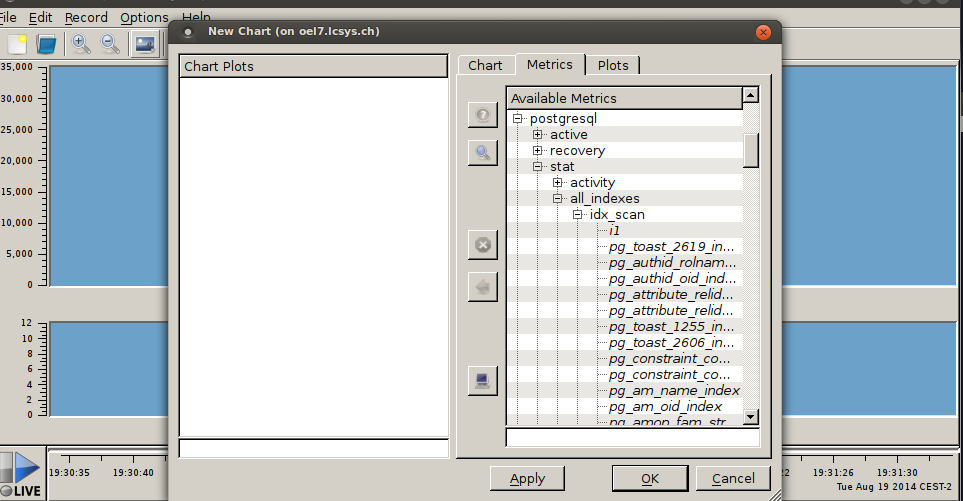 metric selection
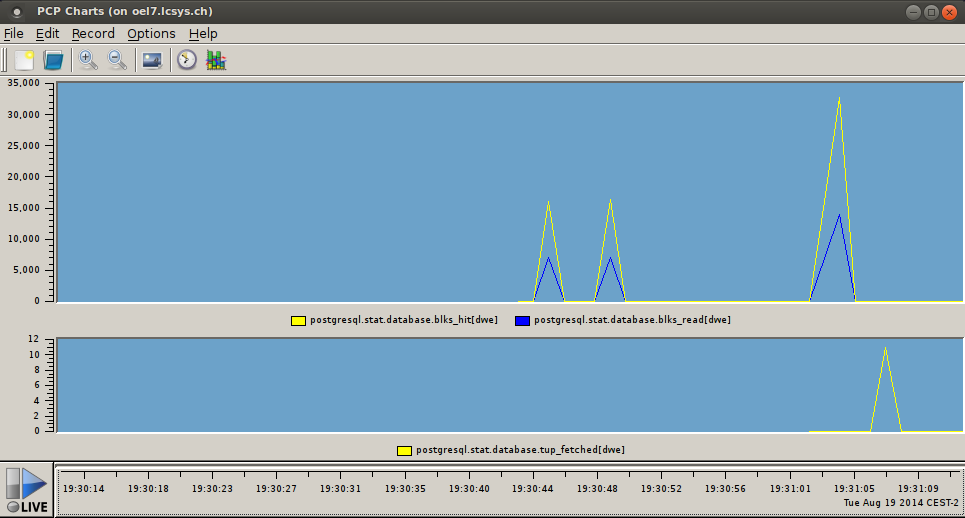 real time graphs
now performance data can be viewed in realtime…really cool.
if you want to play with the latest postgresql development snapshot here is a very simple makefile which does the work for you ( given that you have installed all the dependencies required for building postgresql ):
PGBASEVER=9.3
PG=http://ftp.postgresql.org/pub/snapshot/dev/postgresql-snapshot.tar.bz2
PGFILE=postgresql-snapshot.tar.bz2
CURRDIR=$(shell pwd)
DATADIR=$(CURRDIR)/data

fromscratch: reset download buildpg initdb startdb

reset: stopdb
        rm -rf build
        rm -rf install
        rm -rf data
        mkdir build
        mkdir install
        mkdir data

download:
        wget ${PG}
        mv ${PGFILE} build/

buildpg:
        ( cd build && tar -axf ${PGFILE} )
        ( cd build/postgresql-${PGBASEVER}* && ./configure --prefix=${CURRDIR}/install )
        ( cd build/postgresql-${PGBASEVER}* && make )
        ( cd build/postgresql-${PGBASEVER}* && make check )
        ( cd build/postgresql-${PGBASEVER}* && make install )

initdb:
        ( cd install/bin && ./initdb -D ${DATADIR} )

startdb:
        ( install/bin/pg_ctl -D ${DATADIR} start )

stopdb:
        if [ -f ${DATADIR}/postmaster.pid ]; then \
                ( install/bin/pg_ctl -D ${DATADIR} stop -m fast ) \
        fi
copy this to a directory where you are the owner of, name the file “Makefile” and execute:
make fromscratch
this will create the directories, download the latest snapshot, compile the source and start the postgresql database ( this takes 4 minutes on my mint workstation ). once the script finished you may connect to the database and start playing:
install/bin/psql postgres
psql (9.3devel)
Type "help" for help.

postgres=# \h create materialized view
Command:     CREATE MATERIALIZED VIEW
Description: define a new materialized view
Syntax:
CREATE [ UNLOGGED ] MATERIALIZED VIEW table_name
    [ (column_name [, ...] ) ]
    [ WITH ( storage_parameter [= value] [, ... ] ) ]
    [ TABLESPACE tablespace_name ]
    AS query
    [ WITH [ NO ] DATA ]

postgres=#
of course you may put this in a shell script, too. but this way it was more fun :)
 pmatop
 Daniel Westermann's Blog