
head over to the blog of dbi services to read about how to prepare postgresql for bulk loading:
Archives For November 30, 1999
head over to the blog of dbi services to read the fourth post of the series:
getting started with postgres plus advanced server (4) – setting up the monitoring server

The second posts on the topic are now online:
Oracle post done by my colleague Franck Pachot: Variations on 1M rows insert(2): commit write
PostgreSQL post done be me: Variations on 1M rows insert(2): commit write – PostgreSQL
Have fun with the test cases …
Again, head over to the dbi services blog:
Oracle post done by my colleague Franck Pachot: Variations on 1M rows insert (1): bulk insert
PostgreSQL post done be me: Variations on 1M rows insert (1): bulk insert – PostgreSQL
Have fun with the test cases …
head over to the blog of dbi services to read the third post of the series:
getting started with postgres plus advanced server (3) – setting up a hot standby server
head over to the blog of dbi services to read the second post of the series:
getting started with postgres plus advanced server (2) – setting up a backup and recovery server
I did several posts around postgresql and postgres plus advanced server in the past. what is missing is a beginners guide on how to get postgres plus advanced server up and running including a solution for backup and recovery, high availability and monitoring. so I thought I’d write a guide on how to do that, consisting of:
- setting up postgres plus advanced server
- setting up a backup and recovery server
- setting up a hot standby database
- setting up monitoring
As this is the first post of the series this is about getting ppas installed and creating the first database cluster.
Obviously the first thing to do is to install an operating system. several of these are supported, just choose the one you like. An example setup can be found here.
So, once ppas was downloaded and transferred to the system where it is supposed to be installed we can start.
there are several ways to get ppas installed on the system. before you begin java should be installed. for yum based distributions this is done by:
yum install java
using the standalone installer in interactive mode
starting the installation is just a matter of extracting the the file and executing it:
[root@oel7 tmp]# ls
ppasmeta-9.4.1.3-linux-x64.tar.gz
[root@oel7 tmp]# tar -axf ppasmeta-9.4.1.3-linux-x64.tar.gz
[root@oel7 tmp]# ls
ppasmeta-9.4.1.3-linux-x64  ppasmeta-9.4.1.3-linux-x64.tar.gz
[root@oel7 tmp]# ppasmeta-9.4.1.3-linux-x64/ppasmeta-9.4.1.3-linux-x64.run
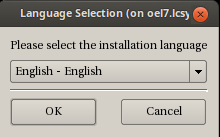


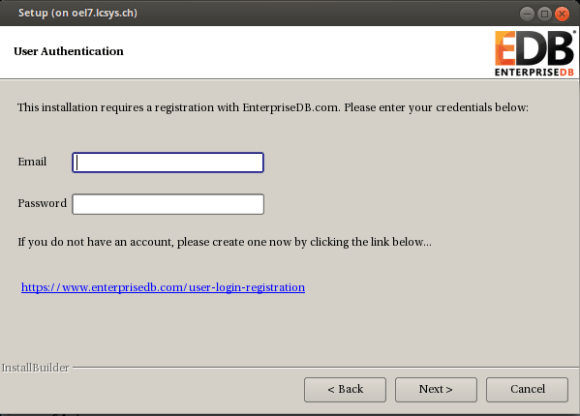
provide the username and password you used for downloading the product:

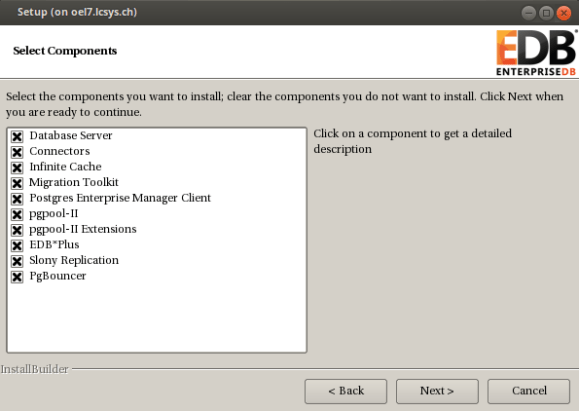


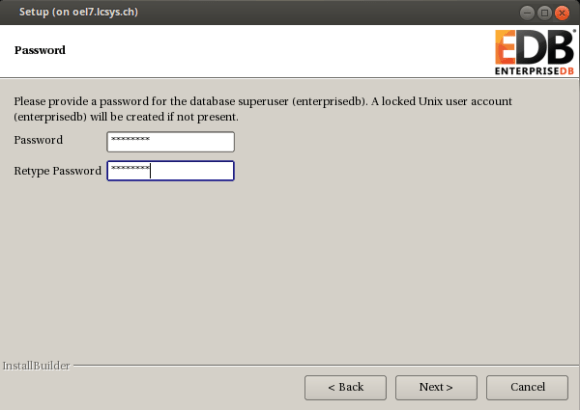
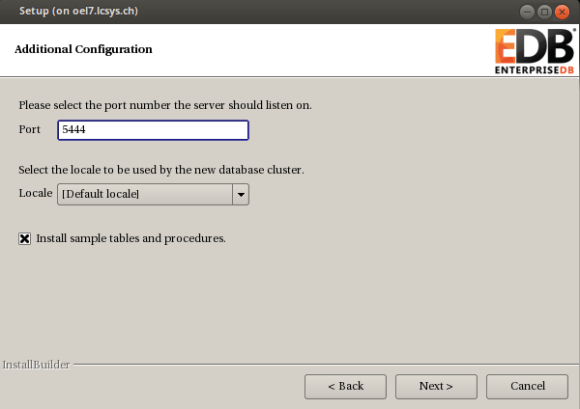

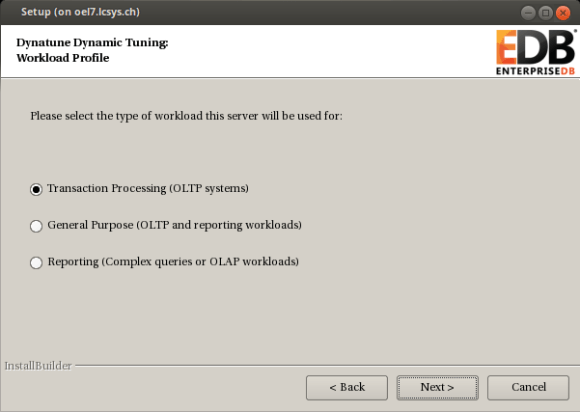

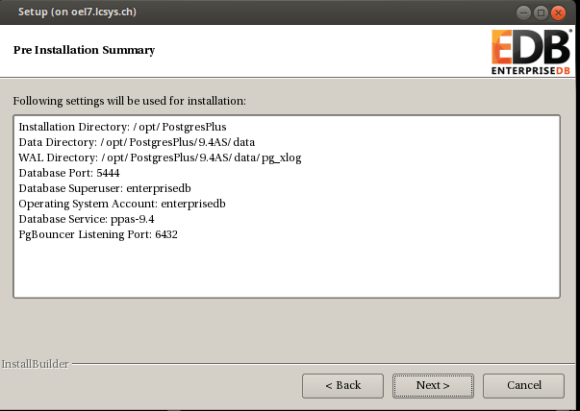
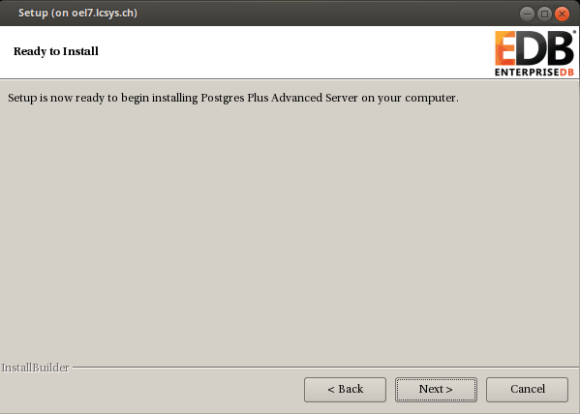


done.
using the standalone installer in interactive text mode
if you do not want to use the graphical user interface you can launch the installer in interactive text mode:
# ppasmeta-9.4.1.3-linux-x64/ppasmeta-9.4.1.3-linux-x64.run --mode text
either go with the default options or adjust what you like. the questions should be self explaining:
Language Selection

Please select the installation language
[1] English - English
[2] Japanese - 日本語
[3] Simplified Chinese - 简体中文
[4] Traditional Chinese - 繁体中文
[5] Korean - 한국어
Please choose an option [1] : 1
----------------------------------------------------------------------------
Welcome to the Postgres Plus Advanced Server Setup Wizard.

----------------------------------------------------------------------------
Please read the following License Agreement. You must accept the terms of this
agreement before continuing with the installation.

Press [Enter] to continue:
.....
.....
Press [Enter] to continue:

Do you accept this license? [y/n]: y

----------------------------------------------------------------------------
User Authentication

This installation requires a registration with EnterpriseDB.com. Please enter
your credentials below. If you do not have an account, Please create one now on
https://www.enterprisedb.com/user-login-registration

Email [xx.xx@xx.xxx]:

Password : xxxxx

----------------------------------------------------------------------------
Please specify the directory where Postgres Plus Advanced Server will be
installed.

Installation Directory [/opt/PostgresPlus]:

----------------------------------------------------------------------------
Select the components you want to install.

Database Server [Y/n] :y

Connectors [Y/n] :y

Infinite Cache [Y/n] :y

Migration Toolkit [Y/n] :y

Postgres Enterprise Manager Client [Y/n] :y

pgpool-II [Y/n] :y

pgpool-II Extensions [Y/n] :y

EDB*Plus [Y/n] :y

Slony Replication [Y/n] :y

PgBouncer [Y/n] :y

Is the selection above correct? [Y/n]: y

----------------------------------------------------------------------------
Additional Directories

Please select a directory under which to store your data.

Data Directory [/opt/PostgresPlus/9.4AS/data]:

Please select a directory under which to store your Write-Ahead Logs.

Write-Ahead Log (WAL) Directory [/opt/PostgresPlus/9.4AS/data/pg_xlog]:

----------------------------------------------------------------------------
Configuration Mode

Postgres Plus Advanced Server always installs with Oracle(R) compatibility features and maintains full PostgreSQL compliance. Select your style preference for installation defaults and samples.

The Oracle configuration will cause the use of certain objects  (e.g. DATE data types, string operations, etc.) to produce Oracle compatible results, create the same Oracle sample tables, and have the database match Oracle examples used in the documentation.

Configuration Mode

[1] Oracle Compatible
[2] PostgreSQL Compatible
Please choose an option [1] : 1

----------------------------------------------------------------------------
Please provide a password for the database superuser (enterprisedb). A locked
Unix user account (enterprisedb) will be created if not present.

Password :
Retype Password :
----------------------------------------------------------------------------
Additional Configuration

Please select the port number the server should listen on.

Port [5444]:

Select the locale to be used by the new database cluster.

Locale

[1] [Default locale]
......
Please choose an option [1] : 1

Install sample tables and procedures. [Y/n]: Y

----------------------------------------------------------------------------
Dynatune Dynamic Tuning:
Server Utilization

Please select the type of server to determine the amount of system resources
that may be utilized:

[1] Development (e.g. a developer's laptop)
[2] General Purpose (e.g. a web or application server)
[3] Dedicated (a server running only Postgres Plus)
Please choose an option [2] : 2

----------------------------------------------------------------------------
Dynatune Dynamic Tuning:
Workload Profile

Please select the type of workload this server will be used for:

[1] Transaction Processing (OLTP systems)
[2] General Purpose (OLTP and reporting workloads)
[3] Reporting (Complex queries or OLAP workloads)
Please choose an option [1] : 2

----------------------------------------------------------------------------
Advanced Configuration

----------------------------------------------------------------------------
PgBouncer Listening Port [6432]:

----------------------------------------------------------------------------
Service Configuration

Autostart PgBouncer Service [Y/n]: n

Autostart pgAgent Service [Y/n]: n

Update Notification Service [Y/n]: n

The Update Notification Service informs, downloads and installs whenever
security patches and other updates are available for your Postgres Plus Advanced
Server installation.

----------------------------------------------------------------------------
Pre Installation Summary

Following settings will be used for installation:

Installation Directory: /opt/PostgresPlus
Data Directory: /opt/PostgresPlus/9.4AS/data
WAL Directory: /opt/PostgresPlus/9.4AS/data/pg_xlog
Database Port: 5444
Database Superuser: enterprisedb
Operating System Account: enterprisedb
Database Service: ppas-9.4
PgBouncer Listening Port: 6432

Press [Enter] to continue:

----------------------------------------------------------------------------
Setup is now ready to begin installing Postgres Plus Advanced Server on your
computer.

Do you want to continue? [Y/n]: Y

----------------------------------------------------------------------------
Please wait while Setup installs Postgres Plus Advanced Server on your computer.

 Installing Postgres Plus Advanced Server
 0% ______________ 50% ______________ 100%
 ########################################
 Installing Database Server ...
 Installing pgAgent ...
 Installing Connectors ...
 Installing Migration Toolkit ...
 Installing EDB*Plus ...
 Installing Infinite Cache ...
 Installing Postgres Enterprise Manager Client ...
 Installing Slony Replication ...
 Installing pgpool-II ...
 Installing pgpool-II Extensions ...
 Installing PgBouncer ...
 Installing StackBuilder Plus ...
 #

----------------------------------------------------------------------------
Setup has finished installing Postgres Plus Advanced Server on your computer.
done.
using the standalone installer in unattended mode
another option is to use the unattended more by providing all the parameters on the command line or by creating a configuration file. this is an example for providing the parameters on the command line. most of the parameters can be skipped and the default is applied:
ppasmeta-9.4.1.3-linux-x64/ppasmeta-9.4.1.3-linux-x64.run --mode unattended \
   --enable-components dbserver,connectors,infinitecache,edbmtk,pem_client,\
                       pgpool,pgpoolextension,edbplus,replication,pgbouncer \
   --installer-language en --superaccount enterprisedb \
   --servicename ppas-9.4 --serviceaccount enterprisedb \
   --prefix /opt/PostgresPlus --datadir /opt/PostgresPlus/9.4AS/data \
   --xlogdir /opt/PostgresPlus/9.4AS/data/pg_xlog \
   --databasemode oracle --superpassword enterprisedb
   --webusername xx.xx@xx.xxx --webpassword xxxxx

 Installing Database Server ...
 Installing pgAgent ...
 Installing Connectors ...
 Installing Migration Toolkit ...
 Installing EDB*Plus ...
 Installing Infinite Cache ...
 Installing Postgres Enterprise Manager Client ...
 Installing Slony Replication ...
 Installing pgpool-II ...
 Installing pgpool-II Extensions ...
 Installing PgBouncer ...
 Installing StackBuilder Plus ...X11 connection rejected because of wrong authentication.
done.
no matter which installation method was chosen the result is that ppas is installed and the database cluster is initialized. you might check the processes:
# ps -ef | grep postgres
enterpr+ 12759     1  0 12:03 ?        00:00:00 /opt/PostgresPlus/9.4AS/bin/edb-postgres -D /opt/PostgresPlus/9.4AS/data
enterpr+ 12760 12759  0 12:03 ?        00:00:00 postgres: logger process
enterpr+ 12762 12759  0 12:03 ?        00:00:00 postgres: checkpointer process
enterpr+ 12763 12759  0 12:03 ?        00:00:00 postgres: writer process
enterpr+ 12764 12759  0 12:03 ?        00:00:00 postgres: wal writer process
enterpr+ 12765 12759  0 12:03 ?        00:00:00 postgres: autovacuum launcher process
enterpr+ 12766 12759  0 12:03 ?        00:00:00 postgres: stats collector process
enterpr+ 12882 12759  0 12:03 ?        00:00:00 postgres: enterprisedb edb ::1[45984] idle
root     13866  2619  0 12:15 pts/0    00:00:00 grep --color=auto postgres
or the services that got created:
# chkconfig --list | grep ppas

Note: This output shows SysV services only and does not include native
      systemd services. SysV configuration data might be overridden by native
      systemd configuration.

      If you want to list systemd services use 'systemctl list-unit-files'.
      To see services enabled on particular target use
      'systemctl list-dependencies [target]'.

ppas-9.4       	0:off	1:off	2:on	3:on	4:on	5:on	6:off
ppas-agent-9.4 	0:off	1:off	2:on	3:on	4:on	5:on	6:off
ppas-infinitecache	0:off	1:off	2:off	3:off	4:off	5:off	6:off
ppas-pgpool    	0:off	1:off	2:off	3:off	4:off	5:off	6:off
ppas-replication-9.4	0:off	1:off	2:off	3:off	4:off	5:off	6:off
# ls -la /etc/init.d/ppas*
-rwxr-xr-x. 1 root root 3663 Apr 23 12:03 /etc/init.d/ppas-9.4
-rwxr-xr-x. 1 root root 2630 Apr 23 12:03 /etc/init.d/ppas-agent-9.4
-rwxr-xr-x. 1 root root 1924 Apr 23 12:04 /etc/init.d/ppas-infinitecache
-rwxr-xr-x. 1 root root 3035 Apr 23 12:04 /etc/init.d/ppas-pgpool
-rwxr-xr-x. 1 root root 3083 Apr 23 12:04 /etc/init.d/ppas-replication-9.4
as the account which installed the software should not be used to work with then database lets create an os account for doing the connections to the database:
# groupadd postgres
# useradd -g postgres postgres
# passwd postgres
Changing password for user postgres.
New password:
Retype new password:
passwd: all authentication tokens updated successfully.
ppas brings an environment file for setting all the environment variables, let’s source that so it will be available for future logins:
su - postgres
echo ". /opt/PostgresPlus/9.4AS/pgplus_env.sh" >> .bash_profile
once you login to the postgres account the environment is there:
$ env | grep PG
PGPORT=5444
PGDATABASE=edb
PGLOCALEDIR=/opt/PostgresPlus/9.4AS/share/locale
PGDATA=/opt/PostgresPlus/9.4AS/data
$ env | grep EDB
EDBHOME=/opt/PostgresPlus/9.4AS
now we are ready to login to the database:
$ psql -U enterprisedb
Password for user enterprisedb:
psql.bin (9.4.1.3)
Type "help" for help.

edb=# \l
                                           List of databases
   Name    |    Owner     | Encoding |   Collate   |    Ctype    | ICU |       Access privileges
-----------+--------------+----------+-------------+-------------+-----+-------------------------------
 edb       | enterprisedb | UTF8     | en_US.UTF-8 | en_US.UTF-8 |     |
 postgres  | enterprisedb | UTF8     | en_US.UTF-8 | en_US.UTF-8 |     |
 template0 | enterprisedb | UTF8     | en_US.UTF-8 | en_US.UTF-8 |     | =c/enterprisedb              +
           |              |          |             |             |     | enterprisedb=CTc/enterprisedb
 template1 | enterprisedb | UTF8     | en_US.UTF-8 | en_US.UTF-8 |     | =c/enterprisedb              +
           |              |          |             |             |     | enterprisedb=CTc/enterprisedb
(4 rows)
mission completed. the next post will setup a backup and recovery server for backing up and restoring the ppas database cluster.
on planet postgres there is a link to a page which lists all postgres release notes since version 6.0. nice work:
original post here.
often there is the requierement to generate some test data. here are some examples for postgres.
generate_series
the generate_series function is one convenient way for generating data, e.g:
generate increasing integer values:
edb=# select generate_series(1,10);
 generate_series
-----------------
               1
               2
               3
               4
               5
               6
               7
               8
               9
              10
(10 rows)
or:
edb=# select generate_series(-10,-1);
 generate_series
-----------------
             -10
              -9
              -8
              -7
              -6
              -5
              -4
              -3
              -2
              -1
generate increasing integer values with steps:
edb=# select generate_series(0,50,5);
 generate_series
-----------------
               0
               5
              10
              15
              20
              25
              30
              35
              40
              45
              50
(11 rows)
generate decreasing integer values:
edb=# select generate_series(10,0,-1);
 generate_series
-----------------
              10
               9
               8
               7
               6
               5
               4
               3
               2
               1
               0
or:
edb=# select generate_series(10,0,-5);
 generate_series
-----------------
              10
               5
               0
generating date values:
edb=# select * from generate_series( '2015-01-01 00:00'::timestamp
                                   , '2015-01-01 08:00'::timestamp
                                   , '1 hour');
  generate_series
--------------------
 01-JAN-15 00:00:00
 01-JAN-15 01:00:00
 01-JAN-15 02:00:00
 01-JAN-15 03:00:00
 01-JAN-15 04:00:00
 01-JAN-15 05:00:00
 01-JAN-15 06:00:00
 01-JAN-15 07:00:00
 01-JAN-15 08:00:00
(9 rows)
generate_series and random()
combining generate_series and random() is another way:
edb=# select generate_series(10,0,-1) order by random();
 generate_series
-----------------
               0
               9
               3
              10
               6
               5
               2
               8
               7
               1
               4
(11 rows)
or:
select * from generate_series( '2015-01-01 00:00'::timestamp
                                  , '2015-01-01 08:00'::timestamp
                                  , '1 hour') order by random();
  generate_series
--------------------
 01-JAN-15 04:00:00
 01-JAN-15 08:00:00
 01-JAN-15 05:00:00
 01-JAN-15 02:00:00
 01-JAN-15 07:00:00
 01-JAN-15 03:00:00
 01-JAN-15 06:00:00
 01-JAN-15 01:00:00
 01-JAN-15 00:00:00
(9 rows)
generate_series and random() and md5()
adding md5() to the picture:
edb=# select generate_series(1,5) as a, md5(random()::text);
 a |               md5
---+----------------------------------
 1 | 5eb731819cf0dbed770ae8d5f11a27ef
 2 | 995360f0745610e9bc9d73abd954196c
 3 | 1461efd0dc899a8eae612439585935b0
 4 | e4bd67cd9f9bb0034a21dffabfe97509
 5 | 8b7c099d4064be2134ebc6ad11b3ce47
generate_series and random() and md5() and common table expressions
adding common table expressions to the picture:
with testdata1 as
( select generate_series(1,5) as a , md5(random()::text) as b ),
     testdata2 as
( select generate_series(10,0,-2) as c order by random() ),
     testdata3 as
( select * from generate_series( '2015-01-01 00:00'::timestamp
                               , '2015-01-01 08:00'::timestamp
                               , '1 hour') as d )
select case when testdata1.a = 4 then 1 else 0 end  a
     , testdata1.b
     , testdata2.c
     , testdata3.d
  from testdata1
     , testdata2
     , testdata3
 order by random()
 limit 10;

 a |                b                 | c  |         d
---+----------------------------------+----+--------------------
 0 | 542d402aa1d5bc3945b692cdf8bde4bc | 10 | 01-JAN-15 05:00:00
 0 | 58c1b1e0ddc072e9e83e4ca31064a4ef |  4 | 01-JAN-15 06:00:00
 0 | 8d917cf5c06539574fcc79089ff0b66d |  4 | 01-JAN-15 07:00:00
 0 | 8d917cf5c06539574fcc79089ff0b66d |  2 | 01-JAN-15 08:00:00
 0 | 58c1b1e0ddc072e9e83e4ca31064a4ef |  6 | 01-JAN-15 07:00:00
 0 | 58c1b1e0ddc072e9e83e4ca31064a4ef |  0 | 01-JAN-15 01:00:00
 0 | 542d402aa1d5bc3945b692cdf8bde4bc |  2 | 01-JAN-15 08:00:00
 0 | 58c1b1e0ddc072e9e83e4ca31064a4ef |  8 | 01-JAN-15 07:00:00
 0 | f1d9650423b432f75a50ae38591b1508 |  2 | 01-JAN-15 01:00:00
 1 | 687b977261e44825b266f461e7547b08 |  6 | 01-JAN-15 01:00:00
this continues the previous post on the oracle compatibility layer available in ppas. while this previous post introduced some parameters which control the behaviour for dates, strings, object names and transaction isolation this post focusses on some features/helpers that are available in oracle but are not (by default) in plain postgresql. ppas adds these whith the oracle compatibility layer.
dual
as in oracle there is a dual table in ppas:
edb=# select 1+1 from dual;
 ?column?
----------
        2
(1 row)

edb=# \d dual;
             Table "sys.dual"
 Column |         Type         | Modifiers
--------+----------------------+-----------
 dummy  | character varying(1) |
synonyms
there are no synonyms available in community postgres. there are in ppas:
edb=# create table t1 ( a int );
CREATE TABLE
edb=# insert into t1 values (1);
INSERT 0 1
edb=# create synonym s1 for t1;
CREATE SYNONYM
edb=# create public synonym ps1 for t1;
CREATE SYNONYM
edb=# select count(*) from s1;
 count
-------
     1
(1 row)

edb=# select count(*) from ps1;
 count
-------
     1
(1 row)
for describing synonyms “describe” must be used, the “\d” switch will not work:
edb=# desc ps1
                                List of synonyms
 Schema | Synonym | Referenced Schema | Referenced Object | Link |    Owner
--------+---------+-------------------+-------------------+------+--------------
 public | ps1     | enterprisedb      | t1                |      | enterprisedb
(1 row)

   Table "enterprisedb.t1"
 Column |  Type   | Modifiers
--------+---------+-----------
 a      | integer |

edb=# \d ps1
Did not find any relation named "ps1".
more details here.
rownum
the pseudo column rownum is available in ppas:
edb=# create table t1 ( a int );
CREATE TABLE
edb=# insert into t1 values ( generate_series ( 1, 50 ) );
INSERT 0 50
edb=# select a, rownum from t1 where rownum < 5;
 a | rownum
---+--------
 1 |      1
 2 |      2
 3 |      3
 4 |      4
(4 rows)
more details here.
packages
community postgresql does not know the concept of packages. ppas implements this:
edb=# create package p1
edb-# as
edb$#   procedure pc1;
edb$# end p1;
CREATE PACKAGE
edb=# create package body p1
edb-# as
edb$#   procedure pc1
edb$#   as
edb$#   begin
edb$#     dbms_output.put_line('a');
edb$#   end pc1;
edb$# begin
edb$#   null;
edb$# end p1;
CREATE PACKAGE BODY

edb=# exec p1.pc1;
a

EDB-SPL Procedure successfully completed
more details here.
build-in packages
ppas comes with a set of build-in packages:
edb=# select distinct name from dba_source where type = 'PACKAGE' order by 1;
      name
----------------
 DBMS_ALERT
 DBMS_CRYPTO
 DBMS_JOB
 DBMS_LOB
 DBMS_LOCK
 DBMS_MVIEW
 DBMS_OUTPUT
 DBMS_PIPE
 DBMS_PROFILER
 DBMS_RANDOM
 DBMS_RLS
 DBMS_SCHEDULER
 DBMS_SQL
 DBMS_UTILITY
 UTL_ENCODE
 UTL_FILE
 UTL_HTTP
 UTL_MAIL
 UTL_SMTP
 UTL_TCP
 UTL_URL
more details here.
edbplus
if someone prefers to work in a splplus like environment there is edbplus:
pwd
/opt/PostgresPlus/9.4AS
-bash-4.2$ edbplus/edbplus.sh enterprisedb/admin123
Connected to EnterpriseDB 9.4.1.3 (localhost:5444/edb) AS enterprisedb

EDB*Plus: Release 9.4 (Build 33.0.0)
Copyright (c) 2008-2015, EnterpriseDB Corporation.  All rights reserved.

SQL> help index

Type 'HELP [topic]' for command line help.

@              ACCEPT         APPEND         CHANGE
CLEAR          COLUMN         CONNECT        DEFINE
DEL            DESCRIBE       DISCONNECT     EDBPLUS
EDIT           EXIT           GET            HELP
HOST           INDEX          INPUT          LIST
PASSWORD       PAUSE          PRINT          PROMPT
QUIT           REMARK         SAVE           SET
SHOW           SPOOL          START          UNDEFINE
VARIABLE
head over to the documentation to check what is already supported.
Dynamic Runtime Instrumentation Tools Architecture (DRITA)
drita is a kind of perfstat which can be used to analyse performance issues. the usage is straight forward:
as a first step timed_statistics need to be enabled:
edb=# show timed_statistics;
 timed_statistics
------------------
 off
(1 row)
edb=# alter system set timed_statistics=true;
ALTER SYSTEM
edb=# select pg_reload_conf();
 pg_reload_conf
----------------
 t
(1 row)

edb=# show timed_statistics;
 timed_statistics
------------------
 on
(1 row)
after that lets create a snapshot:
edb=# SELECT * FROM edbsnap();
       edbsnap
----------------------
 Statement processed.
(1 row)
… and generate some load on the system:
edb=# create table t1 ( a int, b int );
CREATE TABLE
edb=# create table t2 ( a int, b int );
CREATE TABLE
edb=# insert into t1 values ( generate_series ( 1,10000)
                            , generate_series ( 1,10000) );
INSERT 0 10000
edb=# insert into t2 values ( generate_series ( 1,10000)
                            , generate_series ( 1,10000) );
INSERT 0 10000
edb=# select count(*) from t1, t2;
   count
-----------
 100000000
(1 row)
create another snapshot:
edb=# SELECT * FROM edbsnap();
       edbsnap
----------------------
 Statement processed.
(1 row)
as we need the snapshot ids to generate a report lets check what we have available:
edb=# select * from get_snaps();
          get_snaps
-----------------------------
 1 24-FEB-15 16:21:55.420802
 2 24-FEB-15 16:25:16.429357
(2 rows)
now we can generate a report, e.g. the report for system wait information:
edb=# select * from sys_rpt(1,2,10);
                                   sys_rpt
-----------------------------------------------------------------------------
 WAIT NAME                                COUNT      WAIT TIME       % WAIT
 ---------------------------------------------------------------------------
 autovacuum lock acquire                  18         0.040010        73.84
 query plan                               2          0.011015        20.33
 db file read                             6          0.003124        5.77
 xid gen lock acquire                     3          0.000021        0.04
 sinval lock acquire                      7          0.000006        0.01
 buffer free list lock acquire            9          0.000005        0.01
 freespace lock acquire                   0          0.000001        0.00
 wal buffer mapping lock acquire          0          0.000000        0.00
 multi xact gen lock acquire              3          0.000000        0.00
 wal flush                                0          0.000000        0.00
(12 rows)
there are many other reports which can be generated, inluding:
- sess_rpt() for session wait information
- sessid_rpt() for session ID information for a specified backend
- sesshist_rpt() for session wait information for a specified backend
- edbreport() for data from the other reporting functions, plus additional system information
- …
more details here.
oracle like catalog views
various oracle like catalog views (all_*, dba_*, user_*) are available in ppas:
edb=# select schemaname,viewname
        from pg_views
       where viewname like 'dba%' order by 1,2 limit 5;
 schemaname |     viewname
------------+------------------
 sys        | dba_all_tables
 sys        | dba_cons_columns
 sys        | dba_constraints
 sys        | dba_db_links
 sys        | dba_ind_columns
(5 rows)
more details here.
summary
enterprise db did a great job making life easier for oracle dbas wanting to learn postgresql. in addition the oracle compatibility layer lowers the burdens of migrating applications from oracle to postgres significantly. you almost can start immediately working on a postgresql database by using your existing oracle skills.
the above is only a sub-set of what the oracle compatibility layer provides. for a complete overview check the official documentation.

