Archives For November 30, 1999

if you followed the first postgresql post the initial postgresql instance should be up and running and now it is time to create the first database. remember that in postgresql terms a database is defined as: A database is a named collection of SQL objects (“database objects”). Generally, every database object (tables, functions, etc.) belongs to one and only one database. (However there are a few system catalogs, for example pg_database, that belong to a whole cluster and are accessible from each database within the cluster.) More accurately, a database is a collection of schemas and the schemas contain the tables, functions, etc. So the full hierarchy is: server, database, schema, table (or some other kind of object, such as a function).

first of all let’s create a .psqlrc file which will control some settings for the psql sessions created:

echo "\set AUTOCOMMIT off
\set PROMPT1 '%n@%m:%>/%/%x%# '
\pset null '<NULL>'
\pset format aligned" > ~/.psqlrc

this will turn off autocommit, set a nice psql prompt for us, display NULL values as ‘<NULL>’ and sets the output to aligned mode.

addtionally I will create a new alias for my database connection as I am too lazy to type the whole command every time:

echo "alias pg='psql -d postgres -U sysdba'" >> ~/.bashrc
. ~/.bashrc

lest quickly check which databases are already present in the current postgresql instance:

pg
Null display is "<>".
Output format is aligned.
psql (9.1.4)
Type "help" for help.
sysdba@[local]:5432/postgres# select datname from pg_database;
datname
-----------
template1
template0
postgres
(3 rows)
sysdba@[local]:5432/postgres*#

the template1 database will essentially be cloned for every database created. this means if you create objects or users in this database they will be present ( cloned ) in the created database, too. If i remember correctly microsoft sql server uses a similar concept.
the template0 database should not be used to create users or objects so that you always have a blank template at the original state available if you need to create databases without custom objects.

to create a database issue a command similar to this:

mkdir /opt/postgres/mydb/tbs
pg
CREATE TABLESPACE db_tbs1 LOCATION '/opt/postgres/mydb/tbs/';
CREATE DATABASE db1
OWNER default
TEMPLATE template1
ENCODING 'UTF8'
TABLESPACE db_tbs1
;

the character sets supported by postgres are listed in the documentation.

to quickly check the encodings of your databases may either query pg_database:

 sysdba@[local]:5432/postgres*# select datname,datcollate,datctype from pg_database; 
datname    | datcollate  | datctype 
-----------+-------------+------------- 
template1 | en_US.UTF-8 | en_US.UTF-8 
template0 | en_US.UTF-8 | en_US.UTF-8 
postgres | en_US.UTF-8 | en_US.UTF-8 
db1 | en_US.UTF-8 | en_US.UTF-8 

or use the psql shortcut:

psql -U sysdba -l 
Null display is "<>". 
Output format is aligned. 
List of databases 
Name | Owner | Encoding | Collate | Ctype | Access privileges 
-----------+--------+----------+-------------+-------------+------------------- 
db1       | sysdba | UTF8 | en_US.UTF-8 | en_US.UTF-8 | postgres | sysdba | UTF8 | en_US.UTF-8 | en_US.UTF-8 | 
template0 | sysdba | UTF8 | en_US.UTF-8 | en_US.UTF-8 | =c/sysdba + | | | | | sysdba=CTc/sysdba 
template1 | sysdba | UTF8 | en_US.UTF-8 | en_US.UTF-8 | =c/sysdba + | | | | | sysdba=CTc/sysdba 

destroying the database is almost exactly the same as in oracle:

DROP DATABASE db1;

what about temporary tablespaces ? let’s see what tablespaces currently exist in the instance:

SELECT * FROM pg_tablespace; 
spcname    | spcowner | spclocation | spcacl | spcoptions 
------------+----------+------------------------+----------+------------ 
pg_default | 10       | | | pg_global | 10 | | | 
db_tbs1    | 10       | /opt/postgres/mydb/tbs | | 

if you read the documentation postgresql seems to use a similar concept than the table space groups within oracle. let’s create two new tablespaces. for this prepare the directories ( is not possible to create more than one tablespace in the same directory ):

mkdir /opt/postgres/mydb/tbs_temp1/
mkdir /opt/postgres/mydb/tbs_temp2/

… and create the tablespaces:

CREATE TABLESPACE temp1 LOCATION '/opt/postgres/mydb/tbs_temp1/'; 
CREATE TABLESPACE temp2 LOCATION '/opt/postgres/mydb/tbs_temp2/'; 
SELECT * FROM pg_tablespace; 
spcname | spcowner | spclocation | spcacl | spcoptions 
------------+----------+------------------------------+----------+------------ 
pg_default | 10 | | <> | <> pg_global | 10 | | <> | <> 
db_tbs1 | 10 | /opt/postgres/mydb/tbs | <> | <> 
temp1 | 10 | /opt/postgres/mydb/tbs_temp1 | <> | <> 
temp2 | 10 | /opt/postgres/mydb/tbs_temp2 | <> | <> 

adjusting the configuration file:

echo "temp_tablespaces='temp1,temp2'" >> /opt/postgres/mydb/postgresql.conf

… reload the configuration

pgreload

… and check the actual value:

show temp_tablespaces;
temp_tablespaces
------------------
temp1, temp2
(1 row)

postgresql will now select one of the tablespaces ( round robin ) for the operations which will require temporary space.

next time I will take a look at the maintenance tasks which can/should be performed with postgres.

from time to time it is interesting to see how other databases are implemented and as postgresql seems to be one of the most widely used open source databases I decided to have a look at it. the result will be some posts which describe the very basics one needs to know to start working with this database system. please keep in mind that I am not an experienced postgres admin nor developer so some statements may not be totally correct or even misleading. just drop me an email or post a comment if you find any wrong statements or think something is missing to complete the picture.

if you are running a rpm based linux distribution the easiest way to install postgres is to include the postgres yum repository ( if you are on a debian based distribution there are apt repositories, too, just check the download section on the postgresql website )

to avoid any conflicts with current repositories it may be a good idea to exclude the postgres packages provided by your distribution. for this you need to add “exclude=postgresql*” to the sections of your repositories. here is an example:

cat CentOS-Base.repo
# CentOS-Base.repo
#
# The mirror system uses the connecting IP address of the client and the
# update status of each mirror to pick mirrors that are updated to and
# geographically close to the client. You should use this for CentOS updates
# unless you are manually picking other mirrors.
#
# If the mirrorlist= does not work for you, as a fall back you can try the
# remarked out baseurl= line instead.
#
#
[base]
name=CentOS-$releasever - Base
mirrorlist=http://mirrorlist.centos.org/?release=$releasever&arch=$basearch&repo=os
#baseurl=http://mirror.centos.org/centos/$releasever/os/$basearch/
gpgcheck=1
gpgkey=file:///etc/pki/rpm-gpg/RPM-GPG-KEY-CentOS-6
exclude=postgresql*
#released updates
[updates]
name=CentOS-$releasever - Updates
mirrorlist=http://mirrorlist.centos.org/?release=$releasever&arch=$basearch&repo=updates
#baseurl=http://mirror.centos.org/centos/$releasever/updates/$basearch/
gpgcheck=1
gpgkey=file:///etc/pki/rpm-gpg/RPM-GPG-KEY-CentOS-6
exclude=postgresql*
#additional packages that may be useful
[extras]
name=CentOS-$releasever - Extras
mirrorlist=http://mirrorlist.centos.org/?release=$releasever&arch=$basearch&repo=extras
#baseurl=http://mirror.centos.org/centos/$releasever/extras/$basearch/
gpgcheck=1
gpgkey=file:///etc/pki/rpm-gpg/RPM-GPG-KEY-CentOS-6
exclude=postgresql*
#additional packages that extend functionality of existing packages
[centosplus]
name=CentOS-$releasever - Plus
mirrorlist=http://mirrorlist.centos.org/?release=$releasever&arch=$basearch&repo=centosplus
#baseurl=http://mirror.centos.org/centos/$releasever/centosplus/$basearch/
gpgcheck=1
enabled=0
gpgkey=file:///etc/pki/rpm-gpg/RPM-GPG-KEY-CentOS-6
exclude=postgresql*
#contrib - packages by Centos Users
[contrib]
name=CentOS-$releasever - Contrib
mirrorlist=http://mirrorlist.centos.org/?release=$releasever&arch=$basearch&repo=contrib
#baseurl=http://mirror.centos.org/centos/$releasever/contrib/$basearch/
gpgcheck=1
enabled=0
gpgkey=file:///etc/pki/rpm-gpg/RPM-GPG-KEY-CentOS-6
exclude=postgresql*

now you can safely add the postgresql repository to your yum:

wget http://yum.postgresql.org/9.1/redhat/rhel-6-x86_64/pgdg-centos91-9.1-4.noarch.rpm
rpm -ihv pgdg-centos91-9.1-4.noarch.rpm

this will download the repository rpm and, once installed, create the yum repo file:

ls -la /etc/yum.repos.d/
total 24
drwxr-xr-x. 2 root root 4096 Jun 12 07:28 .
drwxr-xr-x. 61 root root 4096 Jun 12 07:28 ..
-rw-r--r--. 1 root root 2026 Jun 12 07:22 CentOS-Base.repo
-rw-r--r--. 1 root root 657 Jun 12 07:22 CentOS-Debuginfo.repo
-rw-r--r--. 1 root root 646 Jun 12 07:22 CentOS-Media.repo
-rw-r--r--. 1 root root 436 Aug 22 2011 pgdg-91-centos.repo

before installing the software you need to decide which packages you want to install. check the Installing PostgreSQL on Red Hat Enterprise Linux / Fedora Core document for a list of the packages provided.

because I want to install the server, this is the procedure to use:

yum clean all
yum install postgresql91-libs, postgresql91 and postgresql91-server

as stated in the pdf linked above, these are the locations of the files installed:

what where
Executables /usr/bin
Libraries /usr/lib
Documentation /usr/share/doc/postgresql­x.y.z, /usr/share/doc/postgresql­x.y.z/contrib
Contrib /usr/share/pgsql/contrib
Data /var/lib/pgsql/data
Backup area /var/lib/pgsql/backup
Templates /usr/share/pgsql
Procedural Languages /usr/lib/pgsql
Development Headers /usr/include/pgsql
Other shared data /usr/share/pgsql
Regression tests /usr/lib/pgsql/test/regress

the very first thing one needs to do is to initialize the database cluster, which in postgresql terms is the database storage area on disk which contains the actual data. according to the documentation this is also called: data directory or data area. the definition the wiki referenced below uses is: “A database cluster is a collection of databases that is stored at a common file system location (the “data area”). It is possible to have multiple database clusters, so long as they use different data areas and different communication ports.”
once initialized the cluster will contain three databases:

  • postgres: the default database for utilities and users
  • template0: same as template1 but should not be used for creating any objects or users
  • template1: which serves as a template for other databases created ( everything installed in the template DB will be copied to newly created databases )

as with every database there needs to be a location on disk where all the files will be stored:

su -
mkdir -p /opt/postgres/mydb
mkdir -p /opt/postgres/log
chown postgres:postgres /opt/postgres
chown postgres:postgres /opt/postgres/mydb
chown postgres:postgres /opt/postgres/log

the installed package provides a system V init script. because I created custom locations for the data and the logfiles I adjusted the init script:

vi /etc/init.d/postgresql-9.1
PGDATA=/opt/postgres/mydb
PGLOG=/opt/postgres/log/mydb_pgstartup.log

to initialize the cluster on the newly created location the initdb command is used:

/usr/pgsql-9.1/bin/initdb -D /opt/postgres/mydb -U sysdba -W
The files belonging to this database system will be owned by user "postgres".
This user must also own the server process.
The database cluster will be initialized with locale en_US.UTF-8.
The default database encoding has accordingly been set to UTF8.
The default text search configuration will be set to "english".
fixing permissions on existing directory /opt/postgres/mydb ... ok
creating subdirectories ... ok
selecting default max_connections ... 100
selecting default shared_buffers ... 32MB
creating configuration files ... ok
creating template1 database in /opt/postgres/mydb/base/1 ... ok
initializing pg_authid ... ok
Enter new superuser password:
Enter it again:
setting password ... ok
initializing dependencies ... ok
creating system views ... ok
loading system objects' descriptions ... ok
creating collations ... ok
creating conversions ... ok
creating dictionaries ... ok
setting privileges on built-in objects ... ok
creating information schema ... ok
loading PL/pgSQL server-side language ... ok
vacuuming database template1 ... ok
copying template1 to template0 ... ok
copying template1 to postgres ... ok
WARNING: enabling "trust" authentication for local connections
You can change this by editing pg_hba.conf or using the -A option the
next time you run initdb.
Success. You can now start the database server using:
/usr/pgsql-9.1/bin/postgres -D /opt/postgres/mydb
or
/usr/pgsql-9.1/bin/pg_ctl -D /opt/postgres/mydb -l logfile start

in my opinion the “-U” and “-W” are very important. by using inidb’s default behaviour every local os-user may become the database superuser. so specifying a username and password for the superuser is a good idea.

for the scope of this and the following posts I will start with a minimal set of parameters, so overwriting the default configuration file ( this is the equivalent of oracle’s pfile ):

echo "max_connections = 100
shared_buffers = 32MB
log_destination = 'stderr'
logging_collector = on
log_directory = '/opt/postgres/log/'
log_filename = 'postgresql-%a.log'
log_file_mode = 0600
log_truncate_on_rotation = on
log_rotation_age = 1d
log_rotation_size = 0
datestyle = 'iso, mdy'
lc_messages = 'en_US.UTF-8'
lc_monetary = 'en_US.UTF-8'
lc_numeric = 'en_US.UTF-8'
lc_time = 'en_US.UTF-8'
default_text_search_config = 'pg_catalog.english'" > /opt/postgres/mydb/postgresql.conf

startup the service:

# check the current status of the service
service postgresql-9.1 status
# start the service
service postgresql-9.1 start

quickly use chkconfig to see if postgres will come up again once the servers is rebooted:

chkconfig --list postgresql-9.1
postgresql-9.1 0:off 1:off 2:off 3:off 4:off 5:off 6:off

no. so let’s enable this:

chkconfig postgresql-9.1 on
chkconfig --list postgresql-9.1
postgresql-9.1 0:off 1:off 2:on 3:on 4:on 5:on 6:off

installation done. do a reboot to confirm everything works as expected..

reboot
service postgresql-9.1 status
(pid 937) is running...

if you prefer to manually startup the service you can either do:

postgres -D /opt/postgres/mydb >logfile 2>&1 &

or

pg_ctl start -D /opt/postgres/mydb -l serverlog

and always remember to _not_ start the service as the root user.

for shutting down the server manually use:

/usr/pgsql-9.1/bin/pg_ctl stop -D /opt/postgres/mydb/ -m smart

as with the oracle database there are some shutdown options ( the “-m” switch ):

  • smart: quit after all clients have disconnected
  • fast: quit directly, with proper shutdown
  • immediate: quit without complete shutdown; will lead to recovery on restart

you can directly send the signals to the server process, too, if you prefer:

  • SIGTERM = smart
  • SIGINT = fast
  • SIGQUIT = immediate

for exmaple:

kill -INT `head -1 /opt/postgres/mydb/postmaster.pid`

as admins tend to be lazy let’s simplify life and define the environment and some aliases:

echo "PGDATA=/opt/postgres/mydb
PATH=$PATH:/usr/pgsql-9.1/bin
PGLOGDIR=/opt/postgres/log
PGPORT=5432
PGLOG=$PGLOGDIR/mydb_pgstartup.log
export PGDATA PATH PGLOG PGPORT
alias pgstart='pg_ctl start -D $PGDATA -l $PGLOG'
alias pgstop='pg_ctl stop -D $PGDATA -m fast'
alias pgreload='pg_ctl reload -D $PGDATA'
alias pgrestart='pg_ctl restart -D $PGDATA -m fast'
alias pgstatus='pg_ctl status'
alias viparam='vi $PGDATA/postgresql.conf'
alias tlog='tail -1000f $PGLOGDIR/postgresql-Tue.log'" >> ~/.bashrc
. ~/.bashrc

if you miss the kernel parameters you may check the documentation for the recommendations ( the default parameters should be sufficient for a test installation ).

might be a good idea to prevent the OOM symptom mentioned in the documentation by setting the parameter in question :) :

sysctl -w vm.overcommit_memory=2

oracle uses various kinds of processes for different tasks. how does postgresql handle this ? there is a wiki on the postgres website especially for oracle dbas which describes the processes involved:

  • Master process – launches the other processes, background and session processes.
  • Writer process – background process that coordinates database writes, log writes and checkpoints.
  • Stats collector process – background process collecting information about server activity.
  • User session processes.

additionally you will see processes like this:

  • Wal writer process – background process for writing write ahead logs ( redo )
  • autovacuum launcher process – launcher for processes that scan tables to release memory/space and prevents loss of data. vacuum processes are also used to clean-up any unused undo data which is present in the table’s files. there are no separate undo/rollback segments as in oracle

if you take a look at the data area ( /opt/postgres/mydb in my case ) you will see various files and directories. the wiki mentioned above provides a clean description what all the files and directories are for:

  • postgresql.conf – Parameter or main server configuration file.
  • pg_hba.conf – Client authentication configuration file.
  • pg_ident.conf – Map from OS account to PostgreSQL account file.

The cluster subdirectories:

  • base – Subdirectory containing per-database subdirectories
  • global – Subdirectory containing cluster-wide tables
    • pg_auth – Authorization file containing user and role definitions.
    • pg_control – Control file.
    • pg_database – Information of databases within the cluster.
  • pg_clog – Subdirectory containing transaction commit status data
  • pg_multixact – Subdirectory containing multitransaction status data (used for shared row locks)
  • pg_subtrans – Subdirectory containing subtransaction status data
  • pg_tblspc – Subdirectory containing symbolic links to tablespaces
  • pg_twophase – Subdirectory containing state files for prepared transactions
  • pg_xlog – Subdirectory containing WAL (Write Ahead Log) files

to finish the this post, here is a quick comparison between oracle and postgres for the things I noticed right now:

oracle postgres
default transaction isolation level: read committed default transaction isolation level: read committed
pfile/spfile postgresql.conf
binary parameter file: yes binary parameter file: no, but reload function of the server
multiplexed control files one pg_control directory containing one control-file
create database … initdb
location of the archived logs: dynamic pg_xlog
size of the redologs: dynamic must be specified once when building postgres and can not be changed afterwards
system/sysaux, data dictionary base and global directories
listener/sqlnet configuration postgresql.conf, pg_hba.conf
datafiles symlinks in pg_tblspc
sqlplus psql
one to one relation of instance and database ( except for rac ) one cluster can serve multiple databases
select * from v$instrance; SELECT version();
show user; select current_user;
select 1 +3 from dual; select 1 + 3;
shutdown modes: normal, immediate, transactional, abort shutdown modes: smart, immediate, fast
$ORACLE_SID $PGDATABASE
alter session… SET…TO…

by now we know that we can tell the optimizer to write its decisions to a trace file. this file can tell us what access plans for the sql in question were considered and what statistics were used to come up with the final costs.

as introduced in the first post one parameter which influences the correctness of the statistics is the estimate_percent parameter of the the gather_*_stats procedures. wouldn’t it be great if we could compare statistics which were gathered with different values for the parameters to help us to decide which will be the best strategy for our database and application ?

recall the table containing the house- and phonenumbers which was created in the second post. we already noticed that the num_rows statistic reported different values once the estimate_percent changed. so let’s see if we can report the changes for different sets of parameters for the gather_*_stats procedures.

the first thing we’ll need is a table where we can export some sets of statistics to:

BEGIN
dbms_stats.create_stat_table ( ownname => USER
, stattab => 'MY_STATS'
, tblspace => 'USERS'
);
END;
/

as oracle recommends using the default value for the estimate_percent ( which is DBMS_STATS.AUTO_SAMPLE_SIZE ) this shall be our first set of statistics:

BEGIN
dbms_stats.gather_table_stats ( ownname => USER
, tabname => 'T1' );
END;
/

we already noticed in the first post that the values will not be that correct:

SELECT num_rows
FROM user_tab_statistics
WHERE table_name = 'T1';
NUM_ROWS
----------
9966

the actual number of rows is still 10’000:

SELECT count(*)
FROM t1;
COUNT(*)
----------
10000

before playing around with the estimate_parameter save the current statistics to the statistic table created above:

BEGIN
dbms_stats.export_table_stats ( ownname => USER
, tabname => 'T1'
, statid => 'DEFAULT_ESTIMATE_PERCENT'
, stattab => 'MY_STATS'
);
END;
/

now there is stored set of statistics we may use to compare with other sets. as we know a value of 100 for the estimate_percent parameter should produce better statistics let’s re-generate with the increased value:

BEGIN
dbms_stats.gather_table_stats ( ownname => USER
, tabname => 'T1'
, estimate_percent => 100 );
END;
/

… and quickly check the result for the num_rows statistic:

SELECT num_rows
FROM user_tab_statistics
WHERE table_name = 'T1';
NUM_ROWS
----------
10000

looks correct. again, let’s save the statistics:

BEGIN
dbms_stats.export_table_stats ( ownname => USER
, tabname => 'T1'
, statid => 'ESTIMATE_PERCENT_100'
, stattab => 'MY_STATS'
);
END;
/

to see what values changed for the different sets we can now compare the sets of statistics:

SET LONG 20000
SET LINES 164
SET PAGES 999
SELECT *
FROM TABLE ( dbms_stats.diff_table_stats_in_stattab ( USER
, 'T1'
, 'MY_STATS'
, 'MY_STATS'
, NULL
, 'DEFAULT_ESTIMATE_PERCENT'
, 'ESTIMATE_PERCENT_100'
)
);

this will produce a report similar to this one:

REPORT MAXDIFFPCT
-------------------------------------------------------------------------------- ----------
###############################################################################
STATISTICS DIFFERENCE REPORT FOR:
.................................
TABLE : T1
OWNER : OW
SOURCE A : User statistics table MY_STATS
: Statid : DEFAULT_ESTIMATE_PERCENT
: Owner : OW
SOURCE B : User statistics table MY_STATS
: Statid : ESTIMATE_PERCENT_100
: Owner : OW
PCTTHRESHOLD :
~~~~~~~~~~~~~~~~~~~~~~~~~~~~~~~~~~~~~~~~~~~~~~~~~~~~~~~~~~~~~~~~~~~~~~~~~~~~~~~
TABLE / (SUB)PARTITION STATISTICS DIFFERENCE:
.............................................
OBJECTNAME TYP SRC ROWS BLOCKS ROWLEN SAMPSIZE
...............................................................................
T1 T A 9966 20 8 4764
B 10000 20 8 10000
~~~~~~~~~~~~~~~~~~~~~~~~~~~~~~~~~~~~~~~~~~~~~~~~~~~~~~~~~~~~~~~~~~~~~~~~~~~~~~~
COLUMN STATISTICS DIFFERENCE:
.............................
COLUMN_NAME SRC NDV DENSITY HIST NULLS LEN MIN MAX SAMPSIZ
...............................................................................
HOUSENUMBER A 9941 .000100593 NO 0 4 C104 C302 4752
B 10000 .0001 NO 0 4 C102 C302 10000
PHONENUMBER A 5503 .000181719 NO 0 4 C104 C2646 4852
B 6376 .000156838 NO 0 4 C102 C2646 10000
~~~~~~~~~~~~~~~~~~~~~~~~~~~~~~~~~~~~~~~~~~~~~~~~~~~~~~~~~~~~~~~~~~~~~~~~~~~~~~~
INDEX / (SUB)PARTITION STATISTICS DIFFERENCE:
.............................................
OBJECTNAME TYP SRC ROWS LEAFBLK DISTKEY LF/KY DB/KY CLF LVL SAMPSIZ
...............................................................................
INDEX: I_HOUSENUMBER
....................
I_HOUSENUMBER I A 10000 21 10000 1 1 18 1 10000
B 10000 21 10000 1 1 18 1 10000
INDEX: I_PHONENUMBER
....................
I_PHONENUMBER I A 10000 21 6376 1 1 9411 1 10000
B 10000 21 6376 1 1 9411 1 10000
###############################################################################

take a look at the report and you can easily see how the statistics changed when increasing the estimate_percent parameter ( of course you can change any other parameter, too ).

this is a great feature if you want to play around with different settings for the gather_*_procedures and want to check which settings are the best for your case. and always remember that you can set different parameters down to the table level. for a quick description check this post.

this post will continue the post optimizer basics (2) and further look at how the optimizer decides if an index will be used or not. the clustering_factor was already introduced as one important statistic the optimizer uses for making its decisions.

recall the two statements from the last post:

-- first statement
SELECT phonenumber
FROM t1
WHERE housenumber < 100;
-- second statement
SELECT housenumber
FROM t1
WHERE phonenumber < 100;

while for the first statement the appropriate index ( I_HOUSENUMBER ) was used the index on the phone number column ( I_PHONENUMBER ) was ignored for the second statement. until now the assistant of the phone company realized that it makes a difference on how well the table is ordered in relation to the index and that this is expressed in a statistic called the clustering_factor. what is missing to complete the picture is how the optimizer chooses its plan.

as the oracle database is highly instrumented we are lucky and can tell the optimizer to write its decisions to a trace file. the event one needs to set for this is: 10053.

let’s create two trace files, one for each of the statements from above:

alter session set tracefile_identifier='I_HOUSENUMBERS';
alter session set events '10053 trace name context forever, level 12';
SELECT phonenumber
FROM t1
WHERE housenumber < 100;
alter session set events '10053 trace name context forever, level 0';

alter session set tracefile_identifier='I_PHONENUMBERS';
alter session set events '10053 trace name context forever, level 12';
SELECT housenumber
FROM t1
WHERE phonenumber < 100;
alter session set events '10053 trace name context forever, level 0';

remember that you can can ask the database if you’re not sure where to find the trace files:
show parameter background_dump_dest

if you open the trace files and scroll down to the section called “QUERY BLOCK TEXT” you will see the statement. right after that the interesting stuff begins:
-----------------------------
SYSTEM STATISTICS INFORMATION
-----------------------------
Using NOWORKLOAD Stats
CPUSPEEDNW: 1998 millions instructions/sec (default is 100)
IOTFRSPEED: 4096 bytes per millisecond (default is 4096)
IOSEEKTIM: 10 milliseconds (default is 10)
MBRC: NO VALUE blocks (default is 8)

these are the statistical values which are valid for the system:

  • CPUSPEEDNW: the speed of the cpu
  • IOTFRSPEED: transfer speed for singel I/O read requests
  • IOSEEKTIM: I/O seek time
  • MBRC: multiblock read count

for a detailed description of these statistics check the oracle documentation.
how this statistics are gathered and how they are modified will be a topic for another post. for the scope of this post just realize the ones present in the trace file.

the next section in the trace file reports the statistics for the table and its indexes:
Table Stats::
Table: T1 Alias: T1
#Rows: 10000 #Blks: 20 AvgRowLen: 8.00 ChainCnt: 0.00
Index Stats::
Index: I_HOUSENUMBER Col#: 1
LVLS: 1 #LB: 21 #DK: 10000 LB/K: 1.00 DB/K: 1.00 CLUF: 18.00
Index: I_PHONENUMBER Col#: 2
LVLS: 1 #LB: 21 #DK: 6376 LB/K: 1.00 DB/K: 1.00 CLUF: 9411.00

these are the same values that you can query directly from the database:
SELECT NUM_ROWS "#rows"
, BLOCKS "#Blks"
, AVG_ROW_LEN "AvgRowLen"
, CHAIN_CNT "ChainCnt"
FROM user_tab_statistics
WHERE table_name = 'T1';
#rows #Blks AvgRowLen ChainCnt
---------- ---------- ---------- ----------
10000 20 8 0
SELECT BLEVEL "LVLS"
, LEAF_BLOCKS "#LB"
, DISTINCT_KEYS "#DK"
, AVG_LEAF_BLOCKS_PER_KEY "LB/K"
, AVG_DATA_BLOCKS_PER_KEY "DB/K"
, CLUSTERING_FACTOR "CLUF"
FROM user_ind_statistics
WHERE index_name IN ( 'I_HOUSENUMBER','I_PHONENUMBER' );
LVLS #LB #DK LB/K DB/K CLUF
---------- ---------- ---------- ---------- ---------- ----------
1 21 10000 1 1 18
1 21 6376 1 1 9411

let’s look at the first statement. the trace file reports that the following access paths were considered:
SINGLE TABLE ACCESS PATH
Single Table Cardinality Estimation for T1[T1]
Column (#1): HOUSENUMBER(
AvgLen: 4 NDV: 10000 Nulls: 0 Density: 0.000100 Min: 1 Max: 10000
Table: T1 Alias: T1
Card: Original: 10000.000000 Rounded: 99 Computed: 99.01 Non Adjusted: 99.01
Access Path: TableScan
Cost: 7.09 Resp: 7.09 Degree: 0
Cost_io: 7.00 Cost_cpu: 2144409
Resp_io: 7.00 Resp_cpu: 2144409
Access Path: index (RangeScan)
Index: I_HOUSENUMBER
resc_io: 3.00 resc_cpu: 58364
ix_sel: 0.009901 ix_sel_with_filters: 0.009901
Cost: 3.00 Resp: 3.00 Degree: 1
******** Begin index join costing ********
****** trying bitmap/domain indexes ******
Access Path: index (IndexOnly)
Index: I_HOUSENUMBER
resc_io: 2.00 resc_cpu: 34243
ix_sel: 0.009901 ix_sel_with_filters: 0.009901
Cost: 2.00 Resp: 2.00 Degree: 0
Bitmap nodes:
Used I_HOUSENUMBER
Cost = 2.001985, sel = 0.009901
****** finished trying bitmap/domain indexes ******
******** End index join costing ********
Best:: AccessPath: IndexRange
Index: I_HOUSENUMBER
Cost: 3.00 Degree: 1 Resp: 3.00 Card: 99.01 Bytes: 0

clearly the IndexRange scan reports the lowest cost. so this is the plan to choose for the first statement. for the second statement:
SINGLE TABLE ACCESS PATH
Single Table Cardinality Estimation for T1[T1]
Column (#2): PHONENUMBER(
AvgLen: 4 NDV: 6376 Nulls: 0 Density: 0.000157 Min: 1 Max: 9998
Table: T1 Alias: T1
Card: Original: 10000.000000 Rounded: 99 Computed: 99.03 Non Adjusted: 99.03
Access Path: TableScan
Cost: 7.10 Resp: 7.10 Degree: 0
Cost_io: 7.00 Cost_cpu: 2342429
Resp_io: 7.00 Resp_cpu: 2342429
Access Path: index (RangeScan)
Index: I_PHONENUMBER
resc_io: 96.00 resc_cpu: 720658
ix_sel: 0.009903 ix_sel_with_filters: 0.009903
Cost: 96.03 Resp: 96.03 Degree: 1
******** Begin index join costing ********
****** trying bitmap/domain indexes ******
Access Path: index (IndexOnly)
Index: I_PHONENUMBER
resc_io: 2.00 resc_cpu: 34243
ix_sel: 0.009903 ix_sel_with_filters: 0.009903
Cost: 2.00 Resp: 2.00 Degree: 0
Bitmap nodes:
Used I_PHONENUMBER
Cost = 2.001986, sel = 0.009903
****** finished trying bitmap/domain indexes ******
******** End index join costing ********
Best:: AccessPath: TableScan
Cost: 7.10 Degree: 1 Resp: 7.10 Card: 99.03 Bytes: 0

… the cost for using the index ( 96.03 ) is far to high in comparison to the cost of the full tablescan ( 7.10 ). that’s why the full table scan will be the plan of choice.

if you are interesed in how these numbers gets calculated: there are lots of smart people out there who spent a lot of work in describing this, for example:
Richard Foote
Randolf Geist
John Brady

… and of course Jonathan Lewis’ book

in short every I/O is a cost + some costing for CPU.

conclusion: if you know how your data is organized you should be able to predict what the optimizer will do for the statements in question. you always should think about the indexes before you decide to create them. not every index will be used by oracle and every additional index will increase the work oracle needs to do in case of insert/updates/deletes to the table. sequential reads are very fast today so don’t be surprised if a full tablescan is the plan of choice …

linux ( as well as most of the unixes ) provides the ability to integrate many different file systems at the same time. to name a few of them:

  • ext2, ext3, ext4
  • ocfs, ocfs2
  • reiserfs
  • vxfs
  • brtfs
  • dos, ntfs

although each of them provides different features and was developed with different purposes in mind the tools to work with them stay the same:

  • cp
  • mv
  • cd

the layer which makes this possible is called the virtual filesystem ( vfs ). this layer provides a common interface for the filesystems which are plugged into the operating system. I already introduced one special kind of filesystem, the the proc filesystem. the proc filesystem does not handle any files on disk or on the network, but neitherless it is a filesystem. in addition to the above mentioned filesystems, which all are disk based, filesystem may also handle files on the network, such as nfs or cifs.

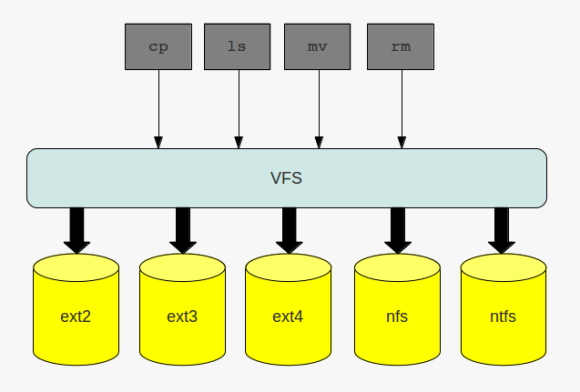
no matter what kind of filesystem you are working with: when interacting with the filesystem by using the commands of choice you are routed through the virtual filesystem:

the virtual file system

to make this possible there needs to be a standard all file system implementations must comply with, and this standard is called the common file model. the key components this model consist of are:

  • the superblock which stores information about a mounted filesystem ( … that is stored in memory as a doube linked list )
  • inodes which store information about a specific file ( … that are stored in memory as a doube linked list)
  • the file object which stores information of the underlying files
  • dentries, which represent the links to build the directory structure ( … that are stored in memory as a doube linked list)

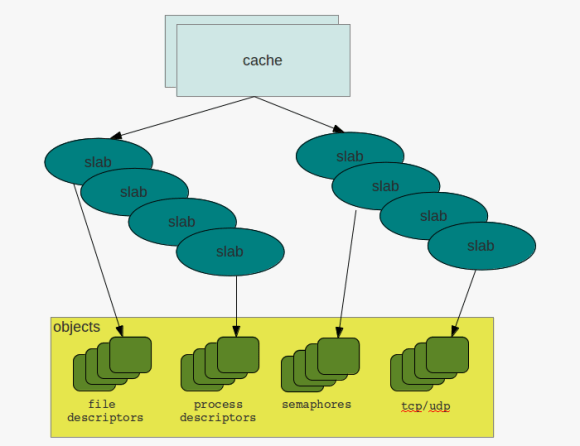
to speed up operations on the file systems some of the information which is normally stored on disk are cached. if you recall the post about slabs, you can find an entry like the following in the /proc/slabinfo file if you have a mounted ext4 filesystem on your system:

cat /proc/slabinfo | grep ext4 | grep cache
ext4_inode_cache   34397  34408    920   17    4 : tunables    0    0    0 : slabdata   2024   2024      0

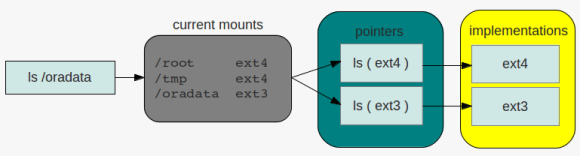
so what needs the kernel to do if, for example, a request for listing the contents of a directoy comes in and the directory resides on an ext4 filesystem? because the filesystem is mounted the kernel knows that the filesystem for the specific request is of type ext4. the ls command will then be translated ( pointed ) to the specific ls implementation of the ext4 filesystem. this operation is the same for all commands interacting with filesystems. there is a pointer for each operation that links to the specific implementation of the command in question:

directory listing

as the superblock is stored in memory and therefore may become dirty, that is not synchronized with the superblock on disk, there is the same issue that oracle must handle with its buffer pools: periodically check the dirty flag and write down the changes to disk. the same is true for inodes ( while in memory ), which contain all the information that make up a file. closing a loop to oracle again: to speed up searching the ionodes linux maintains a hash table for fast access ( remember how oracle uses hashes to identify sql statements in the shared_pool ).

when there are files, there are processes which want to work with files. once a file is opened a new file object will be created. as these are frequent operations file objects are allocated through a slab cache.

the file objects itself are visible to the user through the /proc filesystem per process:

ls -la /proc/*/fd/
/proc/832/fd/:
total 0
dr-x------ 2 root root  0 2012-05-18 14:03 .
dr-xr-xr-x 8 root root  0 2012-05-18 06:40 ..
lrwx------ 1 root root 64 2012-05-18 14:03 0 -> /dev/null
lrwx------ 1 root root 64 2012-05-18 14:03 1 -> /dev/null
lr-x------ 1 root root 64 2012-05-18 14:03 10 -> anon_inode:inotify
lrwx------ 1 root root 64 2012-05-18 14:03 2 -> /dev/null
lrwx------ 1 root root 64 2012-05-18 14:03 3 -> anon_inode:[eventfd]
lrwx------ 1 root root 64 2012-05-18 14:03 4 -> /dev/null
lrwx------ 1 root root 64 2012-05-18 14:03 5 -> anon_inode:[signalfd]
lrwx------ 1 root root 64 2012-05-18 14:03 6 -> socket:[7507]
lrwx------ 1 root root 64 2012-05-18 14:03 7 -> anon_inode:[eventfd]
lrwx------ 1 root root 64 2012-05-18 14:03 8 -> anon_inode:[eventfd]
lrwx------ 1 root root 64 2012-05-18 14:03 9 -> socket:[11878]
...

usually numbers 0 – 3 refer to the standard input, standard output and standard error of the corresponding process.

last but not least there are the dentries. as with the file objects, dentries are allocated from a slab cache, the dentry cache in this case:

cat /proc/slabinfo | grep dentry
dentry             60121  61299    192   21    1 : tunables    0    0    0 : slabdata   2919   2919      0

directories are files, too, but special in that kind that dictories may contain other files or directories. once a directory is read into memory it is transformed into a dentry object. as this operation is expensive there is the dentry cache mentioned above. thus the operations for building the dentry objects can be minimized.
another link to oracle wording: the unused dentry double linked list uses a least recently used ( lru ) algorithm to track the usage of the entries. when the kernel needs to shrink the cache the objects at the tail of the list will be removed. as with the ionodes there is hash table for the dentries and a lock protecting the lists ( dcache_spin_lock in this case ).

this should give you enough hints to go further if you are interesed …

nowadays everybody is talking about consolidation to reduce costs and ( maybe ) to simplify management of the infrastructure. the current trend seems to be:

  • buy big boxes ( exadata, for example ) and put many databases on one physical host.
  • buy big boxes, use one of the virtualization or partition technologies ( vmware, lpars, ldoms, oracle vm, solaris zones, …. ) and put the database on the virtual hosts
  • use RAC in combination with cheaper boxes and try to scale by adding more cheaper boxes once the workload increases

what less people seem to think about ( correct me if I’m wrong ): why not consolidate some of the smaller applications which do not need that much resources into the same database ? this will reduce licensing costs and ( maybe ) simplifies administration, too. of course, there are things to consider:

  • each application must use the same database version
  • if you need to patch, all applications will be affected
  • if you need to upgrade, all applications will be affected
  • if there is unplanned or planned downtime, all applications will be affected
  • security inside the database becomes more important: permissions, roles …
  • if one of the applications goes crazy how do you manage that it does not affect the other applications that much that they are not usable anymore ?
  • how to quickly identify an application which has troubles ?

having thought about these points maybe you’ll give it a try. especially for identifying the applications quickly and react on issues one concept that should be implemented is services. if you ever worked with RAC, services should not be new to you, but services are useful in single instances, too. as services do not require any changes to the application implementing them is straight forward:

  • if you use oracle restart or a clustered grid infratructure the easiest way to manage services is by using the srvctl utility
  • if you don’t use oracle restart, single instance services should be managed by the dbms_service package

this post will discuss both methods and give some examples. obviously the first step you need to do is to create a service ( I will create two services to show how one can connect to a specific service later ).

the srvctl way:

srvctl add service -d DB112 -s BEER -y AUTOMATIC -B SERVICE_TIME

… where:

  • -d: is the database unique name
  • -s: is the service name
  • -y: is the flag for the management policy
  • -B: is the runtime load balancing goal

note: there are some other parameters one can specify, but as these parameter are important for failover, load balancing, dataguard and rac I will not discuss them right now.

service created. does oracle restart report the newly created service ? yes, of course:

crsctl stat res ora.db112.beer.svc
NAME=ora.db112.beer.svc
TYPE=ora.service.type
TARGET=OFFLINE
STATE=OFFLINE

does the database report the service ?

SYS@DB112> select name from all_services;
NAME
----------------------------------------------------------------
SYS$BACKGROUND
SYS$USERS
DB112

… not yet. lets start the service:

srvctl start service -d DB112 -s beer

… and check what oracle restart reports for the service now:

crsctl stat res ora.db112.beer.svc
NAME=ora.db112.beer.svc
TYPE=ora.service.type
TARGET=ONLINE
STATE=ONLINE on oracleplayground

seems to be online. does the database report the service now? :

SYS@DB112> select name from all_services;
NAME
----------------------------------------------------------------
SYS$BACKGROUND
SYS$USERS
DB112
BEER

yes. once the service is started the database reports the service in the appropriate views. to quickly check the attributes and state of the service:

srvctl config service -d DB112 -s beer -v
Service name: BEER
Service is enabled
Cardinality: SINGLETON
Disconnect: false
Service role: PRIMARY
Management policy: AUTOMATIC
DTP transaction: false
AQ HA notifications: false
Failover type: NONE
Failover method: NONE
TAF failover retries: 0
TAF failover delay: 0
Connection Load Balancing Goal: LONG
Runtime Load Balancing Goal: SERVICE_TIME
TAF policy specification: NONE
Edition: 

thats all you need to do. a new service is created and the service is up and running. one more thing to consider: will the service be started automatically once the database is restarted? :

srvctl stop database -d DB112
srvctl start database -d DB112
crsctl stat res ora.db112.beer.svc
NAME=ora.db112.beer.svc
TYPE=ora.service.type
TARGET=ONLINE
STATE=ONLINE on oracleplayground

yes, it will.

for creating the second service i will use the dbms_service package.

the dbms_service way:

BEGIN
  DBMS_SERVICE.CREATE_SERVICE (
      service_name => 'MOREBEER'
    , network_name => 'MOREBEER'
    , goal => DBMS_SERVICE.GOAL_THROUGHPUT
    , dtp => NULL
    , aq_ha_notifications => NULL
    , failover_method => NULL
    , failover_type => NULL
    , failover_retries => NULL
    , failover_delay => NULL
    , clb_goal => NULL
    , edition => NULL
   );
END;
/

in contrast to the srvctl method the database already knows about the service now:

select name from all_services;
NAME
----------------------------------------------------------------
SYS$BACKGROUND
SYS$USERS
DB112
BEER
MOREBEER

lets start the service:

BEGIN
  dbms_service.start_service (
     service_name => 'MOREBEER'
   , instance_name => 'DB112'
  );
END;
/

thats it. service up and running.

to make things a little easier for us oracle already registered the services with listener:

lsnrctl services listener_db112
LSNRCTL for Linux: Version 11.2.0.3.0 - Production on 22-MAY-2012 12:46:25
Copyright (c) 1991, 2011, Oracle.  All rights reserved.
Connecting to (DESCRIPTION=(ADDRESS=(PROTOCOL=IPC)(KEY=LISTENER_DB112)))
Services Summary...
Service "BEER" has 1 instance(s).
  Instance "DB112", status READY, has 1 handler(s) for this service...
    Handler(s):
      "DEDICATED" established:0 refused:0 state:ready
         LOCAL SERVER
Service "DB112" has 1 instance(s).
  Instance "DB112", status READY, has 1 handler(s) for this service...
    Handler(s):
      "DEDICATED" established:0 refused:0 state:ready
         LOCAL SERVER
Service "MOREBEER" has 1 instance(s).
  Instance "DB112", status READY, has 1 handler(s) for this service...
    Handler(s):
      "DEDICATED" established:0 refused:0 state:ready
         LOCAL SERVER
The command completed successfully

… and modified the services parameter:

show parameter service_names
NAME				     TYPE	 VALUE
------------------------------------ ----------- ------------------------------
service_names			     string	 BEER, MOREBEER

quickly check if the database starts up the second service if we bounce the instance:

srvctl stop database -d db112
srvctl start database -d db112
lsnrctl services listener_db112
LSNRCTL for Linux: Version 11.2.0.3.0 - Production on 22-MAY-2012 12:53:45
Copyright (c) 1991, 2011, Oracle.  All rights reserved.
Connecting to (DESCRIPTION=(ADDRESS=(PROTOCOL=IPC)(KEY=LISTENER_DB112)))
Services Summary...
Service "BEER.fun" has 1 instance(s).
  Instance "DB112", status READY, has 1 handler(s) for this service...
    Handler(s):
      "DEDICATED" established:0 refused:0 state:ready
         LOCAL SERVER
Service "DB112.fun" has 1 instance(s).
  Instance "DB112", status READY, has 1 handler(s) for this service...
    Handler(s):
      "DEDICATED" established:0 refused:0 state:ready
         LOCAL SERVER
The command completed successfully

no. only the service which was created through srvctl is up and running. if you want services to startup automatically you created with the dbms_service package you’ll need to create triggers similar to this:

CREATE OR REPLACE TRIGGER MOREBEER_STARTUP
AFTER STARTUP ON DATABASE
BEGIN
  dbms_service.start_service (
     service_name => 'MOREBEER'
   , instance_name => 'DB112'
  );  
END;
/
CREATE OR REPLACE TRIGGER MOREBEER_SHUTDOWN
BEFORE SHUTDOWN ON DATABASE
BEGIN
  dbms_service.stop_service (
     service_name => 'MOREBEER'
   , instance_name => 'DB112'
  );  
END;
/

restart the database and check if it works:

srvctl stop database -d db112
srvctl start database -d db112
lsnrctl services listener_db112
LSNRCTL for Linux: Version 11.2.0.3.0 - Production on 22-MAY-2012 12:58:15
Copyright (c) 1991, 2011, Oracle.  All rights reserved.
Connecting to (DESCRIPTION=(ADDRESS=(PROTOCOL=IPC)(KEY=LISTENER_DB112)))
Services Summary...
Service "BEER.fun" has 1 instance(s).
  Instance "DB112", status READY, has 1 handler(s) for this service...
    Handler(s):
      "DEDICATED" established:0 refused:0 state:ready
         LOCAL SERVER
Service "DB112.fun" has 1 instance(s).
  Instance "DB112", status READY, has 1 handler(s) for this service...
    Handler(s):
      "DEDICATED" established:0 refused:0 state:ready
         LOCAL SERVER
Service "MOREBEER.fun" has 1 instance(s).
  Instance "DB112", status READY, has 1 handler(s) for this service...
    Handler(s):
      "DEDICATED" established:0 refused:0 state:ready
         LOCAL SERVER
The command completed successfully

works. both services will now survive a database restart. time to connect to the services…

as I will use sqlplus for the connections I will need two more entries in my tnsnames.ora:

BEER.fun =
  (DESCRIPTION=
    (ADDRESS_LIST=
      (ADDRESS= (PROTOCOL = TCP)(Host = oracleplayground.fun)(Port = 1521))
  )
    (CONNECT_DATA =
      (SERVICE_NAME = BEER.fun)
    )
  )
MOREBEER.fun =
  (DESCRIPTION=
    (ADDRESS_LIST=
      (ADDRESS= (PROTOCOL = TCP)(Host = oracleplayground.fun)(Port = 1521))
  )
    (CONNECT_DATA =
      (SERVICE_NAME = MOREBEER.fun)
    )
  )

… quickly check if I can reach the listener:

tnsping beer
TNS Ping Utility for Linux: Version 11.2.0.3.0 - Production on 22-MAY-2012 13:03:44
Copyright (c) 1997, 2011, Oracle.  All rights reserved.
Used parameter files:
/opt/oracle/product/base/11.2.0.3/network/admin/sqlnet.ora
Used TNSNAMES adapter to resolve the alias
Attempting to contact (DESCRIPTION= (ADDRESS_LIST= (ADDRESS= (PROTOCOL = TCP)(Host = oracleplayground.fun)(Port = 1521))) (CONNECT_DATA = (SERVICE_NAME = BEER)))
OK (10 msec)
tnsping morebeer
TNS Ping Utility for Linux: Version 11.2.0.3.0 - Production on 22-MAY-2012 13:04:04
Copyright (c) 1997, 2011, Oracle.  All rights reserved.
Used parameter files:
/opt/oracle/product/base/11.2.0.3/network/admin/sqlnet.ora
Used TNSNAMES adapter to resolve the alias
Attempting to contact (DESCRIPTION= (ADDRESS_LIST= (ADDRESS= (PROTOCOL = TCP)(Host = oracleplayground.fun)(Port = 1521))) (CONNECT_DATA = (SERVICE_NAME = MOREBEER)))
OK (10 msec)

fine. for the following I just did a seperate connection to each service and generated some load. once the connections are established you can use the service views to query data about your services:

ALL_SERVICES
V$SERVICEMETRIC
V$SERVICEMETRIC_HISTORY
V$SERVICES
V$SERVICE_EVENT
V$SERVICE_STATS
V$SERVICE_WAIT_CLASS
V$ACTIVE_SERVICES

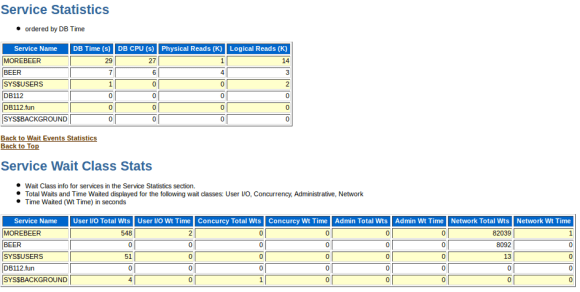
if there are performance issues awr displays some performance data by service, too:

service stats in awr

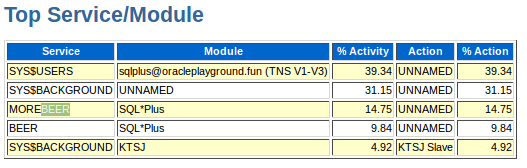
as well as the ash report:

service stats in ash

this is the foundation you may use when thinking about application consolidation into a single database. of course you should go further and integrate the services with the database resource manager to minimize impacts between the services or applications … and by the way: splitting a single application into services might be a good idea, too

the first optimizer post tried to introduce the very basic knowledge you need for understanding how the optimizer decides on how to get the data users are requesting.

the key points discovered were:

  • full table scans are not always bad, as the database can read multiple block at a time
  • indexes do not always help, as index access is always sequential and always block by block
  • statistics are the basics which help the optimizer with its decisions
  • statistics might be wrong

this post will discuss the question: how does the optimizer decide if an index gets used or not ?

this time, image the following scenario: in your city there is a very, very, very long road with 10’000 houses on the right side, and because there is no sun at the left side there are no houses ( or for what ever reason you like :) ). each house is located next to the other and is identified by its house number. in addition, as lots of people love to do smalltalk by phone, there is a phone number for each house. in contrast to the phone numbers which are assigned random, the house numbers start by one for the first house and increase to ten thousand for the last one. house by house.

the table representing this scenario could look like this one:

DROP TABLE T1;
CREATE TABLE T1 ( HOUSENUMBER NUMBER
                , PHONENUMBER NUMBER
                ) TABLESPACE USERS;

as the scenario assumes one phone number per house the content could look as follows:

BEGIN
  FOR
    i IN 1..10000
  LOOP
    INSERT INTO T1 ( HOUSENUMBER, PHONENUMBER )
           VALUES ( i, ROUND ( dbms_random.value(1,10000), 0 ) );
  END LOOP;  
  COMMIT;
END;
/
exec dbms_stats.gather_table_stats ( USER, 'T1', NULL, 100 );

lets quickly check how our houses are organized:

SELECT num_rows houses
     , blocks
  FROM user_tables
 WHERE table_name = 'T1';
    HOUSES     BLOCKS
---------- ----------
     10000	   20

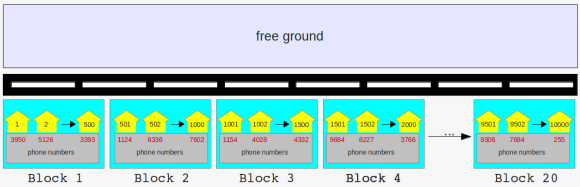
this tells that the database grouped our ten thousand houses in twenty blocks. well, this is a common way to group houses in the US, but not in Europe. anyway, if we try to put this on a picture it looks similar to this one ( if you have problems reading the numbers scroll down to the end of this post to find the URLs ):

long street with tiny houses, grouped into blocks

as the frustrated teacher in the first post discovered you will need to walk down all the road no matter if you search for a phone- or a house number nor how much of each. this is the only solution right now. even the search for exactly one phone number will require you to take a real long walk:

SET AUTOTRACE ON;
SELECT phonenumber
  FROM t1
 WHERE housenumber = 1;
Execution Plan
----------------------------------------------------------
Plan hash value: 3617692013
--------------------------------------------------------------------------
| Id  | Operation	  | Name | Rows  | Bytes | Cost (%CPU)| Time	 |
--------------------------------------------------------------------------
|   0 | SELECT STATEMENT  |	 |     1 |     8 |     7   (0)| 00:00:01 |
|*  1 |  TABLE ACCESS FULL| T1	 |     1 |     8 |     7   (0)| 00:00:01 |
--------------------------------------------------------------------------
Predicate Information (identified by operation id):
---------------------------------------------------
   1 - filter("HOUSENUMBER"=1)

but the teacher learned that creating indexes sometimes helps to reduce the amount of work and to provide the answer in a much faster way:

CREATE INDEX I_HOUSENUMBER ON T1 ( HOUSENUMBER );

lets see if this helps:

SET AUTOTRACE ON;
SELECT phonenumber
  FROM t1
 WHERE housenumber = 1;
---------------------------------------------------------------------------------------------
| Id  | Operation		    | Name	    | Rows  | Bytes | Cost (%CPU)| Time     |
---------------------------------------------------------------------------------------------
|   0 | SELECT STATEMENT	    |		    |	  1 |	  8 |	  2   (0)| 00:00:01 |
|   1 |  TABLE ACCESS BY INDEX ROWID| T1	    |	  1 |	  8 |	  2   (0)| 00:00:01 |
|*  2 |   INDEX RANGE SCAN	    | I_HOUSENUMBER |	  1 |	    |	  1   (0)| 00:00:01 |
---------------------------------------------------------------------------------------------
Predicate Information (identified by operation id):
---------------------------------------------------
   2 - access("HOUSENUMBER"=1)

same for the phone number:

CREATE INDEX I_PHONENUMBER ON T1 ( PHONENUMBER );
SET AUTOTRACE ON;
SELECT housenumber
  FROM t1
 WHERE phonenumber = 5126;
---------------------------------------------------------------------------------------------
| Id  | Operation		    | Name	    | Rows  | Bytes | Cost (%CPU)| Time     |
---------------------------------------------------------------------------------------------
|   0 | SELECT STATEMENT	    |		    |	  2 |	 16 |	  3   (0)| 00:00:01 |
|   1 |  TABLE ACCESS BY INDEX ROWID| T1	    |	  2 |	 16 |	  3   (0)| 00:00:01 |
|*  2 |   INDEX RANGE SCAN	    | I_PHONENUMBER |	  2 |	    |	  1   (0)| 00:00:01 |
---------------------------------------------------------------------------------------------
Predicate Information (identified by operation id):
---------------------------------------------------
   2 - access("PHONENUMBER"=5126)

helps, too. both indexes seem to be useful for the queries above. what happens if we go further and increase the range:

SET AUTOTRACE ON;
SELECT phonenumber
  FROM t1
 WHERE housenumber < 100;
---------------------------------------------------------------------------------------------
| Id  | Operation		    | Name	    | Rows  | Bytes | Cost (%CPU)| Time     |
---------------------------------------------------------------------------------------------
|   0 | SELECT STATEMENT	    |		    |	 99 |	792 |	  3   (0)| 00:00:01 |
|   1 |  TABLE ACCESS BY INDEX ROWID| T1	    |	 99 |	792 |	  3   (0)| 00:00:01 |
|*  2 |   INDEX RANGE SCAN	    | I_HOUSENUMBER |	 99 |	    |	  2   (0)| 00:00:01 |
---------------------------------------------------------------------------------------------
Predicate Information (identified by operation id):
---------------------------------------------------
   2 - access("HOUSENUMBER"<100)

still ok for the house number. what’s with the phone number? :

SET AUTOTRACE ON;
SELECT housenumber
  FROM t1
 WHERE phonenumber < 100;
--------------------------------------------------------------------------
| Id  | Operation	  | Name | Rows  | Bytes | Cost (%CPU)| Time	 |
--------------------------------------------------------------------------
|   0 | SELECT STATEMENT  |	 |    99 |   792 |     7   (0)| 00:00:01 |
|*  1 |  TABLE ACCESS FULL| T1	 |    99 |   792 |     7   (0)| 00:00:01 |
--------------------------------------------------------------------------
Predicate Information (identified by operation id):
---------------------------------------------------
   1 - filter("PHONENUMBER"<100)

damn. although there is an index on the phone number column and we are not querying that much data the index is not used, while the index for the house number gets used. and both queries return a similar amount of data ( it is quite possible that the dbms_random function used to generate the numbers produces more results for one number and no result for a another number. in this way the use case is not totally correct as the same phone number may be assigned to more than one house but this is not very important here ).

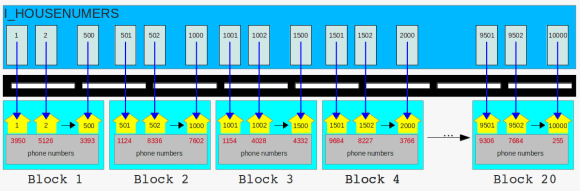
back to the question: how can this be? for answering the questions lets expand the scenario: the sun comes back to the other side of the road and our first index ( I_HOUSENUMBERS ) decided that the left side of the road is a really nice place to life:

the houses got new neighbors

in the morning the postman wants deliver some letters to house numbers 501 – 1000. because the postman does not want to walk the whole road she goes directly to the index and searches for house number 500. happily for delivering the letters to the house with house number 501 the postman just needs to go directly to the block on the opposite of the street. the procedure is the same for the house numbers 502 to 1000. very short distances to go and no need to walk the whole road. all houses are located in the same block.

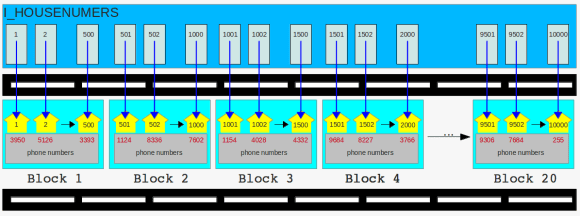
as people are telling that the environment around our street is one of the best places to life in town, the mayor decided to build a new road to make more people come to town:

the new road is ready

it is not taking too much time: once the new road is ready our second index ( I_PHONENUMBERS ) took the chance for a new home and settled down by the brand new road:

more neighbors

one sunny day the phone company which assigned the phone numbers to the houses sends an assistant to check if the phone numbers 4200 – 4300 are still correctly assigned. the assistant is lazy, too, so she directly goes to the phone number index. she searches for entry 4200, follows the pointer and walks down the road to block 3 where she finds the corresponding house. once she noticed that the phone number is still assigned correctly she goes all the way back to the index, picks up the next pointer for phone number 4201 and ends up at block 19 where she finds the house belonging to the phone number. once verified, she goes again back to the index, sees the pointer for phone number 4203 and walks down the road to block 2. and back to index, next pointer, different block. and on and on and on. in the worst case she has to visit a different block for each pointer and maybe visit the same block twice or more. after hours of walking she can finally return to the office and deliver the results. for the next time she promised herself: I will walk down the whole road from the beginning to the end and not visit the index. that will save me a lot of steps.

it is the same with the optimizer. each index has an attribute called the clustering_factor:

SELECT index_name
     , num_rows
     , clustering_factor
  FROM user_indexes
 WHERE index_name IN ( 'I_HOUSENUMBER','I_PHONENUMBER' )
 ORDER BY 1;
INDEX_NAME			 NUM_ROWS CLUSTERING_FACTOR
------------------------------ ---------- -----------------
I_HOUSENUMBER			    10000		 18
I_PHONENUMBER			    10000	       9411

the clustering_factor describes how well the table is sorted in relation to the index. the house number index has a clustering_factor of 18, which is close to number of blocks of the table:

SELECT num_rows
     , blocks
  FROM user_tables
 WHERE table_name = 'T1';
  NUM_ROWS     BLOCKS
---------- ----------
     10000	   20

what does this tell the optimizer? this means how many times the database will need to read a different block of the table for finding the rows pointed to by the index. for example:

  • we know the first 500 rows of the table are all stored in the first block
  • if someone now requests the phone numbers of the first 500 houses the database will need to read a single block of the table where all the index pointers point to
  • in contrast, if someone requests the house number for the first 500 phone numbers the database will need to read several blocks of the table as the pointers might all point to different blocks of the table

the clustering_factor 9411 of the phone number index tells the optimizer that is likely that the database needs to access a different block for every consecutive pointer in the index. you may have noticed that the clustering_factor of 9411 is close to the number of rows in the table. this means, in regards to I/O: might be much to expensive if several rows must be retrieved. although the clustering_factor is not the only statistic the optimizer uses to make its decisions, it is an important one. good to know for the mayor if he wants to build another street …

URLs for the pictures in original size:
long street with tiny houses, grouped into blocks
the houses got new neighbors
the new road is ready
more neighbors

how does one retrieve data from the database ? by using the sql language. sql is easy to learn and everyone can write statetments, but many times the user who fires a statement has little or no knowledge on how the data is organized and stored inside the database system.
this is where the optimizer comes into the game. once the statement reaches the database it is the task of the optimizer to find the fastest and most efficient way to the data. to make things a littler easier to understand lets start with an example:

imagine the following the scenario:

  • as the teacher is ill you have been asked to teach the class
  • the subject of todays class is J.R.R. Tolkien’s Lord of the Rings
  • the students are allowed to ask any question which can be answered by reading the book
  • all you have to answer the questions is the book, your memory, a blank paper and a pencil

in this scenario you are the optimizer while the books is the entity which stores the actual data. the students represent the users querying the database. it is your ( the optimizers ) task to find the most efficient way to answer your student’s questions. the problem is: nobody told you what is the subject of todays class and, oh my god, you never read the book :) anyway, as the real teacher is a good friend of you, you decided to give your best.

lets set up the scenario. first of all we’ll need a table which represents our book:

DROP TABLE LORDOFTHERINGS;
CREATE TABLE LORDOFTHERINGS ( PAGENUMBER NUMBER
, CHAPTER NUMBER
, TEXT VARCHAR2(4000)
)
TABLESPACE USERS;

as a book without any content would not be worth reading lets generate some content:

DECLARE
  ln_chapter lordoftherings.chapter%TYPE := 0;
  -- same stupid text for all pages, for now
  lv_text lordoftherings.text%TYPE := LPAD('GOLLUM IS SAD',4000,'BLABLA');
BEGIN
  FOR
    i IN 1..10000
  LOOP
    -- each chapter will have 50 pages
    IF
      mod(i,50) = 0
    THEN
      ln_chapter := ln_chapter + 1;
    END IF;
    INSERT INTO LORDOFTHERINGS ( PAGENUMBER, CHAPTER, TEXT )
           VALUES ( i, ln_chapter, lv_text );
  END LOOP;
  COMMIT;
END;
/
-- as we know there is a bad warlock called sauron:
UPDATE LORDOFTHERINGS
   SET TEXT = 'SAURON'
 WHERE MOD(pagenumber,77) = 0;
-- ... and hobbits play some kind of role
UPDATE LORDOFTHERINGS
   SET TEXT = 'HOBBITS'
 WHERE MOD(pagenumber,111) = 0;
-- ... and there is the good counterpart to sauron called gandalf
UPDATE LORDOFTHERINGS
   SET TEXT = 'GANDALF'
 WHERE MOD(pagenumber,201) = 0;
UPDATE LORDOFTHERINGS
   SET TEXT = 'RING'
 WHERE MOD(pagenumber,2) = 0;
COMMIT;

so our book is ready:

  • there is a total of 10’000 pages, each containing a maximum of 4’000 characters
  • there are 200 chapters, each consisting of 50 pages
  • on some pages the story tells about hobbits
  • on some pages the story tells about sauron
  • on some pages the story tells about gandalf
  • on every second page the ring is mentioned

your class opens, the students are coming in and prepare to ask the questions they’d like to have answered from your side. remember, you are the expert. the students do not know that you never read the book. this is the same situation as when the database queries a table for the first time. for our scenario this means…

alter system flush buffer_cache;

… which erases the buffer cache of the database ( no brain available currently, or at least the brain has nothing to remember ).

07:31 am ( almost in time ), first question from a student: how many pages does the book consist of ?

puh, easy. isn’t it? just open the book go to the last page and take a look at the page number. really ? are you sure all pages are numbered including the first few pages which introduce the author and the last ones which may contain some advertising for other books one may be interested in ? perhaps the author decided to start over with page number one for each chapter ? not as simple as you thought. the only option you have: count all the pages. this is the only option which will give the correct answer. if you take a look the thickness of book you could guess that there should be around 10’000 pages ( if you are good at guessing how many pages a book may consist of ), but you can’t know for sure. you just did what the optimizer will do if a statement like this comes in:

SELECT count(pagenumber)
  FROM lordoftherings;

the only option the optimizer has available at this very moment is to do a full tablescan, that is reading every block of the table:

ALTER SYSTEM FLUSH BUFFER_CACHE;
SET AUTOTRACE TRACEONLY;
SELECT count(pagenumber)
  FROM lordoftherings;
Execution Plan
----------------------------------------------------------
Plan hash value: 4101815809
-------------------------------------------------------------------------------------
| Id  | Operation	   | Name	    | Rows  | Bytes | Cost (%CPU)| Time     |
-------------------------------------------------------------------------------------
|   0 | SELECT STATEMENT   |		    |	  1 |	 13 |  2739   (1)| 00:00:33 |
|   1 |  SORT AGGREGATE    |		    |	  1 |	 13 |		 |	    |
|   2 |   TABLE ACCESS FULL| LORDOFTHERINGS | 11059 |	140K|  2739   (1)| 00:00:33 |
-------------------------------------------------------------------------------------

you probably noticed that the 11059 rows reported in the above plan are wrong. that’s the guess mentioned above. you ( the optimizer ) guess that 11059 will be the correct answer. this guess is based on dynamic sampling which is reported under the “Note” section. as you could guess the number of pages by looking at the thickness of the book the optimizer uses dynamic sampling if it has no other statistics available which may help in finding the fastest way to the data. but as it is with a guess, this may be wrong. i will introduce dynamic sampling in a later post, for now just remember that the optimizer makes some assumptions if no adequate statistics are available.

09:30 am: after two hours you finally finished counting the pages and are able to answer the student’s question: there are 10’000 pages in total. you did quite a lot of work for answering a simple question. lets take a look at what the database does once the optimizer decided how to query the data:

SET AUTOTRACE OFF;
ALTER SYSTEM FLUSH BUFFER_CACHE;
ALTER SESSION SET TRACEFILE_IDENTIFIER = 'select_1';
ALTER SESSION SET EVENTS '10046 trace name context forever, level 8';
SELECT count(pagenumber)
  FROM lordoftherings;
ALTER SESSION SET EVENTS '10046 trace name context forever, level 0';

this will produce a sql trace file which you can find in the trace directory of your database. if you are not sure where to search, ask the database:

show parameter background_dump_dest

I’ll just copy two representative lines here:

WAIT #47691901769152: nam='db file sequential read' ela= 274 file#=3 block#=128 blocks=1 obj#=0 tim=1336672754891155
WAIT #47691901769152: nam='direct path read' ela= 15962 file number=4 first dba=161 block cnt=15 obj#=19241 tim=1336672754908366

these are the two reads the database was performing for answering our question:

  • db file sequential read: read one block per I/O request
  • direct path read: read multiple blocks per I/O request ( these reads go directly to the pga not to the sga )

don’t be confused because of the “direct path read” and that the blocks do not go to the sga in this case. for the scope of this post it is just important to note that multiple blocks can be read at once. if you ( as the teacher ) are really good in counting pages then you too may be able to count several pages at once. and thats what happens here: because the database needs to read the whole table which results in a full tablescan multiple blocks are read at once. in contrast, if you see “db file sequential read” this is always a single block read.

two hours of work for answering a simple question….

after a short coffee break, at 09:40 the second question comes in: how many pages are there per chapter ?
seems a little bit more complicated as the first question. after thinking about it: oh no. again you need to browse through all the pages very quickly and count those on which you find the chapter’s heading. again, no other option is available for getting the correct answer:

Execution Plan
----------------------------------------------------------
Plan hash value: 3984697483
-------------------------------------------------------------------------------------
| Id  | Operation	   | Name	    | Rows  | Bytes | Cost (%CPU)| Time     |
-------------------------------------------------------------------------------------
|   0 | SELECT STATEMENT   |		    | 11059 |	140K|  2740   (1)| 00:00:33 |
|   1 |  HASH GROUP BY	   |		    | 11059 |	140K|  2740   (1)| 00:00:33 |
|   2 |   TABLE ACCESS FULL| LORDOFTHERINGS | 11059 |	140K|  2739   (1)| 00:00:33 |
-------------------------------------------------------------------------------------
Note
-----
   - dynamic sampling used for this statement (level=2)

11:40 am: another two hours of work. almost noon and time for lunch. but you are able to answer the question: its 50 pages per chapter. you start hating the students for asking stupid questions. it can not go on like this. after sending them to lunch you start thinking on how you will be able do less work while still providing the correct answers. as you already answered two questions you decide to write down the results:

  • 10’000 pages in total
  • 50 pages per chapter
  • 201 chapters in total

these are your first statistics. only three, but better than nothing. this is input you can use for future questions. this does not mean it saves you any of the work, but it may help. in regards to the database this does mean:

exec dbms_stats.gather_table_stats ( USER, 'LORDOFTHERINGS' );

this told the database to create statistics for the table which may help the optimizer with its decisions. lets quickly check what a few of them are at the table level:

SELECT NUM_ROWS
     , BLOCKS
     , AVG_ROW_LEN 
  FROM USER_TAB_STATISTICS 
 WHERE TABLE_NAME = 'LORDOFTHERINGS';
  NUM_ROWS     BLOCKS AVG_ROW_LEN
---------- ---------- -----------
     10076	10097	     1985

hm. we know for sure that the book consists of 10’000 pages. why does the database report to have 10076 ? this is dependent on the parameter estimate_percent of the gather_table_stats procedure. try to re-gather the statistics with estimate_percent=100 ( which means a hundred percent ) and the numbers will be correct:

exec dbms_stats.gather_table_stats ( USER, 'LORDOFTHERINGS',NULL,100 );
SELECT NUM_ROWS
     , BLOCKS
     , AVG_ROW_LEN 
  FROM USER_TAB_STATISTICS 
 WHERE TABLE_NAME = 'LORDOFTHERINGS';
  NUM_ROWS     BLOCKS AVG_ROW_LEN
---------- ---------- -----------
     10000	10097	     1966

this is one decision you need to make for your statistic gathering strategy. gather statistics faster, which means a lower estimate percent or give more time and resources for the gathering and get more adequate statistics by using the whole table. in general the defaults should be fine for most environments, but this depends on your database and application.

additionally the database created statistics for the columns of the table:

SELECT COLUMN_NAME
     , NUM_DISTINCT
     , DENSITY
     , NUM_NULLS 
  FROM USER_TAB_COL_STATISTICS 
 WHERE TABLE_NAME = 'LORDOFTHERINGS';
COLUMN_NAME		       NUM_DISTINCT    DENSITY	NUM_NULLS
------------------------------ ------------ ---------- ----------
PAGENUMBER			      10000	 .0001		0
CHAPTER 				201 .004975124		0
TEXT					  5	    .2		0

this corresponds to the statistics you as a teacher recorded. i will not discuss how this numbers influence the optimizer right now, maybe in later post. just notice there are statistical values right now.

lunch finished, all the students are back to the classroom.
01:00 am, third question: how many pages do just contain the word gandalf ?
damn it. none of the statistics will help you in answering the question. another two hours of work, another time browsing through the whole book.

Execution Plan
----------------------------------------------------------
Plan hash value: 1483287049
------------------------------------------------------------------------------------
| Id  | Operation	  | Name	   | Rows  | Bytes | Cost (%CPU)| Time	   |
------------------------------------------------------------------------------------
|   0 | SELECT STATEMENT  |		   |  2000 |  3828K|  2739   (1)| 00:00:33 |
|*  1 |  TABLE ACCESS FULL| LORDOFTHERINGS |  2000 |  3828K|  2739   (1)| 00:00:33 |
------------------------------------------------------------------------------------
Predicate Information (identified by operation id):
---------------------------------------------------
   1 - filter("TEXT"='GANDALF')

its 03:00 p.m and you are at the point where you really hate the students. and you hate author, too, for writing such a thick book. something must change. you send send the students to get a coffee and start thinking again. a few minutes later you have an idea. once the students are back from coffee you tell them that the class will continue tomorrow but give them some work to do for the remaining two hours: everyone who wants to ask a question shall send it before 08:00 pm so you may prepare for the next day. under no circumstances you will spend two hours for answering a simple question again. home sweet home, take a rest from this frustrating day. at around 09:00 pm ( students are not that in time ) you check your mails for tomorrows questions:

  • how many pages just contain the word HOBBIT ?
  • how many pages just contain the word HOBBIT or GANDALF
  • how many pages in chapter fifty are empty ?
  • someone wants to know the page number and chapter for pages where there is the term ring

… and for sure there will be more questions at 10:00 pm
grrr. why do they ask such questions ? none of the question is about the story. ok, that’s life. you can not influence what people like to ask. but, you are smart again, you can recognize the patterns. the first step was to make them think before they ask the questions, so far so good. one step forward. you notice that these people seem to be interested in crazy stuff, like page numbers, single words, the amount of chapters but not in the story. and then you remember: why not create an index for the most common search terms ( columns ) ? wonderful.

CREATE INDEX I_TEXT ON LORDOFTHERINGS(TEXT);
CREATE INDEX I_CHAPTERS ON LORDOFTHERINGS(CHAPTER);

after hours of work you are finished with the indexes and go to sleep. you should be prepared for the crazy students tomorrow. some dreams ( fights against horrible page numbers, chapters and small hobbits ) later, you take your morning coffee and go to the classroom. ok, students…..

07:00 am ( in time this morning ): first question: how many pages just contain the word HOBBIT ?
hah, easy. just go to the index and count:

Execution Plan
----------------------------------------------------------
Plan hash value: 2876191354
-----------------------------------------------------------------------------------
| Id  | Operation	 | Name 	  | Rows  | Bytes | Cost (%CPU)| Time	  |
-----------------------------------------------------------------------------------
|   0 | SELECT STATEMENT |		  |  2000 |  3828K|   987   (0)| 00:00:12 |
|*  1 |  INDEX RANGE SCAN| I_SINGLE_WORDS |  2000 |  3828K|   987   (0)| 00:00:12 |
-----------------------------------------------------------------------------------
Predicate Information (identified by operation id):
---------------------------------------------------
   1 - access("TEXT"='HOBBIT')

07:05 am: five minutes later you are able to provide the correct the answer. this will be a short day.

07:06 am: second question: how many pages just contain the word HOBBIT or GANDALF

Execution Plan
----------------------------------------------------------
Plan hash value: 2888173227
---------------------------------------------------------------------------------------
| Id  | Operation	     | Name	      | Rows  | Bytes | Cost (%CPU)| Time     |
---------------------------------------------------------------------------------------
|   0 | SELECT STATEMENT     |		      |  4000 |  7656K|  1329	(1)| 00:00:16 |
|*  1 |  INDEX FAST FULL SCAN| I_SINGLE_WORDS |  4000 |  7656K|  1329	(1)| 00:00:16 |
---------------------------------------------------------------------------------------
Predicate Information (identified by operation id):
---------------------------------------------------
   1 - filter("TEXT"='GANDALF' OR "TEXT"='HOBBIT')

pff, another five minutes later you can answer the question. this will be a very short day. indexes are the solution.

07:15 am: third question: how many pages in chapter fifty are empty ?

Execution Plan
----------------------------------------------------------
Plan hash value: 1881835047

-----------------------------------------------------------------------------------------------
| Id  | Operation		     | Name	      | Rows  | Bytes | Cost (%CPU)| Time     |
-----------------------------------------------------------------------------------------------
|   0 | SELECT STATEMENT	     |		      |     1 |  1964 |    51	(0)| 00:00:01 |
|   1 |  SORT AGGREGATE 	     |		      |     1 |  1964 | 	   |	      |
|*  2 |   TABLE ACCESS BY INDEX ROWID| LORDOFTHERINGS |     1 |  1964 |    51	(0)| 00:00:01 |
|*  3 |    INDEX RANGE SCAN	     | I_CHAPTERS     |    50 |       |     1	(0)| 00:00:01 |
-----------------------------------------------------------------------------------------------

thanks to the chapter index you only have to look at the pages for chapter fifty. this speeds up your work, and ten minutes later you’re finished. you love indexes. because you feel wonderful and because you do not hate the students anymore you decide to do a coffee break. because of the work you spend on building the indexes there is no time pressure anymore.

08:30 am: fourth question: someone wants to know the page number and chapter for pages where there is the term ring ?
easy, you have the index. you take a look at the index, pick the first reference, go to the page in book and note the chapter and the page number. back to the index, pick the next reference, open the bock at the page the index tells you, note the chapter and the page number….
back to the index, pick the next reference, open the bock at the page the index tells you, note the chapter and the page number…

you start to realize that this will take a whole bunch of time. you even notice that this will take longer than scanning the whole book. how can this be ? you spend so much work in creating the index and now the index is no help at all. the problem is: for every entry in the index you have to go to the book and open the page the index points to. that is at least two reads. one for the index, one for the page in book. you remember the statistics you wrote down above: there a five distinct values for the text, so it should be around 2’000 pages to scan ( you don’t know right now that it actually are 5’000 ). as the term ring seems to present on every fifth page that would be at least 2’000×2 reads, one index read, one page read for every index entry, puh.
that’s not going to be fast. it will be faster to scan the whole book ( remember that you are able to scan very fast, multiple book pages at a time ) so your decision is: do a full scan of the book.

lets see what the database does:

SET AUTOTRACE TRACEONLY;
SELECT pagenumber,chapter
  FROM lordoftherings
 WHERE text = 'RING';
Execution Plan
----------------------------------------------------------
Plan hash value: 1483287049
------------------------------------------------------------------------------------
| Id  | Operation	  | Name	   | Rows  | Bytes | Cost (%CPU)| Time	   |
------------------------------------------------------------------------------------
|   0 | SELECT STATEMENT  |		   |  2000 |  3839K|  2739   (1)| 00:00:33 |
|*  1 |  TABLE ACCESS FULL| LORDOFTHERINGS |  2000 |  3839K|  2739   (1)| 00:00:33 |
------------------------------------------------------------------------------------
Predicate Information (identified by operation id):
---------------------------------------------------
   1 - filter("TEXT"='RING')

exactly the same. as the database is able to scan multiple blocks at a time when using a full table scan this will be faster than processing the index and visiting the table for every pointer in the index. note that the guess of 2’000 rows in total in the above plan is far from being correct, the correct answer is 5’000 ( more on that in a later post ).

you manage to answer the question just before noon. you decide to close the class and give the students a free afternoon. that has been to much work and you are frustrated. very, very simple questions and you have not been able to answer some questions in a reasonable time.
in the evening, because you are ambitious, you decide to write down what you learned from the one and half days. perhaps this is helpful for the other teacher:

  • always tell the students to think about what they want to know and write down the questions in advance
  • indexes may be useful if there are not to many references to the search term wich point you to a lot of different pages in the book
  • scanning a whole book seems to be fast, in regards to I/O, as you are able to scan multiple pages a time
  • index scans which require you to read the page in the book are, in regards to I/O, much slower as it requires at least two reads and each read can process only one page
  • statistics help in making decisions, but statistics might be wrong and therefore might drive you to the wrong direction
  • some parts of the book, probably the ones you read over and over again, stay in the brain, so you may answer repeated questions without reading the book

time to go to sleep …..

to be honest, when I first heard about slabs i thought of kitchens, or a bathroom, but not about memory management. but after reading and started learning about it, this term seemed not to be bad for what it stands for. to stay in the context of a kitchen there are different kinds of slabs:

  • some maybe appropriate for the floor
  • others for the wall
  • there are all kinds of colors …
  • … all kinds of sizes
  • slabs may consist of different materials

and in a way that’s exactly what slabs, in regards to memory management, are about. they provide regions of memory which are fixed in size and for different kinds of tasks.

the basic idea behind slabs is to avoid fragmentation by reserving fixed size memory regions and minimizing the work for allocation and deallocation. the so called constructor is used to initialize areas if memory while the destructor de-initializes them.

while the system is running the kernel requests memory regions of the same size and type over and over again. the process descriptors discussed earlier are one example. if a new process descriptor gets requested the slab allocator is used to get a memory area from cache which fits for holding the structures. once the process terminates and the descriptor can be discarded the memory region will not be deallocated but can be reused when another process needs to get created. in this way the overhead of frequent allocation and deallocation of pages frames can be avoided.

caches & slabs

to check the current caches and slabs you can either directly go to the /proc filesystem:

cat /proc/slabinfo
slabinfo - version: 2.1
# name : tunables : slabdata
UDPLITEv6 0 0 1024 16 4 : tunables 0 0 0 : slabdata 0 0 0
UDPv6 32 32 1024 16 4 : tunables 0 0 0 : 

… or check the current behavior with slabtop:

 Active / Total Objects (% used) : 305636 / 315218 (97.0%)
Active / Total Slabs (% used) : 11077 / 11077 (100.0%)
Active / Total Caches (% used) : 68 / 99 (68.7%)
Active / Total Size (% used) : 74608.55K / 76732.62K (97.2%)
Minimum / Average / Maximum Object : 0.01K / 0.24K / 8.00K
OBJS ACTIVE USE OBJ SIZE SLABS OBJ/SLAB CACHE SIZE NAME
89193 89192 99% 0.10K 2287 39 9148K buffer_head
55020 54352 98% 0.19K 2620 21 10480K dentry
30260 30247 99% 0.90K 1780 17 28480K ext4_inode_cache
19992 19974 99% 0.08K 392 51 1568K sysfs_dir_cache
17158 16006 93% 0.17K 746 23 2984K vm_area_struct
15360 14165 92% 0.01K 30 512 120K kmalloc-8
10710 10077 94% 0.05K 126 85 504K shared_policy_node
9664 8544 88% 0.06K 151 64 604K kmalloc-64
9051 8118 89% 0.19K 431 21 1724K kmalloc-192
7917 7904 99% 0.59K 609 13 4872K inode_cache

a cache initially does not contain any slabs. slabs will be created once requested and there is no free object to satisfy the request. in this case the cache will grow by n slabs. as with all concurrent access to memory regions caches and slabs are protected by locks, cache spin locks in this case. and when there are locks the must be different states for the objects, that are:

  • emtpy
  • partial
  • full

so what to remember: slabs and caches provide a way to avoid fragmentation and save some work in regards to frequent allocation and deallocation of memory regions. structures that are created and destroyed frequently such as the process or file descriptors benefit from this technique as the requests can be served at much faster time.

when it comes to the grid infrastructure ( single node or cluster configuration ) oracle needs to store and manage some configuration data about the state of the node(s) and its resources. each node in the configuration has its own container to store and manage data which is called the “oracle local registry (olr)”.

by using the ocrcheck utility one can check the current the status of the local registry:

ocrcheck -local
Status of Oracle Local Registry is as follows :
Version : 3
Total space (kbytes) : 262120
Used space (kbytes) : 2472
Available space (kbytes) : 259648
ID : 1322090758
Device/File Name : /opt/oracle/product/crs/11.2.0.3/cdata/localhost/oracleplayground.olr
Device/File integrity check succeeded
Local registry integrity check succeeded
Logical corruption check bypassed due to non-privileged user

beside some other information this tells that the local registry is located here:

/opt/oracle/product/crs/11.2.0.3/cdata/localhost/oracleplayground.olr

if you wonder about the “Logical corruption check bypassed due to non-privileged user” message, this is because the ocrcheck command was executed as the grid infrastructure software owner. re-executing the same command as root user will show “Logical corruption check succeeded”. why root? because some parts of the grid infrastructure run with root privileges ( remember the roothas.pl or rootcrs.pl setup script ).

as the local registry is essential for the cluster stack to start up there must be a way to do proper backups and restores of it in case it gets lost or corrupted. oracle creates an initial backup of the olr after the configuration of the grid infrastructure. from that point onwards it is up to you to create and manage the backups. you will find the initial backup of your olr under ORACLE_HOME/cdata/[HOSTNAME]/, in my case:

ls -al /opt/oracle/product/crs/11.2.0.3/cdata/oracleplayground/
total 5644
drwxr-x--- 2 grid oinstall 4096 Mar 23 09:18 .
drwxrwx--- 4 grid oinstall 4096 Mar 23 09:17 ..
-rw------- 1 grid oinstall 5746688 Mar 23 09:18 backup_20120323_091815.olr

first of all one should decide where to store the manual backups of the olr. the default location is fine if you do regular backups of your $ORACLE_HOME ( and it is strongly recommended to do so ). to list the current configuration use:

./ocrconfig -local -showbackup
oracleplayground 2012/03/23 09:18:15 /opt/oracle/product/crs/11.2.0.3/cdata/oracleplayground/backup_20120323_091815.olr

if you need to change the location for any reason, you can do so by using the ocrconfig command:

./ocrconfig -local -backuploc [BACKUP_DESTINATION]

doing backups of your olr is as easy as:

/ocrconfig -local -manualbackup
oracleplayground 2012/05/03 15:51:38 /opt/oracle/product/crs/11.2.0.3/cdata/oracleplayground/backup_20120503_155138.olr
oracleplayground 2012/03/23 09:18:15 /opt/oracle/product/crs/11.2.0.3/cdata/oracleplayground/backup_20120323_091815.olr

…which will also list the current backups of the olr. of course you need to ensure that these files are being backuped up to a safe location ( to a tape, for example ).

another way for doing backups and restores is to use the “import” and “export” parameters of the ocrconfig command:

./ocrconfig -local -export /tmp/olr.dmp
./ocrconfig -local -import /tmp/olr.dmp

as oracle recommends not to use the “export” and “import” procedures for backups and restores i wonder what these parameters are for.
perhaps you should do both kinds of backups to be sure that one of it really works :)

in case you need to restore a backup of the local registry make sure you stop the cluster stack before:

crsctl stop has
ocrconfig -local -restore [OLR_BACKUP_FILE]
ocrcheck -local
crsctl start has

as it should be clear now how to backup and restore the local registry lets take look at the contents. oracle provides another command for dumping the contents of the local ( or cluster ) registry:

./ocrdump -local -stdout

this will dump the contents of the local registry to the screen. take a look at the output and you will see why the registry is essential for the stack. if you registered a database and listener with the grid infrastructure you will see something like this:

[SYSTEM.OHASD.RESOURCES.ora!db112!db]
[SYSTEM.OHASD.RESOURCES.ora!db112!db.CONFIG]
ORATEXT : ACL=owner:grid:rwx,pgrp:asmdba:r-x,other::r--,group:oinstall:r-x,user:oracle:rwx~ACTION_FAILURE_TEMPLATE=~ACTION_SCRIPT=~ACTIVE_PLACEMENT=1~AGENT_FILENAME=%CRS_HOME%/bin/oraagent%CRS_EXE_SUFFIX%~AUTO_START=restore~BASE_TYPE=ora.cluster_resource.type~CARDINALITY=1~CHECK_INTERVAL=1~CHECK_TIMEOUT=30~CLUSTER_DATABASE=false~DATABASE_TYPE=SINGLE~DB_UNIQUE_NAME=DB112~DEFAULT_TEMPLATE=PROPERTY(RESOURCE_CLASS=database) PROPERTY(DB_UNIQUE_NAME= CONCAT(PARSE(%NAME
%, ., 2), %USR_ORA_DOMAIN%, .)) ELEMENT(INSTANCE_NAME= %GEN_USR_ORA_INST_NAME%) ELEMENT(DATABASE_TYPE= %DATABASE_TYPE%)~DEGREE=1~DESCRIPTION=Oracle Database resource~ENABLED=1~FAILOVER_DELAY=0~FAILURE_INTERVAL=60~FAILURE_THRESHOLD=1~GEN_AUDIT_FILE_DEST=/oradata/DB112/admin/adump~GEN_START_OPTIONS=open~GEN_USR_ORA_INST_NAME=DB112~HOSTING_MEMBERS=~INSTANCE_FAILOVER=1~LOAD=1~LOGGING_LEVEL=1~MANAGEMENT_POLICY=AUTOMATIC~NAME=ora.db112.db~NLS_LANG=~NOT_RESTARTING_TEMPLATE=~OFFLINE_CHECK_INTERVAL=0~ONLINE_RELOCATI
ON_TIMEOUT=0~ORACLE_HOME=/opt/oracle/product/base/11.2.0.3~ORACLE_HOME_OLD=~PLACEMENT=balanced~PROFILE_CHANGE_TEMPLATE=~RESTART_ATTEMPTS=2~ROLE=PRIMARY~SCRIPT_TIMEOUT=60~SERVER_POOLS=~SPFILE=/opt/oracle/product/base/11.2.0.3/dbs/spfileDB112.ora~START_DEPENDENCIES=weak(type:ora.listener.type,uniform:ora.ons) hard(ora.DB112_DATA_DG.dg,ora.DB112_ARCH_DG.dg) pullup(ora.DB112_DATA_DG.dg,ora.DB112_ARCH_DG.dg)~START_TIMEOUT=600~STATE_CHANGE_TEMPLATE=~STOP_DEPENDENCIES=hard(intermediate:ora.asm,shutdown:ora.DB112_D
ATA_DG.dg,shutdown:ora.DB112_ARCH_DG.dg)~STOP_TIMEOUT=600~TYPE=ora.database.type~TYPE_ACL=owner:oracle:rwx,pgrp:oinstall:rwx,other::r--~TYPE_NAME=ora.database.type~TYPE_VERSION=3.2~UPTIME_THRESHOLD=1h~USR_ORA_DB_NAME=~USR_ORA_DOMAIN=~USR_ORA_ENV=~USR_ORA_FLAGS=~USR_ORA_INST_NAME=DB112~USR_ORA_OPEN_MODE=open~USR_ORA_OPI=false~USR_ORA_STOP_MODE=immediate~VERSION=11.2.0.3.0~

everything the cluster stack needs to know about the registered resource is recorded here. this includes all the dependencies of the resource as well as the different kinds of parameters, e.g. :

SPFILE=/opt/oracle/product/base/11.2.0.3/dbs/spfileDB112.ora

… which tells where to find the spfile of the registered database, or:

hard(ora.DB112_DATA_DG.dg,ora.DB112_ARCH_DG.dg)

… which tells that the diskgroups DB112_DATA_DG and DB112_ARCH_DG must be available before the database can start up. this is a hard dependency, so the startup of the database will stop if the diskgroups are not available.

you can get a more readable format by dumping the contents to a xml file:

./ocrdump -local /tmp/olr.xml -xml

as the backups of the olr are the same format as the current olr, ocrdump works the same way if you want to dump the backups. this can help when searching for changes in the olr:

./ocrdump -local /tmp/olr_backup.xml -backupfile /opt/oracle/product/crs/11.2.0.3/cdata/oracleplayground/backup_20120503_155138.olr -xml

you may have observed, that all the commands ( ocrconfig, orcdump, ocrcheck ) are used to manage the local registry as well as the cluster registry in case you have a clustered setup ( RAC or RAC one node, for example ). so, no matter if you are on a single node or cluster configuration: make sure your backup and restore strategy includes the oracle local and cluster registry.