Archives For November 30, 1999

if you are on linux/solaris and sar is configured and running on your system there is a nice utility called kSar which can be used to create graphs of the various statistics sar gathered. this can be very handy if you are looking for peaks and want to have a quick overview what happened on your system.

installing kSar is just a matter of unzipping the provided package and either executing the run.sh script or use java directly to execute the jar file:

java -jar kSar.jar

this will start ksar and you may load the sar files for having a look at the statistics:
standard

another option is to generate a pdf:

java -jar kSar.jar -input '/var/log/sa/sarXX' -outputPDF today.pdf

pdf

and even faster: create a bash function and an alias in your .bashrc:

ksarfunc() {
java -jar PATH_TO/kSar.jar -input "$1" -outputPDF today.pdf
}
alias ksar='ksarfunc'

… and you will be able to quickly generate a pdf for a specific sar file:

ksar /path/to/sar/file

a much more comprehensive tutorial for sar and ksar can be found here.

just a little hint that there is another option than top, which is htop. pre-compiled packages are available for the most distributions.

htop.sourceforge.net/htop-1.0.2-io.png

check htop’s sourceforge page for a tiny comparison between htop and top.

linux ( as well as most of the unixes ) provides the ability to integrate many different file systems at the same time. to name a few of them:

  • ext2, ext3, ext4
  • ocfs, ocfs2
  • reiserfs
  • vxfs
  • brtfs
  • dos, ntfs

although each of them provides different features and was developed with different purposes in mind the tools to work with them stay the same:

  • cp
  • mv
  • cd

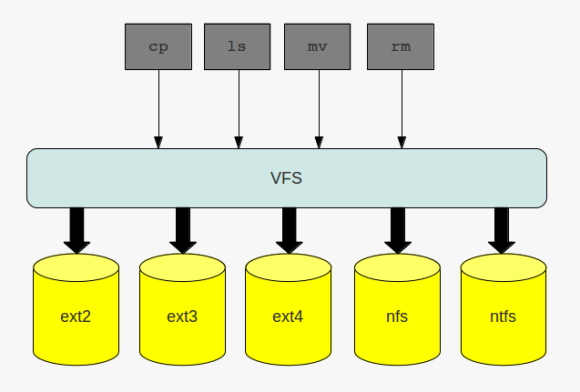
the layer which makes this possible is called the virtual filesystem ( vfs ). this layer provides a common interface for the filesystems which are plugged into the operating system. I already introduced one special kind of filesystem, the the proc filesystem. the proc filesystem does not handle any files on disk or on the network, but neitherless it is a filesystem. in addition to the above mentioned filesystems, which all are disk based, filesystem may also handle files on the network, such as nfs or cifs.

no matter what kind of filesystem you are working with: when interacting with the filesystem by using the commands of choice you are routed through the virtual filesystem:

the virtual file system

to make this possible there needs to be a standard all file system implementations must comply with, and this standard is called the common file model. the key components this model consist of are:

  • the superblock which stores information about a mounted filesystem ( … that is stored in memory as a doube linked list )
  • inodes which store information about a specific file ( … that are stored in memory as a doube linked list)
  • the file object which stores information of the underlying files
  • dentries, which represent the links to build the directory structure ( … that are stored in memory as a doube linked list)

to speed up operations on the file systems some of the information which is normally stored on disk are cached. if you recall the post about slabs, you can find an entry like the following in the /proc/slabinfo file if you have a mounted ext4 filesystem on your system:

cat /proc/slabinfo | grep ext4 | grep cache
ext4_inode_cache   34397  34408    920   17    4 : tunables    0    0    0 : slabdata   2024   2024      0

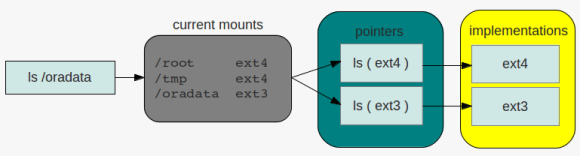
so what needs the kernel to do if, for example, a request for listing the contents of a directoy comes in and the directory resides on an ext4 filesystem? because the filesystem is mounted the kernel knows that the filesystem for the specific request is of type ext4. the ls command will then be translated ( pointed ) to the specific ls implementation of the ext4 filesystem. this operation is the same for all commands interacting with filesystems. there is a pointer for each operation that links to the specific implementation of the command in question:

directory listing

as the superblock is stored in memory and therefore may become dirty, that is not synchronized with the superblock on disk, there is the same issue that oracle must handle with its buffer pools: periodically check the dirty flag and write down the changes to disk. the same is true for inodes ( while in memory ), which contain all the information that make up a file. closing a loop to oracle again: to speed up searching the ionodes linux maintains a hash table for fast access ( remember how oracle uses hashes to identify sql statements in the shared_pool ).

when there are files, there are processes which want to work with files. once a file is opened a new file object will be created. as these are frequent operations file objects are allocated through a slab cache.

the file objects itself are visible to the user through the /proc filesystem per process:

ls -la /proc/*/fd/
/proc/832/fd/:
total 0
dr-x------ 2 root root  0 2012-05-18 14:03 .
dr-xr-xr-x 8 root root  0 2012-05-18 06:40 ..
lrwx------ 1 root root 64 2012-05-18 14:03 0 -> /dev/null
lrwx------ 1 root root 64 2012-05-18 14:03 1 -> /dev/null
lr-x------ 1 root root 64 2012-05-18 14:03 10 -> anon_inode:inotify
lrwx------ 1 root root 64 2012-05-18 14:03 2 -> /dev/null
lrwx------ 1 root root 64 2012-05-18 14:03 3 -> anon_inode:[eventfd]
lrwx------ 1 root root 64 2012-05-18 14:03 4 -> /dev/null
lrwx------ 1 root root 64 2012-05-18 14:03 5 -> anon_inode:[signalfd]
lrwx------ 1 root root 64 2012-05-18 14:03 6 -> socket:[7507]
lrwx------ 1 root root 64 2012-05-18 14:03 7 -> anon_inode:[eventfd]
lrwx------ 1 root root 64 2012-05-18 14:03 8 -> anon_inode:[eventfd]
lrwx------ 1 root root 64 2012-05-18 14:03 9 -> socket:[11878]
...

usually numbers 0 – 3 refer to the standard input, standard output and standard error of the corresponding process.

last but not least there are the dentries. as with the file objects, dentries are allocated from a slab cache, the dentry cache in this case:

cat /proc/slabinfo | grep dentry
dentry             60121  61299    192   21    1 : tunables    0    0    0 : slabdata   2919   2919      0

directories are files, too, but special in that kind that dictories may contain other files or directories. once a directory is read into memory it is transformed into a dentry object. as this operation is expensive there is the dentry cache mentioned above. thus the operations for building the dentry objects can be minimized.
another link to oracle wording: the unused dentry double linked list uses a least recently used ( lru ) algorithm to track the usage of the entries. when the kernel needs to shrink the cache the objects at the tail of the list will be removed. as with the ionodes there is hash table for the dentries and a lock protecting the lists ( dcache_spin_lock in this case ).

this should give you enough hints to go further if you are interesed …

as I frequently use the oracle documentation I looked for a quick way to search without clicking around too much. as I am on linux it was quite easy:

echo "tahiti() {
  firefox http://www.oracle.com/pls/db112/search?remark=quick_search\&word=$1 &
}
alias th='tahiti'" >> ~/.bashrc

that’s it ( remember to source the file or to logout/login before this works ). now I am able to search from the command line:

th dbms_stats

of course you can do the same if you use cygwin on windows. happy searching…

ps: thanks to chinmaykamat’s post, which gave me the hint …

asm workshop

May 17, 2012 — Leave a comment

if you think about switching your databases to asm, want to boot your people or just want to do a workshop which offers a lot of practice and less slides feel free to contact me.

what you’ll get:

your own virtual box image, containing:

  • pre-installed oracle linux
  • software only installation of the grid infrastructure
  • all scripts and solutions for the topics discussed
  • reset scripts for each topic, so you may re-do each topic as much as you want

.. and the full set of slides, of course ( although the workshop is much more about practice you need to know the theoretical fundamentals )

some of the topics are:

  • storage preparation for asm
  • asmlib, use it or not ?
  • configuration of the cluster stack and asm
  • troubleshooting techniques
  • best practices
  • command line tools
  • patching

it’s up to you if you’d like to do the workshop in-house or at a location organized by my company. you may even reuse the slides and virtual image for your own internal workshops, if you want.

to be honest, when I first heard about slabs i thought of kitchens, or a bathroom, but not about memory management. but after reading and started learning about it, this term seemed not to be bad for what it stands for. to stay in the context of a kitchen there are different kinds of slabs:

  • some maybe appropriate for the floor
  • others for the wall
  • there are all kinds of colors …
  • … all kinds of sizes
  • slabs may consist of different materials

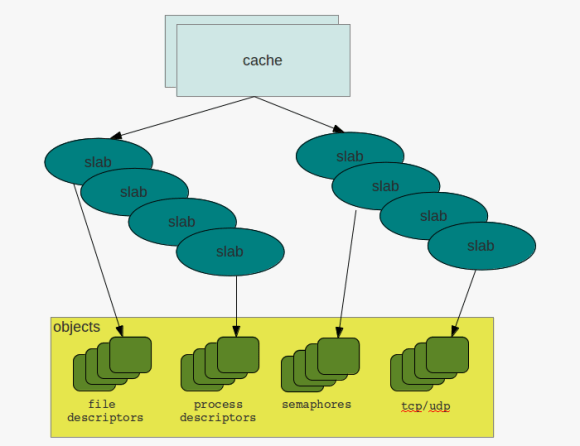
and in a way that’s exactly what slabs, in regards to memory management, are about. they provide regions of memory which are fixed in size and for different kinds of tasks.

the basic idea behind slabs is to avoid fragmentation by reserving fixed size memory regions and minimizing the work for allocation and deallocation. the so called constructor is used to initialize areas if memory while the destructor de-initializes them.

while the system is running the kernel requests memory regions of the same size and type over and over again. the process descriptors discussed earlier are one example. if a new process descriptor gets requested the slab allocator is used to get a memory area from cache which fits for holding the structures. once the process terminates and the descriptor can be discarded the memory region will not be deallocated but can be reused when another process needs to get created. in this way the overhead of frequent allocation and deallocation of pages frames can be avoided.

caches & slabs

to check the current caches and slabs you can either directly go to the /proc filesystem:

cat /proc/slabinfo
slabinfo - version: 2.1
# name : tunables : slabdata
UDPLITEv6 0 0 1024 16 4 : tunables 0 0 0 : slabdata 0 0 0
UDPv6 32 32 1024 16 4 : tunables 0 0 0 : 

… or check the current behavior with slabtop:

 Active / Total Objects (% used) : 305636 / 315218 (97.0%)
Active / Total Slabs (% used) : 11077 / 11077 (100.0%)
Active / Total Caches (% used) : 68 / 99 (68.7%)
Active / Total Size (% used) : 74608.55K / 76732.62K (97.2%)
Minimum / Average / Maximum Object : 0.01K / 0.24K / 8.00K
OBJS ACTIVE USE OBJ SIZE SLABS OBJ/SLAB CACHE SIZE NAME
89193 89192 99% 0.10K 2287 39 9148K buffer_head
55020 54352 98% 0.19K 2620 21 10480K dentry
30260 30247 99% 0.90K 1780 17 28480K ext4_inode_cache
19992 19974 99% 0.08K 392 51 1568K sysfs_dir_cache
17158 16006 93% 0.17K 746 23 2984K vm_area_struct
15360 14165 92% 0.01K 30 512 120K kmalloc-8
10710 10077 94% 0.05K 126 85 504K shared_policy_node
9664 8544 88% 0.06K 151 64 604K kmalloc-64
9051 8118 89% 0.19K 431 21 1724K kmalloc-192
7917 7904 99% 0.59K 609 13 4872K inode_cache

a cache initially does not contain any slabs. slabs will be created once requested and there is no free object to satisfy the request. in this case the cache will grow by n slabs. as with all concurrent access to memory regions caches and slabs are protected by locks, cache spin locks in this case. and when there are locks the must be different states for the objects, that are:

  • emtpy
  • partial
  • full

so what to remember: slabs and caches provide a way to avoid fragmentation and save some work in regards to frequent allocation and deallocation of memory regions. structures that are created and destroyed frequently such as the process or file descriptors benefit from this technique as the requests can be served at much faster time.

memory management

April 28, 2012 — Leave a comment

the performance of most applications depends on the efficiency that memory is managed by the operating system. because memory is not only used by applications but also by the kernel itself for storing its data and structures some portions of the memory are reserved by the kernel. the rest of the memory is called the dynamic memory.

memory gets addressed by the kernel in pages which are typically 4kb in size. you can check the pagesize in linux with the following command:

getconf PAGESIZE
4096

to track the status of all the pages there is a so called page descriptor. as pages may be used by several processes, the kernel itself or not used at all this descriptor contains the information the kernel needs when dealing with all the pages. one of the fields of the pages descriptor is called “lru” which stands for? same as in the oracle database: least recently used. the lru contains pointers to the least recently used double linked list of pages. remember: the same concepts, over and over again.

another fields describes the status of a page, which, for example, can be:

  • locked
  • dirty
  • active

note that oracle uses the word “dirty” in exactly the same manner: the page has been modified ( in oracle syntax it is a buffer )

when there is a request for allocating a page two things can happen:

  1. there is enough free space and the request is successful immediately
  2. before the allocation request may succeed some cleanup work must be done ( which usually blocks the request until finished ). you can compare this to the “buffer wait” events in oracle

because some critical requests can not be blocked there are exceptions to the second case ( for example when handling interrupts ). in these cases the request will be atomic and fail if no free pages are available. to minimize the chance for failing requests some pages are reserved by the kernel for these atomic requests. the amount of pages which will be reserved is calculated at system initialization and can be changed later by modifying a file in the proc filesystem:

cat /proc/sys/vm/min_free_kbytes
67584

oracle uses a similar concept for the shared_pool_reserved_size. this parameter defines some portion of the shared_pool to be reserved for large contiguous memory allocations. the goal is the same as with the linux kernel: try to block others as less as possible and make sure the allocation request succeeds.

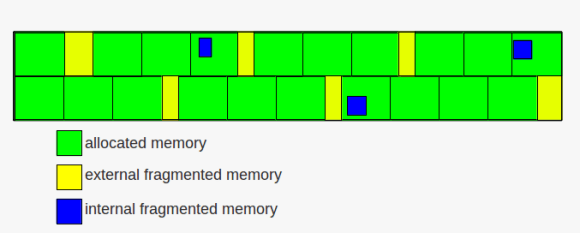
as time goes by and requests for memory allocations come and go, memory will be allocated and released. this leads to a common issue with memory management: fragmentation. frequent allocations and releases may lead to situations that although there is enough free memory for a request the request will fail. this is because the remaining free memory is scattered through already allocated pages ( internal fragmentation ) or there is no free contiguous free memory that can satisfy the request ( external fragmentation ). and that is whats happening when you face the “ORA-04031: unable to allocate x bytes of shared memory” in the alertlog.

memory fragmentation

while internal fragmentation is waste of memory external fragmentation may lead to failing allocation requests. to avoid external fragmentation as much as possible the linux kernel groups the free pages into lists of 1,2,4,8,16,32,64,128,256,512 and 1024 contiguous chunks. if, for example, a request for 128 of contiguous memory page frames arrives the kernel will first check the 128 list for a free block. if a free block exists the memory gets allocated. if no free block exists in that list the next bigger list ( the 256 ) will be check for free blocks. if a free block exists there the kernel allocates 128 from the 256 page frames and inserts the remaining 128 page frames to the 128 list. this, if no free block is found in the next bigger list, will continue until the last group is reached ( the 1024 list ) and if this list is empty an error will be signaled.
the other way around the kernel tries to merge free blocks into bigger blocks when memory is released ( if the blocks have the same size and are located next to each other ).

there is much more to say about memory management ( e.g. slabs ), but this will be a topic for another post ….

until now we had an introduction to processes, how they are managed, what signals are and what they are used for, how the linux kernel ( and oracle ) uses double linked list to quickly look up memory structures and how critical regions like shared memory can be protected. this post gives an introduction to timing and process scheduling.

as the cpu can execute only one process at a time but because maybe hundreds or thousands of processes want to do their work the kernel must provide a mechanism to decide which process to run next ( process switching ). this is the task of the scheduler. for being able to do what it does, the scheduler must be able to make decisions, and the decisions are based on time and priorities.

lots and lots of work behind the scenes is driven by time measurements. consider cronjobs, for example. without being able to measure time they would not work. in short the kernel must be able to keep the current time and to provide a mechanism to notify programs when a specific interval has elapsed.

on the one hand there is the real time clock ( accessible through the /dev/rtc interface ) which is a special chip that continues to tick even if the computer is powered off ( there is a small battery for this chip ). the real time clock is used by linux to derive the date and time.

on the other hand there are several other mechanisms which can be used for timing:

one of the time related activities the kernel must perform is to determine how long a process has been running. each process is given a time slot in which it may run, which is called a quanta. if the quantum expires and the process did not terminate a process switch may occur ( another process is selected for execution ). these processes are called expired. active processes are those which did not yet consume their quantum.
additionally each process has a priority assigned, which is used by the scheduler to decide how appropriate it is to let the process do its work on the cpu.

in general processes can be divided in three classes:

  • interactive: typical interactive processes are those which respond to keyboard and mouse inputs of an end user. as an user wants to see quick responses, for example when editing text, these processes must be woken up quickly
  • batch: batch processes do not interact with the user and often run in the background.
  • real-time: real-time processes have very strong scheduling requirements and should not be blocked by processes with lower priorities.

in general the scheduler will give more attention to interactive processes than to batch processes, although this must not always be true.

one way we can change the base priority of processes from the command line is by using the “nice” command:

nice -19 vi

if you check the process without the nice call:

ps -aux | grep vi
oracle 4185 0.5 0.0 5400 1504 pts/0 S+ 10:51 0:00 vi

… and compare it to when you call vi with a nice value:

ps -aux | grep vi
oracle 4194 1.6 0.0 5400 1496 pts/0 SN+ 10:52 0:00 vi

.. you will see that “S+” changes to “SN+” ( the “N” stands for “low-priority (nice to other users)”

processes in linux are preemptable, which means that higher priority processes may suspend lower priority processes when they enter the running state. another reason a process can be preempted is when its time quantum expires.

consider this example: a user is writing an email while copying music from a cd to her computer. the email client is considered an interactive program while the copy job is considered a batch program. each time the user presses a key on her keyboard an interrupt occurs and the scheduler selects the email program for execution. but because users tend to think when writing emails there is plenty of time ( regarding the cpu ) between the key presses to wake up the copy job and let it do its work.

the time a process is allowed to be on a cpu, the quantum, is derived from a so called “static priority” which can be in the range of 100 to 139 ( with 100 being the highest priority and 139 being the lowest ). the higher the priority the more time the process is granted ( which ranges from 800ms for the highest priority to 5ms for the lowest priority ). in addition to the static priority there is a “dynamic priority” for each process ( again ranging from 100 to 139 ). without going too much into detail again: the dynamic priority is the one the scheduler uses for its decisions. as the name suggest, this priority may change over time ( depending on the average sleep time of a process ). processes with longer sleep times usually get a bonus ( the priority will be increased ) while processes with lower sleep times will get a penalty ( the priority will be decreased ). the average sleep time is also used by the scheduler to decide if processes are interactive or batch.

recall the post about double linked lists. the most important data structure used by the scheduler is the runqueue, which in fact is another linked list. this list links together all the process descriptors of the processes which want to run ( there is one runqueue per cpu ). one process can be in one runqueue only, but processes may migrate to others runqueues if the load between the cpus becomes unbalanced.

what to keep in mind: as only one process can run on one cpu at a time the scheduler decides which process to run next and which processes to suspend in case higher priority processes enter the running state. in general interactive processes are favored over batch processes and real-time processes should not be blocked by lower priority processes.

the previous post about SIGSEGV and the ORA-07445 introduced signals and how they are used by the kernel to notify processes about events.

many times I see people using the “kill -9” to terminate processes. no questions, this works most of the time, but a lot of people are not aware what they are actually doing when firing this command. in my opinion, kill is a really bad name for this command, because what kill is doing is not necessarily kill processes, but send signals to processes ( of which 9, or SIGKILL is probably the most well known ). a much better name, for example, would be “sig” or “signal”.

the list of signals one can use in regards to kill can be printed with:

kill -l
1) SIGHUP 2) SIGINT 3) SIGQUIT 4) SIGILL
5) SIGTRAP 6) SIGABRT 7) SIGBUS 8) SIGFPE
9) SIGKILL 10) SIGUSR1 11) SIGSEGV 12) SIGUSR2
13) SIGPIPE 14) SIGALRM 15) SIGTERM 16) SIGSTKFLT
17) SIGCHLD 18) SIGCONT 19) SIGSTOP 20) SIGTSTP
21) SIGTTIN 22) SIGTTOU 23) SIGURG 24) SIGXCPU
25) SIGXFSZ 26) SIGVTALRM 27) SIGPROF 28) SIGWINCH
29) SIGIO 30) SIGPWR 31) SIGSYS 34) SIGRTMIN
35) SIGRTMIN+1 36) SIGRTMIN+2 37) SIGRTMIN+3 38) SIGRTMIN+4
39) SIGRTMIN+5 40) SIGRTMIN+6 41) SIGRTMIN+7 42) SIGRTMIN+8
43) SIGRTMIN+9 44) SIGRTMIN+10 45) SIGRTMIN+11 46) SIGRTMIN+12
47) SIGRTMIN+13 48) SIGRTMIN+14 49) SIGRTMIN+15 50) SIGRTMAX-14
51) SIGRTMAX-13 52) SIGRTMAX-12 53) SIGRTMAX-11 54) SIGRTMAX-10
55) SIGRTMAX-9 56) SIGRTMAX-8 57) SIGRTMAX-7 58) SIGRTMAX-6
59) SIGRTMAX-5 60) SIGRTMAX-4 61) SIGRTMAX-3 62) SIGRTMAX-2
63) SIGRTMAX-1 64) SIGRTMAX

here you can see, what 9 really means, it is SIGKILL. the ( perhaps ) dangerous about SIGKILL is, that the process will not be allowed to do any cleanup ( for example releasing resources ). as this signal can not be ignored or caught, the process will terminate immediately ( you can compare it to the “shutdown abort” command of the oracle database ).

the way one should terminate processes is to use the SIGTERM (15) signal, the default parameter for kill. this allows the process to do its cleanup work and to safely terminate ( although this is dependent on how the process or the applications handles the signal ).

once interesting thing you can do by sending a signal to a process with kill is to force, for example, the ssh daemon to re-read its configuration without closing the active ssh sessions. you can try this with:

kill -HUP [PID_OF_SSHD]

be aware that this must not be true for other daemons, as this depends on how the program was implemented. the default behavior for SIGHUP ( hang up ) is abnormal termination. originally the SIGHUP comes from serial connections ( e.g. modems ) which indeed did a hang up when the user closed the connection.

closing the loop to the previous post about SIGSEGV and the ORA-07445 you can force an ORA-07445 by sending the SIGSEGV signal, for example, to the dbwriter process ( I hope there is no need to say: you should not try this on a production system ):

ps -ef | grep dbw
oracle 4560 1 0 13:18 ? 00:00:00 ora_dbw0_DB112
kill -11 4560

…which will result in the following errors reported in the alertlog:

Exception [type: SIGSEGV, unknown code] [ADDR:0xC41] [PC:0x32E7CD46BA, semtimedop()+10] [exception issued by pid: 3137, uid: 0] [flags: 0x0, count: 1]
Errors in file /oradata/DB112/admin/diag/rdbms/db112/DB112/trace/DB112_dbw0_4560.trc (incident=26003):
ORA-07445: exception encountered: core dump [semtimedop()+10] [SIGSEGV] [ADDR:0xC41] [PC:0x32E7CD46BA] [unknown code] []
Incident details in: /oradata/DB112/admin/diag/rdbms/db112/DB112/incident/incdir_26003/DB112_dbw0_4560_i26003.trc
Use ADRCI or Support Workbench to package the incident.
See Note 411.1 at My Oracle Support for error and packaging details.
Mon Apr 16 13:23:36 2012

for simulating a power failure try to send the SIGPWR to a sqlplus session. this will result in:

SQL>
SQL>
SQL> Power failure

conclusion: signals are one more important concept when it comes to understanding the operating system. by sending signals processes are notified about events and are given the chance to take the necessary actions ( if an appropriate handler is present ). when using the kill command you do not necessarily kill a process. what you are doing is sending a signal.

as usual, this is just an introduction and far from being complete ….

when working with the oracle database sooner or later you will face the ORA-07445 error reported in a trace file and the alertlog.

there is plenty of documentation about this error on oracle support and the web. in short: this is an unhandled exception in the oracle code ( in contrast the ORA-00600 errors are handled exceptions ). so why do I want to write about it ? because this is another example where you can map database behavior to the operating system. one common type of the ORA-07445 is this one: “type: SIGSEGV”.

what is this about and what does it stand for ?

software contains bugs. this is true for the linux kernel, this is true for the oracle database and this is true for probably all other software. to deal with unexpected behavior and to protect the system there must be some some sort of exception handler which processes/catches the exceptions once they occur and does the necessary steps to recover from the exceptions. the lowest level exceptions are raised by the CPU and must be handled by the operating system’s kernel. these exception are predefined and the kernel provides an exception handler for each of them.

some of them are:

  • division by zero
  • segment not present
  • stack segment fault
  • invalid opcode

you can, for example, check the intel documentation for a complete list of defined exceptions.

when an exception is raised the corresponding exception handler sends a signal to the process which caused the exception. and this is exactly what the SIGSEGV is: it is a signal. signals, for example ( the following list is not complete ), can be:

  • SIGSEGV: page faults, overflows
  • SIGFPE: divide error
  • SIGBUS: stack segments fault
  • SIGILL: invalid opcode

most of these exceptions can only occur when the kernel is in user mode, that is, when executing tasks from user programs ( oracle in this case ). there are two ways in which the processor can halt ( or interrupt ) process execution:

  • interrupts, which are ansynchron and typically triggered by I/O devices
  • exceptions, which are synchron and triggered by the processor when it detects predefined conditions while executing

when the processor halts process execution it switches to the handler routine ( each routine is defined in the interrupt description table, IDT ). once the handler routine has executed its tasks control is given back to the interrupted process.

unfortunately there is not much you can do about it. you can try to find a workaround with oracle support ( e.g. by setting some database parameters or applying a patch ) or check the generated dumps to get some hints on what exactly caused the exception.

a recent search on oracle support returned about 2500 results for the term SIGSEGV. you see, this is not an unusual signal …